Player Animations
Swipe um das Menü anzuzeigen
Attack Type
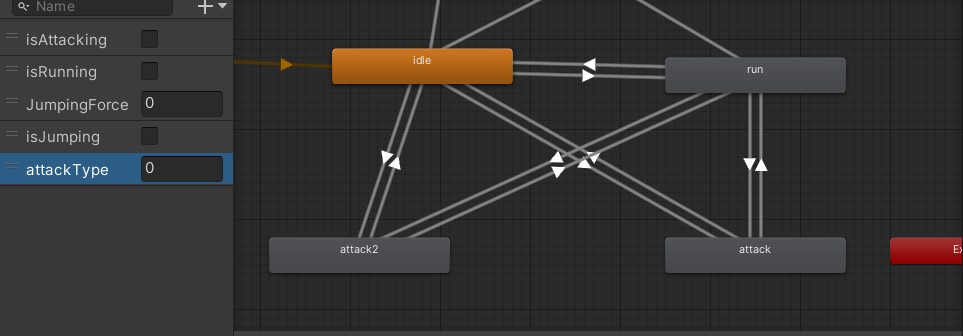
To inform our animator of the desired attack, we need to create different attack types and assign each type an integer value.
For the first ability, the attack type will be 0 and for the second ability, it will be 1.
Control the Attack Type with Script
void Update()
{
    if (Input.GetMouseButtonDown(0)) // Left mouse button
    {
        animator.SetInteger("attackType", 0);
        animator.SetBool("isAttacking", true);
        isAttacking = true;
    }
    if (Input.GetMouseButtonDown(1)) // Right mouse button
    {
        animator.SetInteger("attackType", 1);
        animator.SetBool("isAttacking", true);
        isAttacking = true;
    }
    if (Input.GetMouseButtonUp(0) || Input.GetMouseButtonUp(1)) // Any mouse button released
    {
        isAttacking = false;
        animator.SetBool("isAttacking", false);
    }
}
The code handles attack states by setting different attackType values and updating the isAttacking parameter based on mouse button presses and releases, allowing for distinct attack actions and their termination.
Overall, this code handles attacks in a game, distinguishing between left and right mouse button presses and releases. It sets the attack type since every button will have a different attack, and updates animator parameters accordingly. When either button is released, it stops the attack animation.
Danke für Ihr Feedback!
Fragen Sie AI

Fragen Sie AI

Fragen Sie alles oder probieren Sie eine der vorgeschlagenen Fragen, um unser Gespräch zu beginnen
