Figma Interface Overview
Swipe um das Menü anzuzeigen
Figma can be used on both desktop and browser versions. But the desktop version is preferred for comfort and performance, but the interface is identical to the browser version.
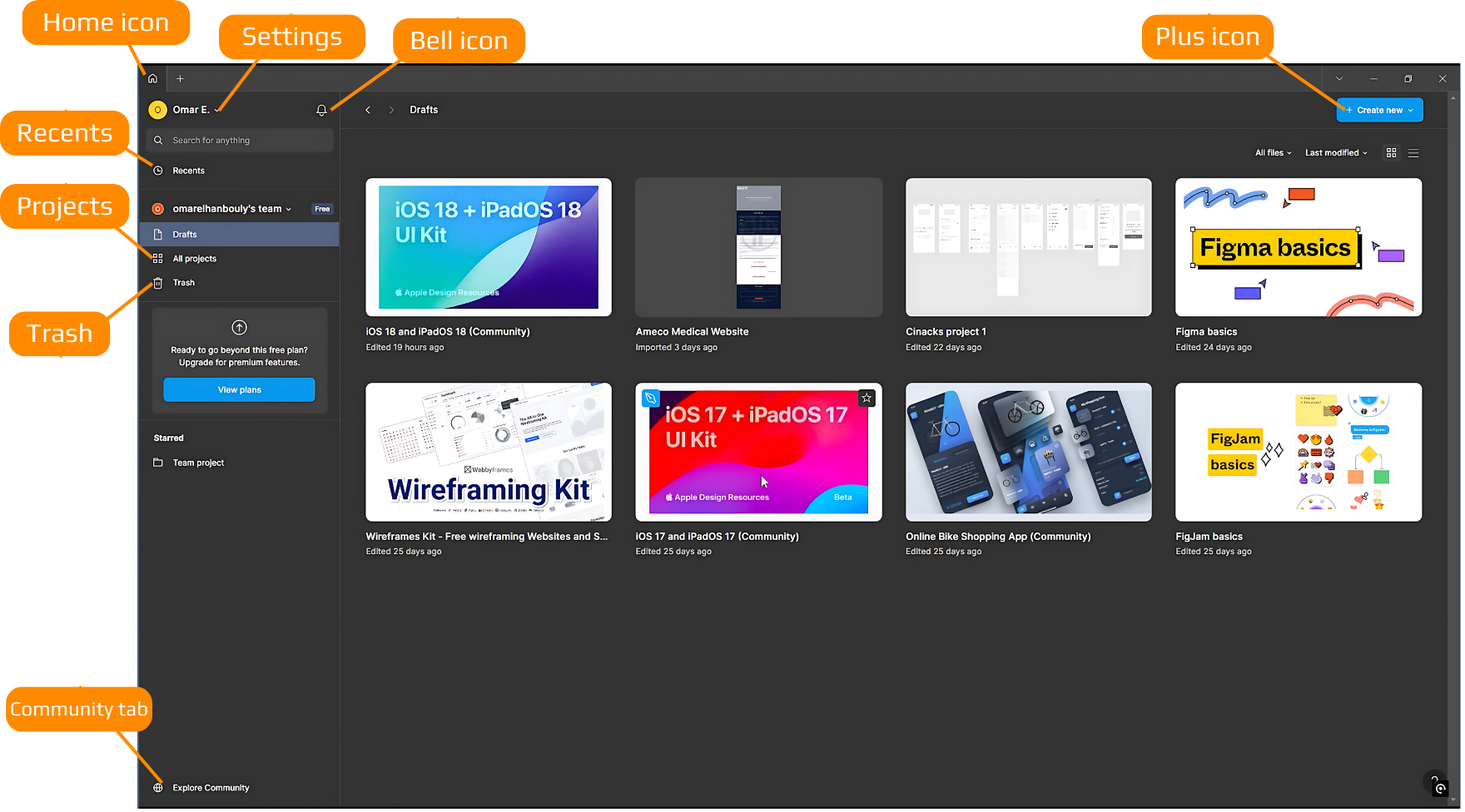
Drafts window
Displays all saved or previously worked-on projects.
Top left corner options
- Home icon: access the start page;
- Settings: customize theme (light, dark, or system), account settings, notifications, security (e.g., two-factor authentication), and sign-out options;
- Community tab: create a community handle if desired.
Top bar icons
- Bell icon: view notifications;
- Recents: quickly access recently opened files or projects;
Teams and projects
- Teams: collaborate with multiple team members (however, free plan limits team options);
- Projects: folders to organize Figma files (e.g., team projects with multiple files).
Trash
- Deleted files are stored here;
- Files can be recovered or permanently deleted.
Creating new files
Use the plus (+) icon or the blue "Create New" button to start a new design file.
Figma's interface is designed to help you stay organized and streamline collaboration and design workflows!
War alles klar?
Danke für Ihr Feedback!
Abschnitt 1. Kapitel 2
Fragen Sie AI

Fragen Sie AI

Fragen Sie alles oder probieren Sie eine der vorgeschlagenen Fragen, um unser Gespräch zu beginnen
