Improving List Rendering with Real API Data
Swipe um das Menü anzuzeigen
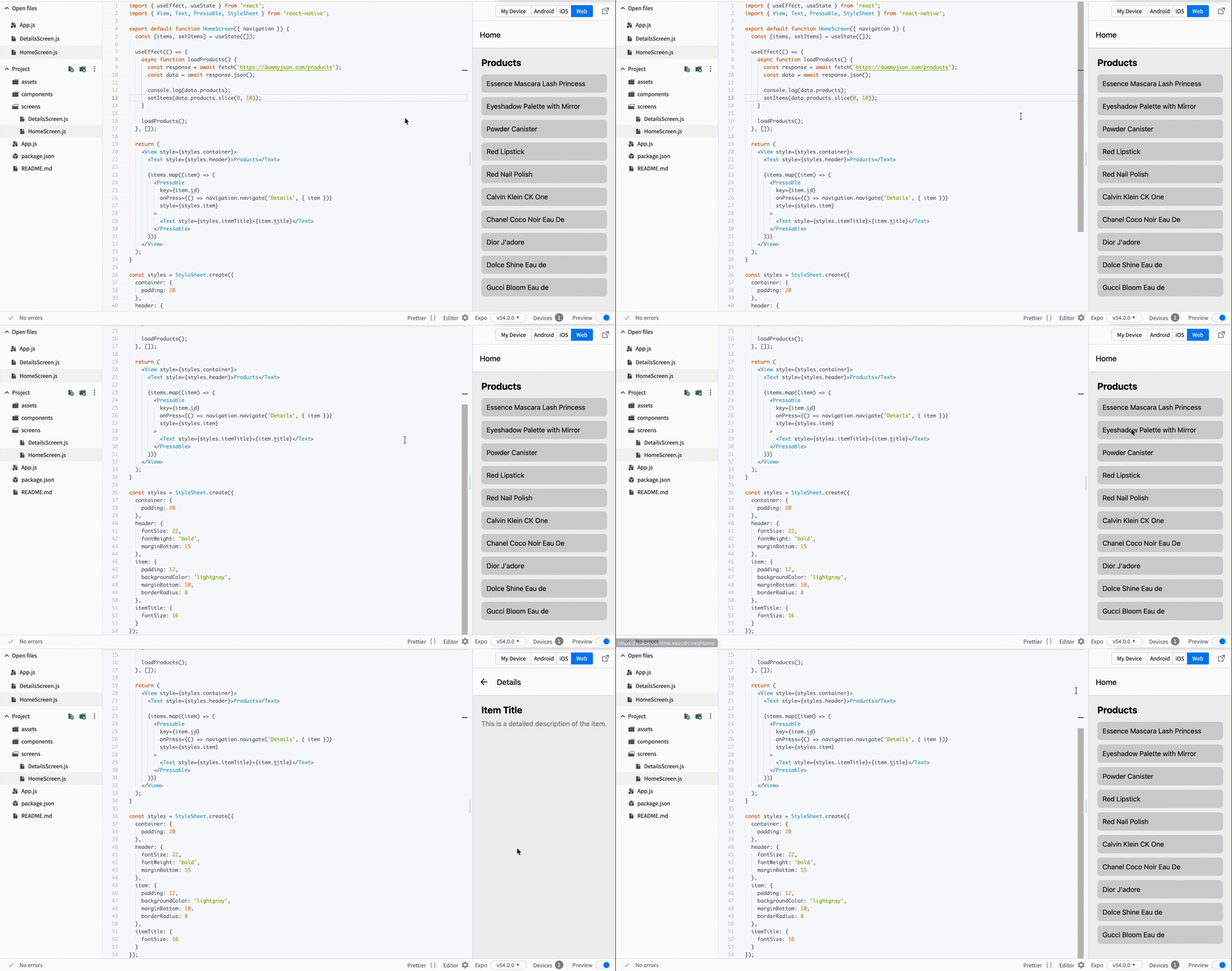
Now we want to make the list feel like a real app. Instead of mock data, you will load products from an API.
This gives you:
- Real titles;
- Descriptions;
- Images (later useful for details screen).
Step 1: Fetch Data
Update your HomeScreen.js:
// screens/HomeScreen.js
import { useEffect, useState } from 'react';
import { View, Text, Pressable, StyleSheet } from 'react-native';

export default function HomeScreen({ navigation }) {
  const [items, setItems] = useState([]);

  useEffect(() => {
    async function loadProducts() {
      const response = await fetch('https://dummyjson.com/products');
      const data = await response.json();

      console.log(data.products);
      setItems(data.products.slice(0, 10));
    }

    loadProducts();
  }, []);

  return (
    <View style={styles.container}>
      <Text style={styles.header}>Products</Text>

      {items.map((item) => (
        <Pressable
          key={item.id}
          onPress={() => navigation.navigate('Details', { item })}
          style={styles.item}
        >
          <Text style={styles.itemTitle}>{item.title}</Text>
        </Pressable>
      ))}
    </View>
  );
}
Step 2: Add Styles
// screens/HomeScreen.js
const styles = StyleSheet.create({
  container: {
    padding: 20
  },
  header: {
    fontSize: 22,
    fontWeight: 'bold',
    marginBottom: 15
  },
  item: {
    padding: 12,
    backgroundColor: 'lightgray',
    marginBottom: 10,
    borderRadius: 8
  },
  itemTitle: {
    fontSize: 16
  }
});
What Changed
- You now load real data from an API;
- Each item represents a real product;
- The app starts to feel realistic;
- You pass full item data to the next screen.
War alles klar?
Danke für Ihr Feedback!
Abschnitt 1. Kapitel 4
Fragen Sie AI

Fragen Sie AI

Fragen Sie alles oder probieren Sie eine der vorgeschlagenen Fragen, um unser Gespräch zu beginnen
Improving List Rendering with Real API Data
Now we want to make the list feel like a real app. Instead of mock data, you will load products from an API.
This gives you:
- Real titles;
- Descriptions;
- Images (later useful for details screen).
Step 1: Fetch Data
Update your HomeScreen.js:
// screens/HomeScreen.js
import { useEffect, useState } from 'react';
import { View, Text, Pressable, StyleSheet } from 'react-native';

export default function HomeScreen({ navigation }) {
  const [items, setItems] = useState([]);

  useEffect(() => {
    async function loadProducts() {
      const response = await fetch('https://dummyjson.com/products');
      const data = await response.json();

      console.log(data.products);
      setItems(data.products.slice(0, 10));
    }

    loadProducts();
  }, []);

  return (
    <View style={styles.container}>
      <Text style={styles.header}>Products</Text>

      {items.map((item) => (
        <Pressable
          key={item.id}
          onPress={() => navigation.navigate('Details', { item })}
          style={styles.item}
        >
          <Text style={styles.itemTitle}>{item.title}</Text>
        </Pressable>
      ))}
    </View>
  );
}
Step 2: Add Styles
// screens/HomeScreen.js
const styles = StyleSheet.create({
  container: {
    padding: 20
  },
  header: {
    fontSize: 22,
    fontWeight: 'bold',
    marginBottom: 15
  },
  item: {
    padding: 12,
    backgroundColor: 'lightgray',
    marginBottom: 10,
    borderRadius: 8
  },
  itemTitle: {
    fontSize: 16
  }
});
What Changed
- You now load real data from an API;
- Each item represents a real product;
- The app starts to feel realistic;
- You pass full item data to the next screen.
War alles klar?
Danke für Ihr Feedback!
Abschnitt 1. Kapitel 4
