Improving List Rendering with Real API Data
Glissez pour afficher le menu
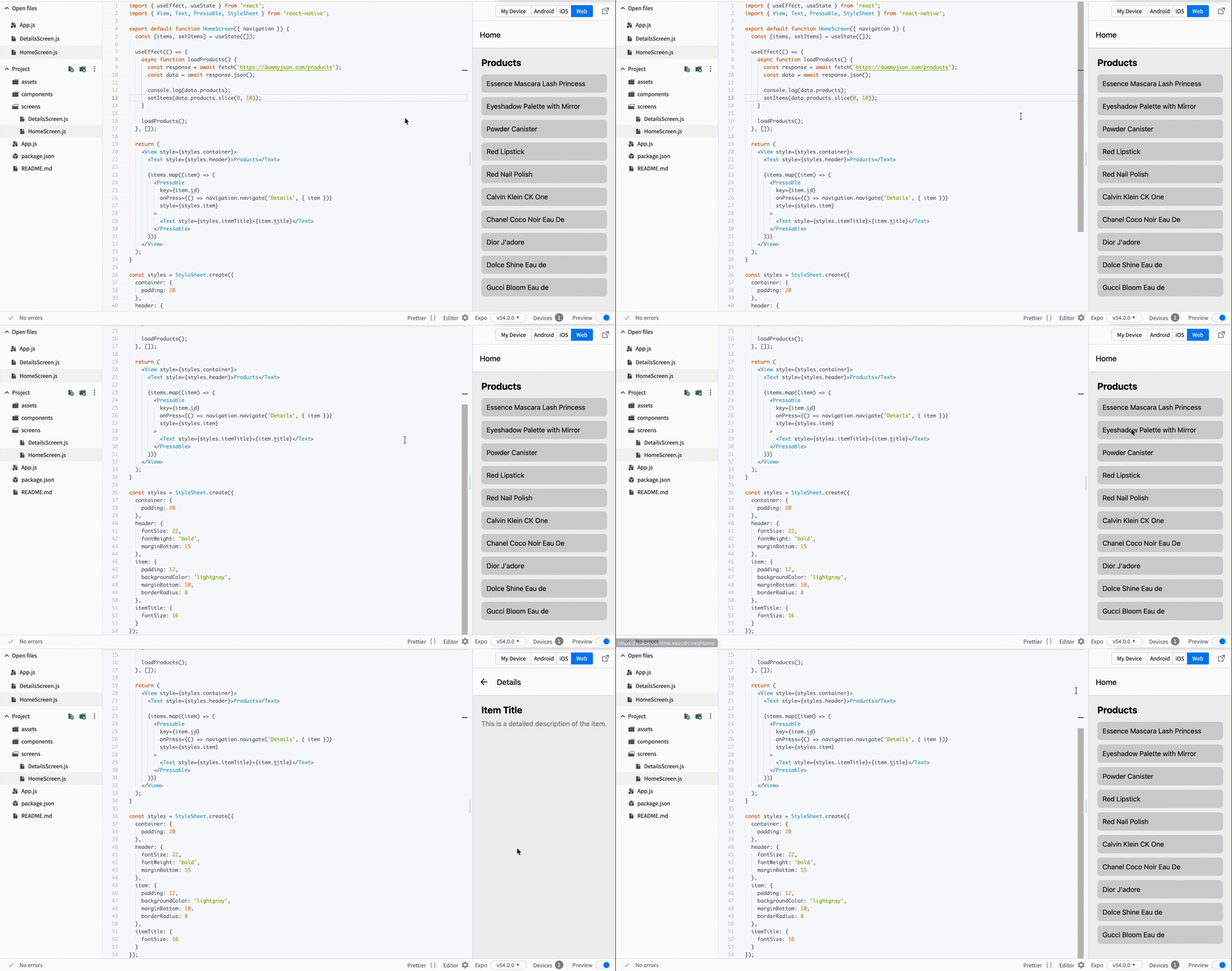
Now we want to make the list feel like a real app. Instead of mock data, you will load products from an API.
This gives you:
- Real titles;
- Descriptions;
- Images (later useful for details screen).
Step 1: Fetch Data
Update your HomeScreen.js:
// screens/HomeScreen.js
import { useEffect, useState } from 'react';
import { View, Text, Pressable, StyleSheet } from 'react-native';

export default function HomeScreen({ navigation }) {
  const [items, setItems] = useState([]);

  useEffect(() => {
    async function loadProducts() {
      const response = await fetch('https://dummyjson.com/products');
      const data = await response.json();

      console.log(data.products);
      setItems(data.products.slice(0, 10));
    }

    loadProducts();
  }, []);

  return (
    <View style={styles.container}>
      <Text style={styles.header}>Products</Text>

      {items.map((item) => (
        <Pressable
          key={item.id}
          onPress={() => navigation.navigate('Details', { item })}
          style={styles.item}
        >
          <Text style={styles.itemTitle}>{item.title}</Text>
        </Pressable>
      ))}
    </View>
  );
}
Step 2: Add Styles
// screens/HomeScreen.js
const styles = StyleSheet.create({
  container: {
    padding: 20
  },
  header: {
    fontSize: 22,
    fontWeight: 'bold',
    marginBottom: 15
  },
  item: {
    padding: 12,
    backgroundColor: 'lightgray',
    marginBottom: 10,
    borderRadius: 8
  },
  itemTitle: {
    fontSize: 16
  }
});
What Changed
- You now load real data from an API;
- Each item represents a real product;
- The app starts to feel realistic;
- You pass full item data to the next screen.
Tout était clair ?
Merci pour vos commentaires !
Section 1. Chapitre 4
Demandez à l'IA

Demandez à l'IA

Posez n'importe quelle question ou essayez l'une des questions suggérées pour commencer notre discussion
Improving List Rendering with Real API Data
Now we want to make the list feel like a real app. Instead of mock data, you will load products from an API.
This gives you:
- Real titles;
- Descriptions;
- Images (later useful for details screen).
Step 1: Fetch Data
Update your HomeScreen.js:
// screens/HomeScreen.js
import { useEffect, useState } from 'react';
import { View, Text, Pressable, StyleSheet } from 'react-native';

export default function HomeScreen({ navigation }) {
  const [items, setItems] = useState([]);

  useEffect(() => {
    async function loadProducts() {
      const response = await fetch('https://dummyjson.com/products');
      const data = await response.json();

      console.log(data.products);
      setItems(data.products.slice(0, 10));
    }

    loadProducts();
  }, []);

  return (
    <View style={styles.container}>
      <Text style={styles.header}>Products</Text>

      {items.map((item) => (
        <Pressable
          key={item.id}
          onPress={() => navigation.navigate('Details', { item })}
          style={styles.item}
        >
          <Text style={styles.itemTitle}>{item.title}</Text>
        </Pressable>
      ))}
    </View>
  );
}
Step 2: Add Styles
// screens/HomeScreen.js
const styles = StyleSheet.create({
  container: {
    padding: 20
  },
  header: {
    fontSize: 22,
    fontWeight: 'bold',
    marginBottom: 15
  },
  item: {
    padding: 12,
    backgroundColor: 'lightgray',
    marginBottom: 10,
    borderRadius: 8
  },
  itemTitle: {
    fontSize: 16
  }
});
What Changed
- You now load real data from an API;
- Each item represents a real product;
- The app starts to feel realistic;
- You pass full item data to the next screen.
Tout était clair ?
Merci pour vos commentaires !
Section 1. Chapitre 4
