Saving Data to Favorites
Scorri per mostrare il menu
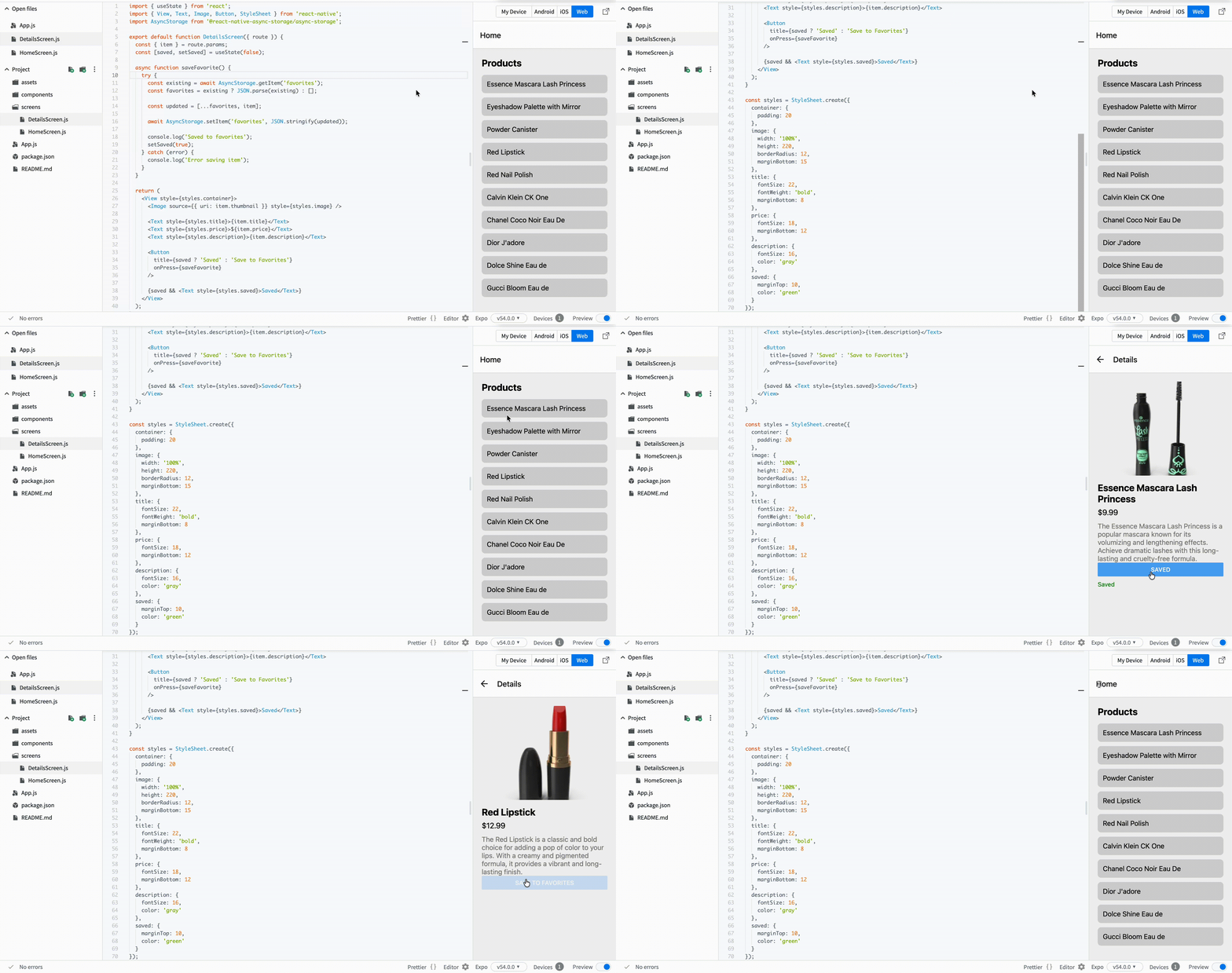
Now we want to let users save items. This is a common feature in real apps. Users often want to keep items and access them later.
To store data on the device, you will use AsyncStorage.
Step 1: Install AsyncStorage
npm install @react-native-async-storage/async-storage
Step 2: Save an Item with Feedback
Update your DetailsScreen.js:
// screens/DetailsScreen.js
import { useState } from 'react';
import { View, Text, Image, Button, StyleSheet } from 'react-native';
import AsyncStorage from '@react-native-async-storage/async-storage';

export default function DetailsScreen({ route }) {
  const { item } = route.params;
  const [saved, setSaved] = useState(false);

  async function saveFavorite() {
    try {
      const existing = await AsyncStorage.getItem('favorites');
      const favorites = existing ? JSON.parse(existing) : [];

      const updated = [...favorites, item];

      await AsyncStorage.setItem('favorites', JSON.stringify(updated));

      console.log('Saved to favorites');
      setSaved(true);
    } catch (error) {
      console.log('Error saving item');
    }
  }

  return (
    <View style={styles.container}>
      <Image source={{ uri: item.thumbnail }} style={styles.image} />

      <Text style={styles.title}>{item.title}</Text>
      <Text style={styles.price}>${item.price}</Text>
      <Text style={styles.description}>{item.description}</Text>

      <Button
        title={saved ? 'Saved' : 'Save to Favorites'}
        onPress={saveFavorite}
      />

      {saved && <Text style={styles.saved}>Saved</Text>}
    </View>
  );
}
Step 3: Add Style
const styles = StyleSheet.create({
  container: {
    padding: 20
  },
  image: {
    width: '100%',
    height: 220,
    borderRadius: 12,
    marginBottom: 15
  },
  title: {
    fontSize: 22,
    fontWeight: 'bold',
    marginBottom: 8
  },
  price: {
    fontSize: 18,
    marginBottom: 12
  },
  description: {
    fontSize: 16,
    color: 'gray'
  },
  saved: {
    marginTop: 10,
    color: 'green'
  }
});
What Changed
- You save data using AsyncStorage;
- You added
useStateto track action; - You show feedback to the user;
- Button text updates after saving.
Important Idea
User actions should always have visible feedback. Otherwise, even working features feel broken.
Tutto è chiaro?
Grazie per i tuoi commenti!
Sezione 1. Capitolo 7
Chieda ad AI

Chieda ad AI

Chieda pure quello che desidera o provi una delle domande suggerite per iniziare la nostra conversazione
Sezione 1. Capitolo 7
