Building Your AI Toolstack
Scorri per mostrare il menu
Most businesses do not need ten AI tools. They need three or four that work well together and cover the majority of their high-value use cases. The goal of this chapter is to help you build a focused, practical toolstack rather than accumulating subscriptions that overlap and compete.
The Four Layers of a Business AI Toolstack
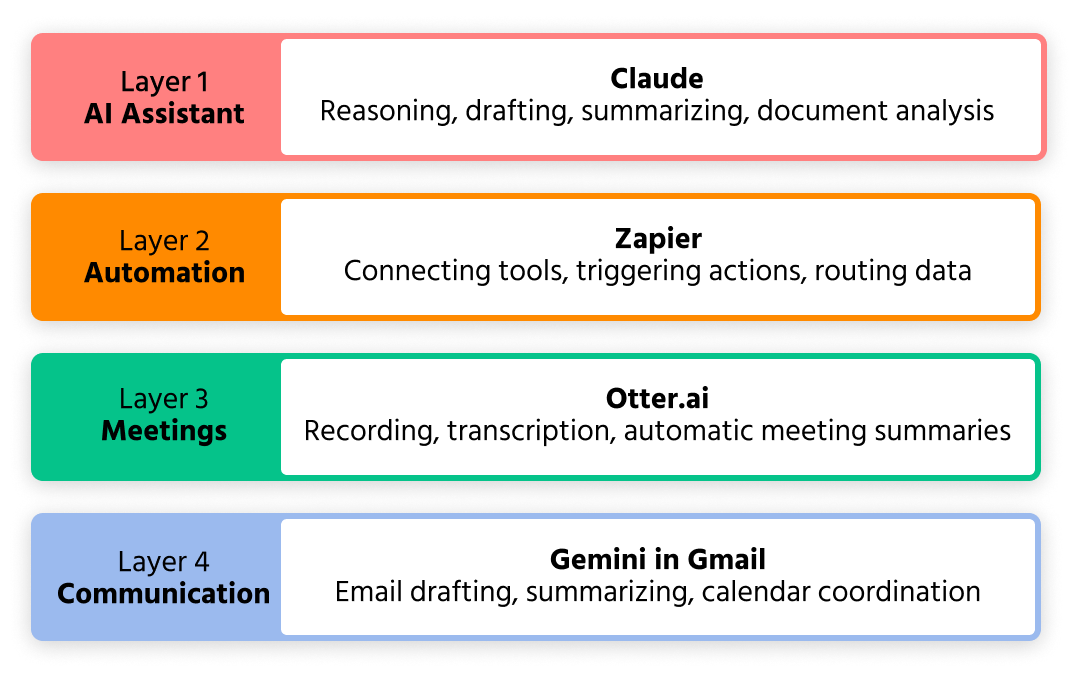
A well-designed AI toolstack for an operations or business team covers four distinct functions. Each layer handles a different category of work, and together they cover the majority of use cases you will encounter.
Layer 1 – AI assistant: your primary tool for reasoning, drafting, summarizing and analysis. This is where most of your direct interaction with AI happens. For this course, that tool is Claude.
Layer 2 – Workflow automation: the layer that connects your tools and moves information between them without manual intervention. Zapier handles this – triggering actions in one app based on events in another, with AI steps built in where needed.
Layer 3 – Meeting intelligence: the tool that captures, transcribes and summarizes your spoken conversations. Otter.ai handles recording, transcription and meeting summaries automatically.
Layer 4 – Communication integration: AI built directly into your email and calendar. Gemini in Gmail and Google Calendar handles drafting, summarizing and scheduling without leaving your existing workflow.

You do not need to implement all four layers at once. Start with Layer 1 – Claude as your AI assistant – and add layers as you identify specific needs. Most teams that try to implement everything simultaneously end up using nothing consistently.
How the Layers Work Together
The real value of a toolstack is not in any individual tool – it is in how they connect. A practical example from an operations workflow:
A client meeting is recorded automatically by Otter.ai. The transcript is processed by Claude into a structured summary with decisions and action items. A Zapier automation picks up the summary and sends it to the relevant Slack channel and adds the action items to the project management tool. The follow-up email to the client is drafted by Gemini in Gmail based on the summary.
What previously took 45 minutes of manual work after every client meeting now takes 5 minutes of review and sending.

Toolstack integration – the configuration of multiple AI tools to work together as a connected system rather than as isolated applications. The most valuable integrations are those where the output of one tool automatically becomes the input of another.
Choosing Tools Within Each Layer
For most business teams, the tools recommended in this course are the right starting point. But if you are evaluating alternatives, the criteria that matter most are:
- Integration depth — whether the tool connects natively with the apps your team already uses;
- Output quality for your specific use case – test the tool on a real task from your workflow, not a demo scenario;
- Total cost at your team size – per-user pricing scales quickly; check what the tool costs at 5, 10 and 20 users before committing.
When Should You Add a Fifth Tool?
The right time to add a tool outside the core four is when you have a specific, high-frequency use case that none of the four layers handles well.
Common additions for operations teams include:

Perplexity – when your team does significant external research and needs sourced, up-to-date information rather than Claude's trained knowledge;
Notion AI – when your team's knowledge base and documentation live in Notion and you want AI to work directly within that environment;
A specialized data tool – when your reporting needs go beyond what Claude can handle with uploaded files and you need direct database or BI tool integration.
Add tools to solve specific problems, not to expand the stack for its own sake.
Grazie per i tuoi commenti!
Chieda ad AI

Chieda ad AI

Chieda pure quello che desidera o provi una delle domande suggerite per iniziare la nostra conversazione
