Define The Enemy AI
メニューを表示するにはスワイプしてください
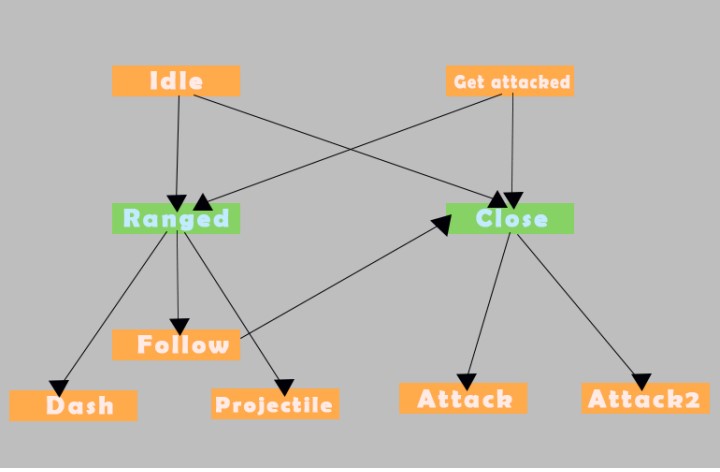
- Idle: This is the default state where the enemy is not engaged in any specific action. From this state, the enemy can transition to other states based on certain conditions;
- Get Attacked: This state represents the enemy being attacked by the player. It triggers animations in response to taking damage;
- Follow: If the player is within range but not too close, the enemy will follow the player, maintaining a certain distance to engage in ranged combat;
- Dash: This action involves the enemy quickly moving in a specific direction;
- Projectile: If the enemy decides to engage in ranged combat, it may launch projectiles towards the player;
- Attack: This represents a generic attack action that the enemy can perform while in close proximity to the player;
- Attack2: Similar to the "Attack" state, this is another type of attack action that the enemy can execute during close combat;
- Idle After Finishing: After performing any action (whether it's attacking, dashing, or launching projectiles), the enemy will return to the idle state to await further commands or player interactions.
Conditions
- Ranged: This condition checks if the player is within a ranged distance from the enemy. If so, the enemy will enter the ranged combat mode, which includes actions like running, dashing, or launching projectiles at the player;
- Close: If the player is within close proximity to the enemy, it will enter close combat mode. In this state, the enemy will primarily focus on attacking the player with close-range attacks, such as attack1 or attack2.
すべて明確でしたか?
フィードバックありがとうございます!
セクション 1. 章 13
AIに質問する

AIに質問する

何でも質問するか、提案された質問の1つを試してチャットを始めてください
