スライシング
メニューを表示するにはスワイプしてください
スライシングは、Pythonにおいてシーケンス内の特定のインデックス範囲から要素を取得する操作。ここでは、NumPy配列におけるスライシングに焦点を当てる。
1次元配列でのスライシング
1次元配列におけるスライシングの一般的な構文は次の通り:array[start:end:step]
start:スライスを開始するインデックスend:スライスが終了するインデックス(このインデックス自体は含まれない)step:インデックス間の増分(デフォルトは1)
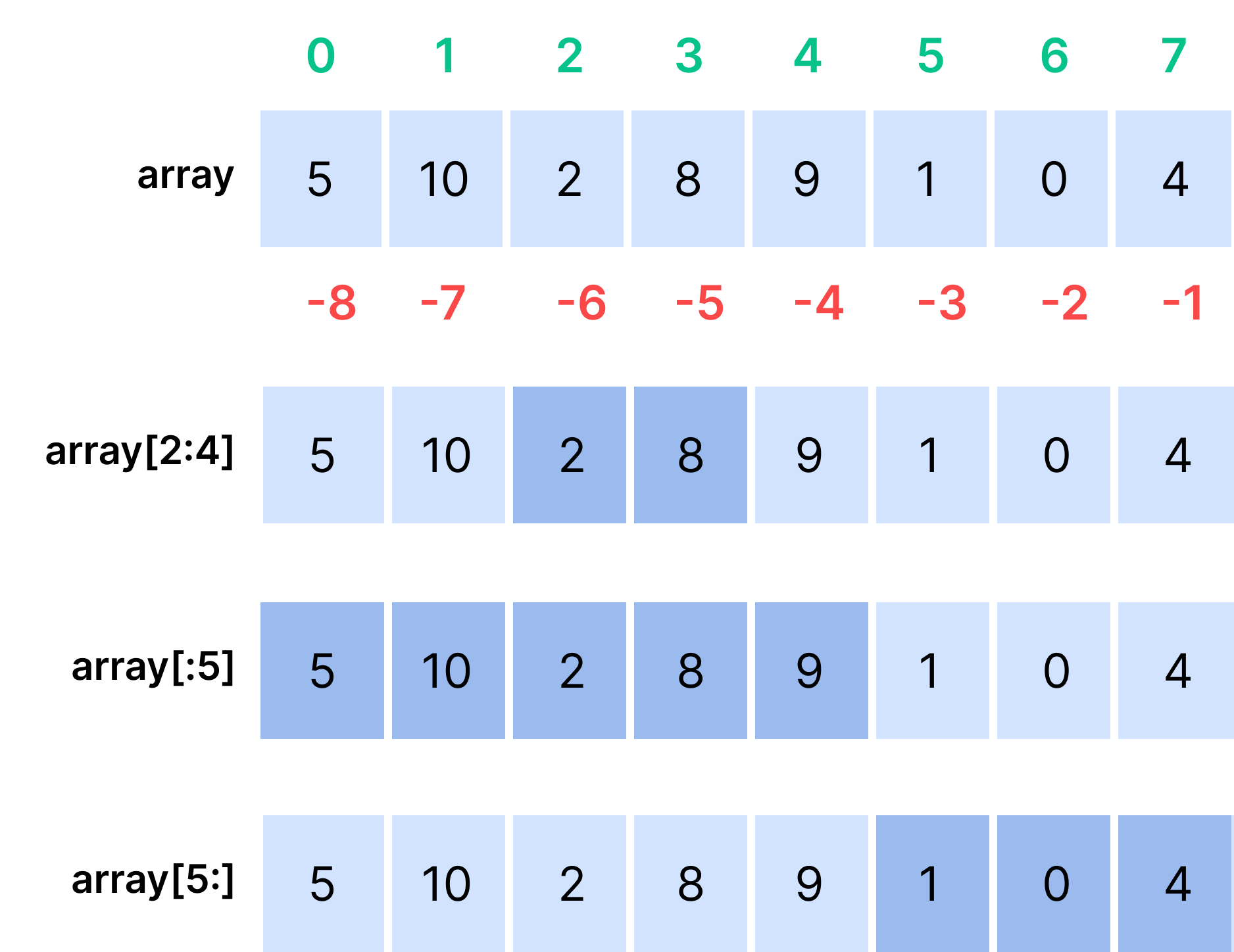
以下は例であり、すべてを明確に示している(紫色の四角はスライシングで取得される要素を表す)。

注意
step を明示的に指定しなかった場合、デフォルト値は 1 となります。
123456789import numpy as np array = np.array([5, 10, 2, 8, 9, 1, 0, 4]) print(f'Initial array: {array}') # Slicing from the element at index 2 to the element at index 4 exclusive print(array[2:4]) # Slicing from the first element to the element at index 5 exclusive print(array[:5]) # Slicing from the element at index 5 to the last element inclusive print(array[5:])
開始、終了、ステップの省略
ご覧の通り、start、end、step、あるいはそれらすべてを同時に省略することがよくあります。step は 1 にしたい場合、省略できます。start と end は以下の状況で省略できます:
startの省略:- 最初の要素からスライスする場合(
stepが正の場合); - 最後の要素からスライスする場合(
stepが負の場合)。
- 最初の要素からスライスする場合(
endの省略:- 最後の要素までスライスする場合(
stepが正の場合); - 最初の要素までスライスする場合(
stepが負の場合)。
- 最後の要素までスライスする場合(
さらにいくつかの例を見てみましょう(黒い矢印は要素が逆順で取得されることを示します):
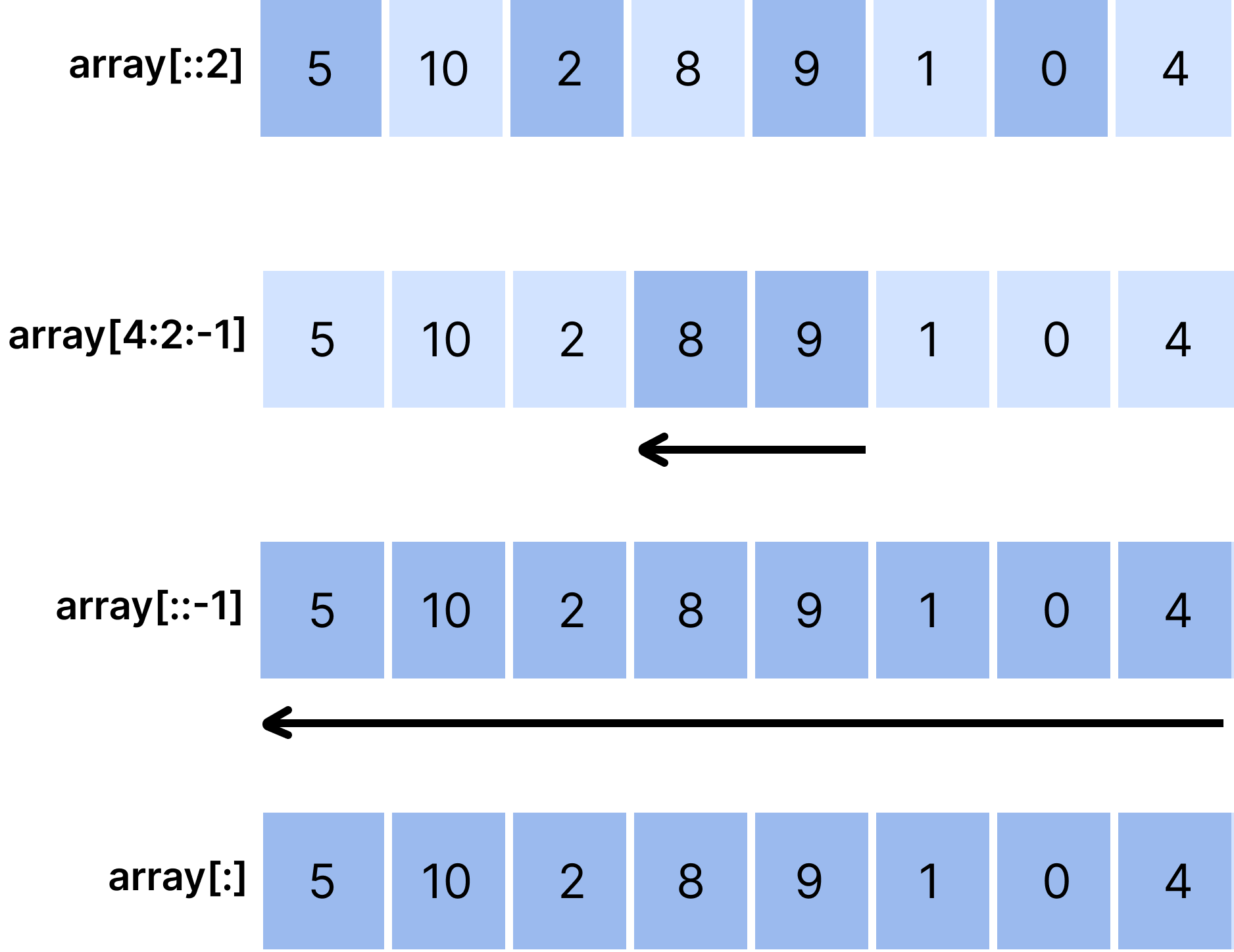
1234567891011import numpy as np array = np.array([5, 10, 2, 8, 9, 1, 0, 4]) print(f'Initial array: {array}') # Slicing from the first element to the last element inclusive with step=2 print(array[::2]) # Slicing from the element at index 4 to the element at index 2 exclusive (step=-1) print(array[4:2:-1]) # Slicing from the last element to the first element inclusive (reversed array) print(array[::-1]) # Slicing from the first element to the last inclusive (the same as our array) print(array[:])
下の図は、課題で使用される weekly_sales 配列の構造を示しています。

タスク
スワイプしてコーディングを開始
小規模小売店の1週間の売上データを分析します。過去1週間の売上は weekly_sales 配列に格納されており、それぞれの要素が特定の日の売上を表しています。
- 2日目(火曜日) から始めて、2日ごとの売上データを含む
weekly_salesのスライスを作成してください。 startには正のインデックスを使用し、endは指定しないでください。- 結果を
alternate_day_salesに保存してください。
解答
 実践的な練習のためにデスクトップに切り替える下記のオプションのいずれかを利用して、現在の場所から続行する
すべて明確でしたか?
フィードバックありがとうございます!
セクション 2. 章 3

single
AIに質問する

AIに質問する

何でも質問するか、提案された質問の1つを試してチャットを始めてください
