Stringプールとequals()メソッド
メニューを表示するにはスワイプしてください
equals() メソッド
このメソッドはオブジェクトの比較に使用され、特に String オブジェクトでよく利用されます。2つの同じ文字列変数を作成し、== を使って比較する例を見てみましょう。

Main.java
123456789package com.example; public class Main { public static void main(String[] args) { String first = new String("string"); String second = new String("string"); System.out.println(first == second); } }
結果は false になります。なぜなら、== はオブジェクトの参照を比較し、実際の値を比較しないためです。両方の文字列が "string" を含んでいても、メモリ上では異なるオブジェクトであり、String pool の外で作成されています。
String pool
String Pool は、文字列リテラルが格納されるヒープメモリの一部です。同じ値のリテラルで文字列を作成すると、メモリ上で同じオブジェクトを参照します。
なぜ false になったのでしょうか?それは、new String("string") を使うことでストリングプールを回避し、新しいオブジェクトをメモリ上に作成したためです。String first = "string"; のようにリテラルで作成した場合、文字列はストリングプールに配置され、共有されます。
コード例を見てみましょう。
Main.java
1234567891011package com.example; public class Main { public static void main(String[] args) { String first = "string"; String second = "string"; String third = new String("string"); System.out.println("Result of comparing first and second: " + (first == second)); System.out.println("Result of comparing first and third: " + (first == third)); } }
どのように動作し、どのオブジェクトがString Poolに存在するかを説明する図解を見てみましょう。
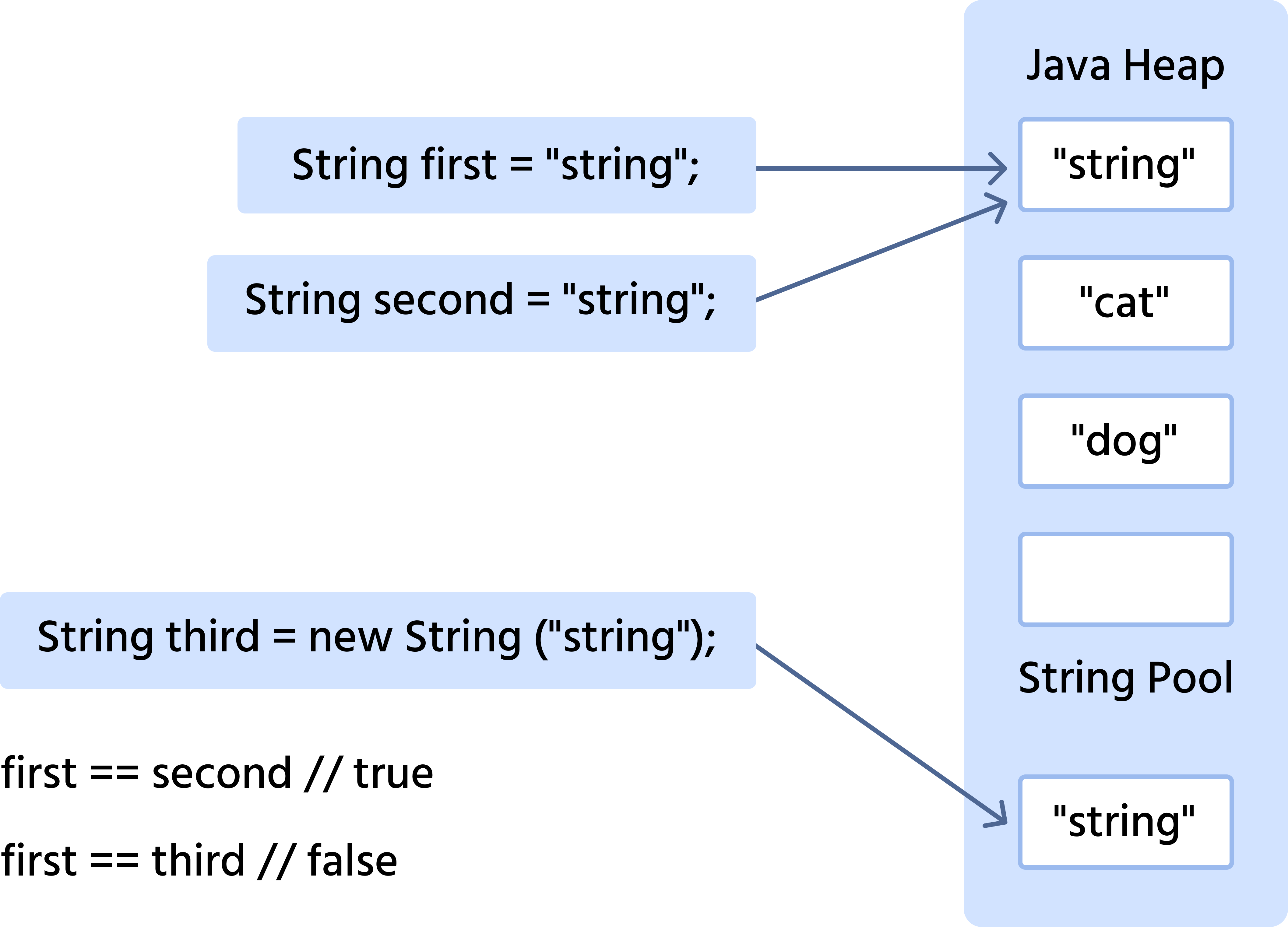
String Pool 内およびそれ以外の文字列の値をどのように比較するか。これには、Java が equals メソッドを提供しており、String オブジェクトの参照ではなく値を比較する。次の例では、equals の代わりに == メソッドを使って文字列を比較するコードを示す。
Main.java
1234567891011package com.example; public class Main { public static void main(String[] args) { String first = "string"; String second = "string"; String third = new String("string"); System.out.println("Result of comparing first and second: " + (first.equals(second))); System.out.println("Result of comparing first and third: " + (first.equals(third))); } }
これで正しい比較ができていることが確認できる。

equals() を扱う際は、== ではなく String メソッドを使用。
フィードバックありがとうございます!
AIに質問する

AIに質問する

何でも質問するか、提案された質問の1つを試してチャットを始めてください
