Deleting a Row/Column
メニューを表示するにはスワイプしてください
At times, certain columns may not provide valuable information, making it advantageous to remove them. The pandas library offers the drop() method for this purpose.
drop(index, columns, axis)
index: specifies the row indexes to be deleted (used whenaxis=0);columns: identifies the column names to be deleted (used whenaxis=1);axis: choose whether to remove labels from the rows (0) or columns (1). The default is0.
Start by examining the DataFrame:
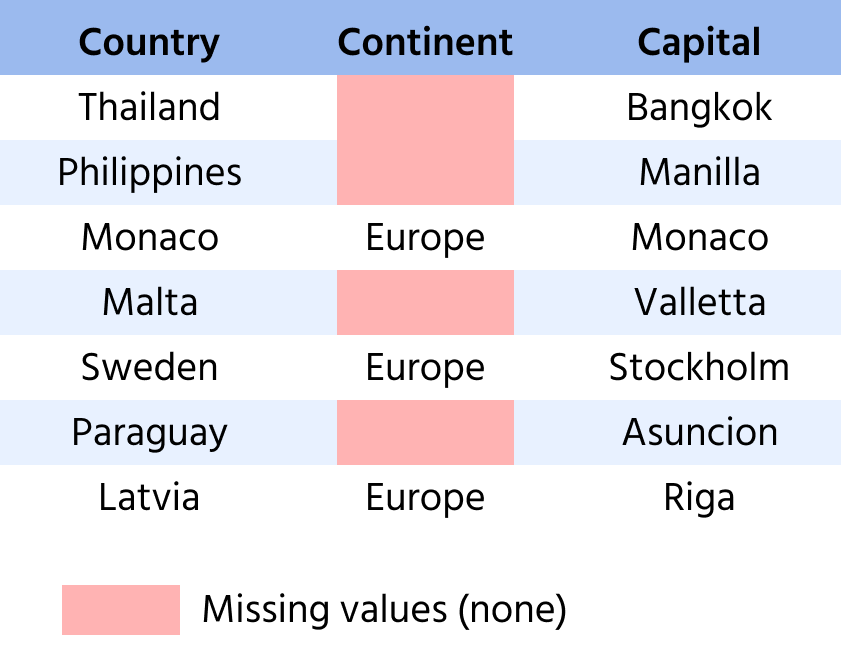
1234567import pandas as pd countries_data = {'country' : ['Thailand', 'Philippines', 'Monaco', 'Malta', 'Sweden', 'Paraguay', 'Latvia'], 'continent' : [None, None, 'Europe', None, 'Europe', None, 'Europe'], 'capital':['Bangkok', 'Manila', 'Monaco', 'Valletta', 'Stockholm', 'Asuncion', 'Riga']} countries = pd.DataFrame(countries_data) print(countries)
You can see that the 'continent' column contains many missing values, making it less informative. Remove this column.
12345678import pandas countries_data = {'country' : ['Thailand', 'Philippines', 'Monaco', 'Malta', 'Sweden', 'Paraguay', 'Latvia'], 'continent' : [None, None, 'Europe', None, 'Europe', None, 'Europe'], 'capital':['Bangkok', 'Manila', 'Monaco', 'Valletta', 'Stockholm', 'Asuncion', 'Riga']} countries = pandas.DataFrame(countries_data) countries = countries.drop(columns = ['continent'],axis=1) print(countries)
タスク
スワイプしてコーディングを開始
You are given a DataFrame named audi_cars.
- Remove the
'capital'column and save the resultingDataFramein theaudi_carsvariable.
解答
 実践的な練習のためにデスクトップに切り替える下記のオプションのいずれかを利用して、現在の場所から続行する
すべて明確でしたか?
フィードバックありがとうございます!
セクション 1. 章 9

single
AIに質問する

AIに質問する

何でも質問するか、提案された質問の1つを試してチャットを始めてください
