チャレンジ:入力欄とラベルを使ったフォームの作成
メニューを表示するにはスワイプしてください
目標
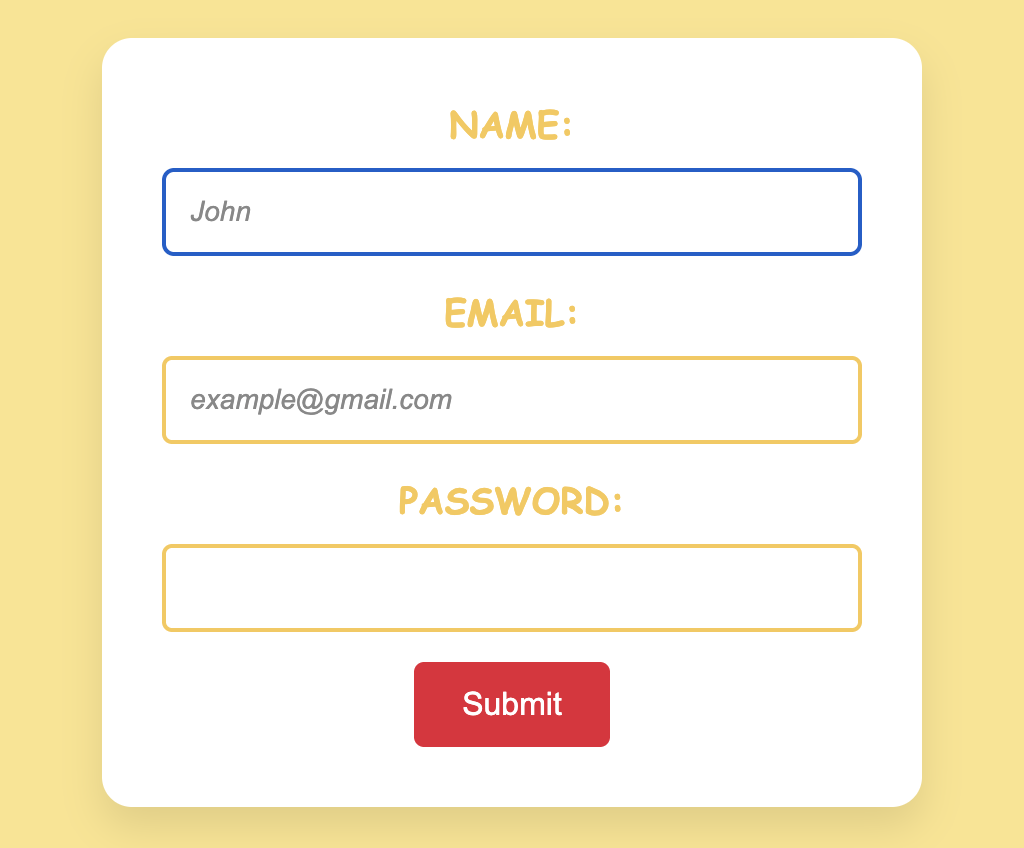
名前、メールアドレス、パスワードの入力欄とそれぞれに対応するラベルを備えたインタラクティブなフォームを作成し、ウェブサイトのユーザー体験を向上させる。
課題
シンプルで使いやすいフォームをページに追加する。以下の要件に従うこと:
- 名前入力欄
- テキスト入力を使用。
- プレースホルダーは
Johnに設定。 - デフォルトでフォーカスを当てる(autofocus)。
- メールアドレス入力欄
- メール入力を使用。
- プレースホルダーは
example@gmail.comに設定。 - 必須項目として設定。
- パスワード入力欄
- パスワード入力を使用。
- この項目を必須にする。

index.html

index.css
ヒント

autofocus: ページの読み込み時に自動的に入力フィールドにフォーカスを当てる機能。required: 入力フィールドを必須項目として指定し、未入力の場合はフォーム送信を防止。placeholder: 入力フィールドにヒントや例となるテキストを表示。forとid: ラベルと入力フィールドを関連付け、アクセシビリティを向上。type: 入力フィールドで期待されるデータの種類(例:text、email、password)を指定。
解答例
<!DOCTYPE html>
<html lang="en">
  <head>
    <link rel="stylesheet" href="index.css" />
  </head>
  <body>
    <form onsubmit="return false">
      <label for="name">Name:</label>
      <input type="text" id="name" name="name" placeholder="John" autofocus />

      <label for="email">Email:</label>
      <input
        type="email"
        id="email"
        name="email"
        placeholder="example@gmail.com"
        required
      />

      <label for="password">Password:</label>
      <input type="password" id="password" name="password" required />

      <button type="submit">Submit</button>
    </form>
  </body>
</html>
すべて明確でしたか?
フィードバックありがとうございます!
セクション 1. 章 27
AIに質問する

AIに質問する

何でも質問するか、提案された質問の1つを試してチャットを始めてください
セクション 1. 章 27
