継承
メニューを表示するにはスワイプしてください
前のセクションでは、派生クラスの概念について学びました。クラスが他のクラスからプロパティを継承するこの機能は、継承と呼ばれます。
すでに継承の概念について知っていますが、今回はより包括的に学習し、より深く理解します。
復習として、以下は継承の例です。

index.cs
1234567891011121314151617181920212223242526272829303132333435363738394041424344#pragma warning disable CS0169 // To disable some unnecessary compiler warnings for this example. Using this is not a recommended practice. using System; class Mammal { int age; float weight; // kilogram (1 kg = 2.2 pounds) } class Dog : Mammal { string breed; public void speak() { Console.WriteLine("Woof!"); } } class Cat : Mammal { string furPattern; public void speak() { Console.WriteLine("Meow!"); } } class ConsoleApp { static void Main() { Cat myCat = new Cat(); Dog myDog = new Dog(); myCat.speak(); myDog.speak(); } }

ディレクティブ #pragma warning disable "warning code" は、特定のコンパイラ警告を無効にするために使用できます。警告を無効にすることは一般的に推奨されていません。無視すると、プログラムで予期しない動作が発生する可能性があります。
上記のコードには、Mammal という親クラスと、Cat および Dog という2つの派生クラスが含まれています。
いずれのクラスにも明示的にコンストラクタが定義されていないため、オブジェクトが作成される際にはデフォルトコンストラクタが使用されます。
デフォルトコンストラクタは、クラスに明示的なコンストラクタが定義されていない場合にプログラミング言語によって自動的に提供されます。デフォルトコンストラクタは基本的に空のコンストラクタであり、コードを含みません。例えば、public className() {} のような形になります。明示的に属性を初期化しないため、すべての属性にはデフォルト値(ゼロ値とも呼ばれる)が設定されます。
Mammal クラスのコンストラクタを手動で作成し、Mammal オブジェクトをいくつかのデータで初期化します:
index.cs
12345678910111213141516171819202122232425262728293031323334353637383940414243444546#pragma warning disable CS0169 // To disable some unnecessary compiler warnings for this example. Using this is not a recommended practice. using System; class Mammal { int age; float weight; // kg public Mammal(int age, float weight) { this.age = age; this.weight = weight; } } class Dog : Mammal { string breed; public void speak() { Console.WriteLine("Woof!"); } } class Cat : Mammal { string furPattern; public void speak() { Console.WriteLine("Meow!"); } } class ConsoleApp { static void Main() { // Creating a "Mammal" object with some data Mammal m1 = new Mammal(10, 42.0f); } }
このプログラムをコンパイルしようとすると、コンソールにいくつかのエラーが表示されます。これらのエラーを理解するには、まずコンストラクターに関連する2つの重要な概念を理解する必要があります。
1つ目は、クラスに明示的にコンストラクターを定義すると、そのクラスにはデフォルトコンストラクターがなくなり、明示的に定義したコンストラクターがそのクラスの主なコンストラクターになるということです。この場合は次のようになります。
index.cs
12345public Mammal(int age, float weight) { this.age = age; this.weight = weight; }
したがって、新しいオブジェクトを作成する際は、必ずコンストラクタの必要な引数を正しい順序で渡す必要があります。
index.cs
1234567// Incorrect ways to create 'Mammal', will show an error Mammal m1 = new Mammal(); Mammal m1 = new Mammal(10); Mammal m1 = new Mammal(42.0f); // Correct way to create 'Mammal', will execute fine. Mammal m1 = new Mammal(10, 42.0f);
次に、派生クラスにもコンストラクタを持たせることができますが、派生クラスのコンストラクタが呼び出される前に、基底(親)クラスのコンストラクタも呼び出されます。
index.cs
1234567891011121314151617181920212223242526272829303132333435#pragma warning disable CS0169 // To disable some unnecessary warnings, using this is not a recommended practice. using System; class Mammal { int age; float weight; // kg // No attribute is initialized explicitly in this constructor // Hence, all attributes will take up "zero" values // It is similar to a "default" constructor except it outputs a message public Mammal() { Console.WriteLine("Mammal Constructor Called"); } } class Dog : Mammal { string breed; public Dog() { Console.WriteLine("Dog Constructor Called"); } } class ConsoleApp { static void Main() { Dog myDog = new Dog(); } }
このコードを実行すると、親クラスである『Mammal』のコンストラクターから WriteLine() メソッドが自動的に呼び出されることがわかります。これは、基底クラスのコンストラクター(ベースコンストラクターとも呼ばれる)が、派生クラスのコンストラクターよりも常に先に呼び出されるという規則を意味します。
この規則は、多重継承の場合にも当てはまります。
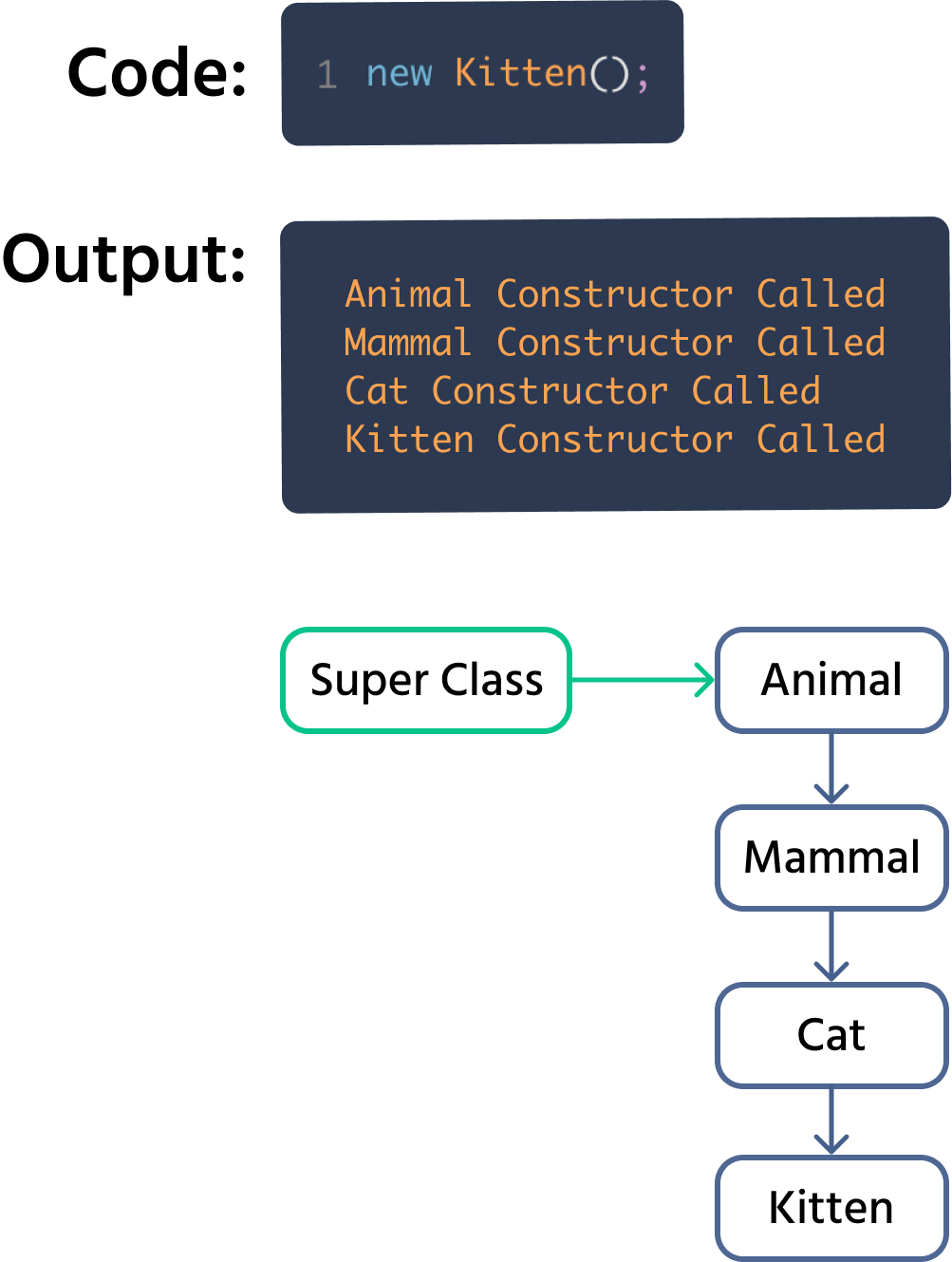
上記の図では、Kitten のコンストラクターは自身の前に Cat のコンストラクターを呼び出しますが、Cat も派生クラスであるため、自身の前に Mammal のコンストラクターを呼び出し、Mammal は自身のコンストラクターの前に Animal のコンストラクターを呼び出します。したがって、最初に実行されるコンストラクターは スーパークラス、つまり Animal クラスのコンストラクターであり、そこから順に下位のクラスへと進みます。
親クラスのコンストラクターが引数を取らない場合、コンパイラーによって自動的に呼び出されます。これが、上記の例で 'Mammal' のコンストラクターが自動的に呼び出された理由です。しかし、もう一度誤ったコードを見てみましょう:
index.cs
12345678910111213141516171819202122232425262728293031323334353637383940414243using System; class Mammal { int age; float weight; // kg public Mammal(int age, float weight) { this.age = age; this.weight = weight; } } class Dog : Mammal { string breed; public void speak() { Console.WriteLine("Woof!"); } } class Cat : Mammal { string furPattern; public void speak() { Console.WriteLine("Meow!"); } } class ConsoleApp { static void Main() { // Creating a "Mammal" object with some data Mammal m1 = new Mammal(10, 42.0f); } }
上記のコードでは、2つのエラーが発生します。これは基本的に、基底コンストラクター を手動で呼び出していないことを意味します。引数が必要な場合は、手動で呼び出す必要があります。親クラスのコンストラクターを手動で呼び出す基本構文は次のとおりです:
index.cs
12345678910class DerivedClassName : ParentClassName { // ... attributes // ... methods public DerivedClassName(int arg1, int arg2, ...) : base(arg1, arg2, ...) { // code here } }
例:
index.cs
1234567891011121314151617181920212223242526272829303132using System; class ExampleParentClass { int value1; int value2; public ExampleParentClass(int value1, int value2) { this.value1 = value1; } } class ExampleDerivedClass : ExampleParentClass { int value3; // The value1 and value2 arguments are passed to the base class's contructor public ExampleDerivedClass(int value1, int value2, int value3) : base (value1, value2) { this.value3 = value3; } } class ConsoleApp { static void Main() { var testObject = new ExampleDerivedClass(5, 7, 9); } }
この構文を使用することで、Mammal および Cat のコンストラクターを通じて、必要なすべてのデータを Dog のコンストラクターに渡し、以前発生していたエラーを修正できます。
index.cs
12345678910111213141516171819202122232425262728293031323334353637383940414243444546474849505152535455565758using System; class Mammal { int age; float weight; // kg public Mammal(int age, float weight) { this.age = age; this.weight = weight; } } class Dog : Mammal { string breed; public Dog(int age, float weight, string breed) : base(age, weight) { this.breed = breed; } public void speak() { Console.WriteLine("Woof!"); } } class Cat : Mammal { string furPattern; public Cat(int age, float weight, string furPattern) : base(age, weight) { this.furPattern = furPattern; } public void speak() { Console.WriteLine("Meow!"); } } class ConsoleApp { static void Main() { // Creating a "Mammal" object with some data Mammal m1 = new Mammal(10, 42.0f); // Creating a "Dog" object with some data Dog d1 = new Dog(10, 42.5f, "Dobermann"); Console.WriteLine("Executed Successfully"); } }
コンストラクターのもう一つの重要な特徴は、他のメソッドと同様にコンストラクターもオーバーロードできることです。引数の数が異なる複数のコンストラクターを作成できます。
index.cs
12345678910111213141516171819202122232425class Mammal { int age; float weight; // kg // 1st constructor public Mammal() { // We leave it empty for this example // Since it's empty, it mimics the "default" constructor } // 2nd constructor public Mammal(int age) { this.age = age; } // 3rd constructor public Mammal(int age, float weight) { this.age = age; this.weight = weight; } }
この場合、Mammal クラスには3つのコンストラクターがあります。そのため、3通りの方法で哺乳類オブジェクトを初期化または作成でき、コンパイラは引数の数と型に基づいて呼び出すコンストラクターを選択します。
index.cs
1234// All Correct var m1 = new Mammal(); var m2 = new Mammal(10); var m3 = new Mammal(10, 42.5f);
これは、派生クラスのコンストラクターから3つのいずれかのコンストラクターを呼び出すことができることも意味します。例えば、次のいずれも有効です。
index.cs
123456789101112131415161718// Using 3rd base constructor public Dog(int age, float weight, string breed) : base(age, weight) { this.breed = breed; } // Using 2nd base constructor public Dog(int age, string breed) : base(age) { this.breed = breed; } // Using 1st base constructor // If the base constructor has no arguments then it is automatically called (similar to the default constructor), so we don't necessarily need to write 'base()' public Dog(string breed) { this.breed = breed; }
上記の2つのスニペットを組み合わせて、Console.WriteLine 文を追加し、コンストラクターがどの順番で実行されるかを実際に確認してみましょう。
index.cs
12345678910111213141516171819202122232425262728293031323334353637383940414243444546474849505152535455565758596061626364656667686970717273747576777879808182838485868788899091929394using System; class Mammal { int age; float weight; // kg // 1st Constructor public Mammal() { // We leave it empty for this example // Since it's empty, it mimics the "default" constructor // The attributes are initialized with zero values Console.WriteLine("Mammal - Constructor 1 Called"); } // 2nd Constructor public Mammal(int age) { this.age = age; Console.WriteLine("Mammal - Constructor 2 Called"); } // 3rd Constructor public Mammal(int age, float weight) { this.age = age; this.weight = weight; Console.WriteLine("Mammal - Constructor 3 Called"); } } class Dog : Mammal { string breed; public Dog() { Console.WriteLine("Dog - Constructor 1 Called"); } // Using 1st Mammal constructor // We don't necessarily need to write 'base()' in this case // It automatically finds and calls the constructor with no arguments public Dog(string breed) { this.breed = breed; Console.WriteLine("Dog - Constructor 2 Called"); } // Using 2nd Mammal constructor public Dog(int age, string breed) : base(age) { this.breed = breed; Console.WriteLine("Dog - Constructor 3 Called"); } // Using 3rd Mammal constructor public Dog(int age, float weight, string breed) : base(age, weight) { this.breed = breed; Console.WriteLine("Dog - Constructor 4 Called"); } public void speak() { Console.WriteLine("Woof!"); } } class ConsoleApp { static void Main() { // Creating a "Mammal" object using different constructors Mammal m1 = new Mammal(10, 42.0f); Mammal m2 = new Mammal(10); Mammal m3 = new Mammal(); Console.WriteLine("----------"); // Seperator, for ease of reading output // Creating a "Dog" object using different constructors Dog d1 = new Dog(10, 42.0f, "Dobermann"); Console.WriteLine(""); Dog d2 = new Dog(10, "Dobermann"); Console.WriteLine(""); Dog d3 = new Dog("Dobermann"); Console.WriteLine(""); Dog d4 = new Dog(); } }
継承のさまざまな特徴について理解したところで、それらをどのように、またはいつ正しく使用するべきかも知っておく必要があります。継承ベースのクラス構造を検討する際に考慮すべき点は以下の通りです。
シンプルさと柔軟性のバランス: コンストラクタのオーバーロードは、異なる型の引数を受け取る複数のコンストラクタを持つことを可能にしますが、やりすぎるとコードが複雑になり、保守が困難になります。クラスのコードは短く、簡潔で、使いやすく保つことがベストプラクティスです。シンプルさと柔軟性のバランスを保つために、クラスにあまり多くのコンストラクタを作成しないようにしましょう。
コンストラクタはシンプルに保つ: コンストラクタは主に、基本データでオブジェクトを初期化する役割を担うべきです。不要な処理や複雑なロジックをコンストラクタ内に記述するのは避けるのがベストプラクティスです。計算やロジックが必要な場合は、別のメソッドを作成する方が適切です。
;悪い例:;
index.cs
123456789101112131415161718192021222324252627class Customer { string name; string accountType; double balance; public Customer (string name, string accountType, double balance) { this.name = name; this.accountType = accountType; if (accountType == "Savings") { // Plus 1 Percent this.balance = balance + balance * 0.01; } else if (accountType == "HighYieldSavings") { // Plus 5 percent this.balance = balance + balance * 0.05; } else { this.balance = balance; } } }
良い実践:
index.cs
123456789101112131415161718192021222324252627282930class Customer { string name; string accountType; double balance; public Customer (string name, string accountType, double balance) { this.name = name; this.accountType = accountType; this.balance = balance; monthlyInterest(); } // This method might be used in other places too private void monthlyInterest() { if(accountType == "Savings") { // Plus 1 Percent balance += balance * 0.01; } else if(accountType == "HighYieldSavings") { // Plus 5 percent balance += balance * 0.05; } } }
重要な属性の初期化: オブジェクトのすべての重要な属性を正しい値で初期化することが必要。これにより、引数なしのコンストラクタであっても正しく機能することが保証される。
悪い実践:
index.cs
123456789101112131415public class Car { private string brand; private string model; private int year; private double price; // Constructor does not initialize important attributes // It is also generally not a good idea to have constructors without any arguments if they're not needed. public Car() { // No initialization of attributes Console.WriteLine("Car Created"); } }
良い実践例:
index.cs
123456789101112131415161718192021222324252627282930313233343536373839public class Car { private string brand; private string model; private int year; private double price; // Good: Constructor initializes important attributes // It also checks if the values are correct // In this case the if-else statements are not unnecessary since they are important for ensuring that the object functions correctly. public Car(string brand, string model, int year, double price) { this.brand = brand; this.model = model; // Validate and set the year // The first public car was created in 1886 :) if (year > 1886) { this.year = year; } else { Console.WriteLine("Invalid year. Setting year to default."); this.year = DateTime.Now.Year; // Set to current year as default } // Validate and set the price if (price >= 0) { this.price = price; } else { Console.WriteLine("Invalid price. Setting price to default."); this.price = 0; // Set to a default value } } }
1. クラスに複数のコンストラクタを作成できる機能はどれですか?
2. このクイズでは前のセクションの概念を使う必要があるかもしれません。下記のコードは15行目と16行目でエラーが発生しています。コードをよく確認し、このエラーを効率的に修正する方法を選んでください。
フィードバックありがとうございます!
AIに質問する

AIに質問する

何でも質問するか、提案された質問の1つを試してチャットを始めてください
