Axes
Sveip for å vise menyen
Ticks Customization
To customize ticks, use:
xticksfor the x-axis,yticksfor the y-axis.
Both accept:
ticks— positions of ticks (empty list removes ticks);labels— custom text for those positions.
Additional keyword arguments let you style tick labels (e.g., rotation, font size).
Below is a plot using these tools:
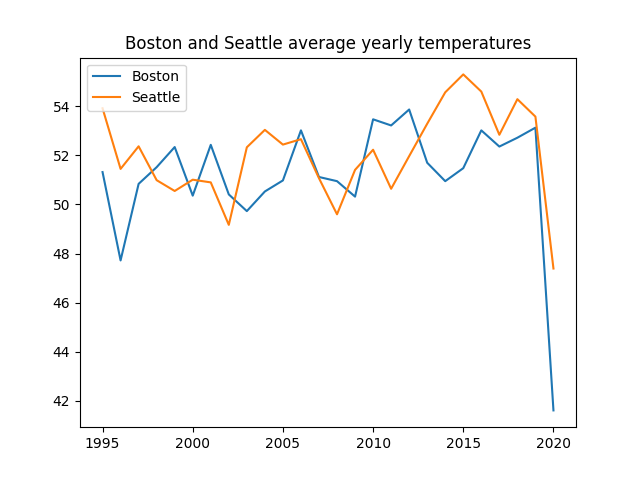
Everything seems to be pretty fine with this plot, however, it would be better to have more years on the x-axis in this range (1995-2020). Let's use xticks() for this purpose:
123456789101112131415import pandas as pd import matplotlib.pyplot as plt url = 'https://staging-content-media-cdn.codefinity.com/courses/47339f29-4722-4e72-a0d4-6112c70ff738/weather_data.csv' weather_df = pd.read_csv(url, index_col=0) plt.plot(weather_df['Boston'], label='Boston') plt.plot(weather_df['Seattle'], label='Seattle') plt.title('Boston and Seattle average yearly temperatures') plt.legend(loc='upper left') plt.xticks(range(1995, 2021, 2), rotation=30) plt.show()
Every second year is displayed on the x-axis thanks to range(1995, 2021, 2).
Labels are rotated 30° for readability.
Tick labels can also be manually set by passing a list to labels.
Axes Labels Customization
Use xlabel() and ylabel() to set axis labels. Each takes a single string.
123456789101112131415import pandas as pd import matplotlib.pyplot as plt url = 'https://content-media-cdn.codefinity.com/courses/47339f29-4722-4e72-a0d4-6112c70ff738/weather_data.csv' weather_df = pd.read_csv(url, index_col=0) plt.plot(weather_df['Boston'], label='Boston') plt.plot(weather_df['Seattle'], label='Seattle') plt.title('Boston and Seattle average yearly temperatures') plt.legend(loc='upper left') plt.xticks(range(1995, 2021, 2), rotation=30) plt.ylabel('Temperature, °F') plt.show()
You can style labels with options such as fontsize and color.
The loc argument controls label placement:
- For x-labels:
'left','center','right'; - For y-labels:
'top','center','bottom'.

Sveip for å begynne å kode
- Use the correct function to set
data_linearas x-axis ticks. - Use the correct function to set
'x'as the x-axis label. - Use
'right'as the location for the x-axis label. - Use the correct function to set
'y'as the y-axis label. - Use
'top'as the location for the y-axis label. - Set
rotationparameter to0for the y-axis label.
Løsning
 Bytt til skrivebordet for virkelighetspraksisFortsett der du er med et av alternativene nedenfor
Takk for tilbakemeldingene dine!

single
Spør AI

Spør AI

Spør om hva du vil, eller prøv ett av de foreslåtte spørsmålene for å starte chatten vår
