Certificates And The Chain Of Trust
Sveip for å vise menyen
Certificates And The Chain Of Trust
Here's the question we've been dancing around. When Maria's browser opens https://yourbank.com, it gets a public key from the server. How does the browser know that key really belongs to the bank — and not to an attacker pretending to be the bank?
Asymmetric encryption solves the problem of sharing a secret. But it doesn't solve the problem of knowing whose secret it is. That's what certificates are for.
The Idea — A Trusted Third Party Vouches For You
Imagine you're at a club. The bouncer doesn't know you, and you say "I'm Daniel." Anyone could say that. So instead, you hand over a government-issued ID. The bouncer doesn't trust you — but they trust the government that issued the ID, because:
- They believe the government has procedures to verify identity;
- They believe the ID is hard to forge;
- They've seen this format before and know what a real one looks like.
A TLS certificate works exactly the same way. The server hands the browser a document that says:
- "The public key below belongs to yourbank.com";
- "I, the Certificate Authority (CA), have verified this";
- Signed, dated, and digitally signed by the CA's private key.
The browser doesn't trust the server. The browser trusts the CA that signed the certificate. And it trusts the CA because the CA's own public key is pre-installed in your browser or operating system.
The Trust Store — A List Of Pre-Approved CAs
Every browser and OS ships with a list of CAs it trusts. This is called the trust store or root store. Your laptop probably has 100 to 200 of them right now. Common ones include:
- DigiCert;
- Let's Encrypt;
- GlobalSign;
- Sectigo;
- Google Trust Services;
- Amazon Trust Services.
When Mozilla, Apple, Microsoft, or Google decides a CA is trustworthy, they add it to the store. When a CA misbehaves, they remove it — and overnight, billions of devices stop trusting that CA's certificates. This has happened multiple times (Symantec lost trust in 2017–2018; several smaller CAs have been removed since).
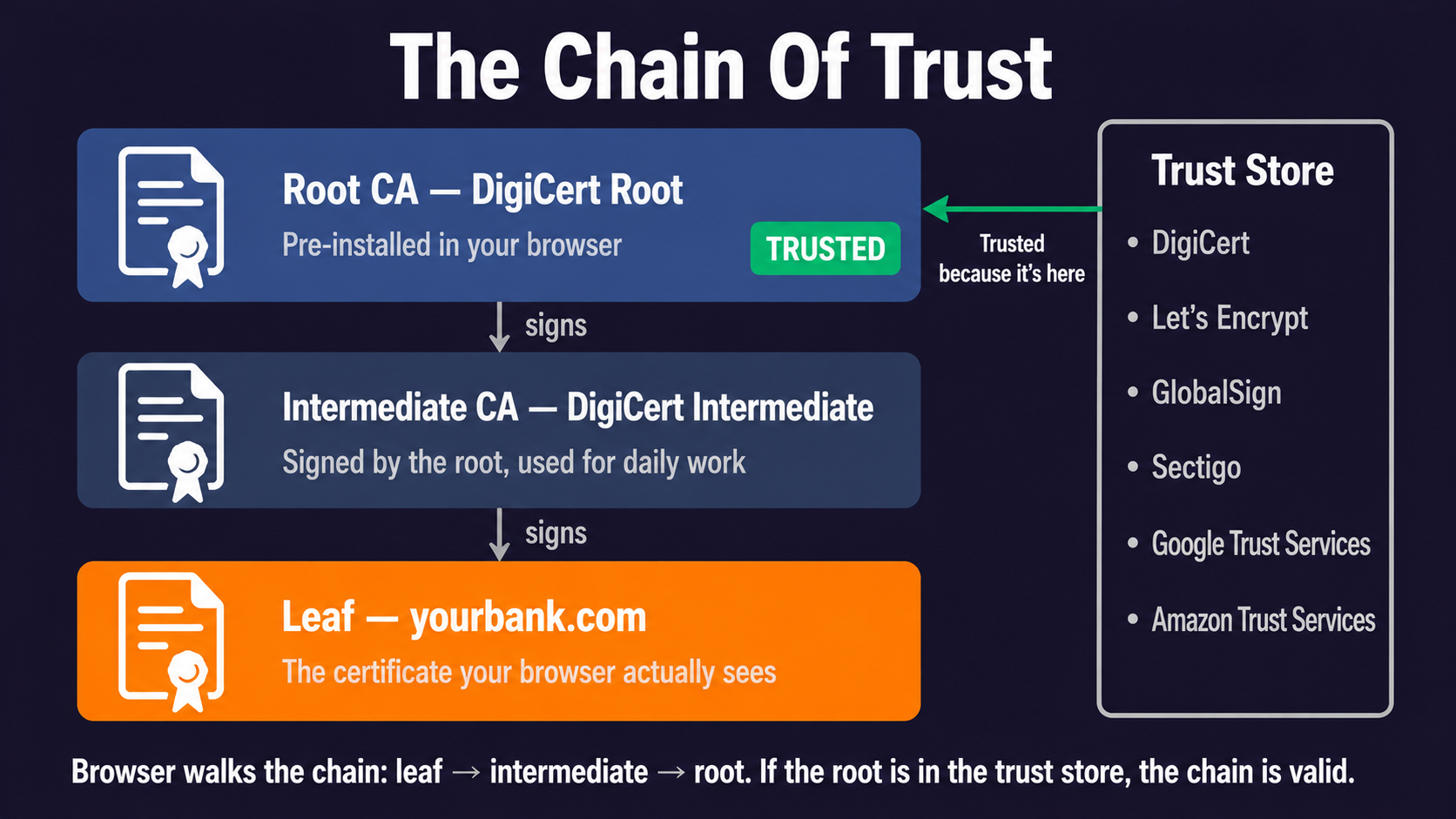
The Chain Of Trust — Roots, Intermediates, Leaves
Real-world CAs don't sign your certificate directly with their root key — that key is too valuable, locked in a vault, used only rarely. Instead, the root signs an intermediate CA certificate, and the intermediate signs your certificate. This creates a chain:
- Root certificate — DigiCert Root, in your browser's trust store;
- Intermediate certificate — DigiCert Intermediate, signed by the root;
- Leaf certificate — yourbank.com, signed by the intermediate.
When the browser receives yourbank.com's certificate, it walks the chain: leaf → intermediate → root. If the root is in the trust store and every signature in the chain checks out, the certificate is trusted. If any link is broken, the connection fails with a scary red warning.
What's Actually Inside A Certificate
Open any TLS certificate (you can click the padlock in your browser to see one). The key fields:
- Subject — who the certificate is for (e.g.,
CN=yourbank.com); - Issuer — which CA signed it;
- Public key — the public half of the key pair the server will use;
- Validity period —
Not BeforeandNot Afterdates; - Subject Alternative Names (SAN) — list of additional domain names the cert covers;
- Signature — the CA's signature over all the above.
In 2026, that "validity period" is shrinking fast. The maximum lifetime dropped to 200 days in March 2026, and will fall to 100 days in 2027 and 47 days in 2029. Some Let's Encrypt certificates are already valid for just 6 days. We'll cover why in Section 3 — the short version is that short certificates are easier to revoke when something goes wrong.
How CAs Actually Verify You Own A Domain
Before issuing a certificate for yourbank.com, the CA must verify the requester actually controls the domain. There are three common methods:
- HTTP-01 — the CA gives you a random token; you put it at a specific URL on the domain; the CA fetches it;
- DNS-01 — the CA gives you a random token; you add it as a TXT record in DNS; the CA queries it;
- TLS-ALPN-01 — variation of HTTP-01 done over TLS.
These are part of the ACME protocol — the same one Let's Encrypt and Certbot use. Section 3 has a full chapter on automation.
Why This Matters For Security
The whole TLS system rests on the assumption that CAs are honest and competent. When they're not, the consequences are severe:
- In 2011, the CA DigiNotar was hacked. Attackers issued fake certificates for Google, Yahoo, and others. The Iranian government used them to spy on Gmail users. DigiNotar was removed from every trust store and went bankrupt within months;
- In 2015, Symantec was caught mis-issuing certificates for
google.comto a partner without authorization. Over the next few years, Google forced them out of the WebPKI; - Certificate Transparency (covered later) was invented in response to these incidents.
The chain of trust is strong — but only because the people running CAs and root stores actively police it. If you ever wonder why a certificate "just works," it's because thousands of people are quietly making sure the trust holds.
Takk for tilbakemeldingene dine!
Spør AI

Spør AI

Spør om hva du vil, eller prøv ett av de foreslåtte spørsmålene for å starte chatten vår
