Exploring the Exception Hierarchy
Veeg om het menu te tonen
When you work with exceptions in C#, you are using a powerful hierarchy rooted in the System.Exception class. This base class provides the foundation for all error handling in .NET, and many specialized exceptions derive from it to represent different error scenarios. Some of the most common derived types include ArgumentNullException, ArgumentException, InvalidOperationException, and FormatException. Each of these exceptions is designed to signal a specific kind of problem, making your code more precise and easier to debug.

Program.cs
1234567891011121314151617181920212223242526272829using System; namespace ConsoleApp { public class Program { public static void Main(string[] args) { try { PrintLength(null); } catch (ArgumentNullException ex) { Console.WriteLine("Caught specific exception: " + ex.Message); } } public static void PrintLength(string input) { if (input == null) { throw new ArgumentNullException(nameof(input), "Input string cannot be null."); } Console.WriteLine("Length: " + input.Length); } } }
Catching specific exceptions, such as ArgumentNullException, is generally better than catching all exceptions with a generic catch (Exception ex) block. When you target a specific exception, you can handle each error type appropriately and avoid masking unexpected bugs or logic errors. This approach leads to more robust and maintainable code, as you only respond to errors you expect and understand, rather than swallowing all errors indiscriminately.
CustomExceptionExample.cs
123456789101112using System; namespace ConsoleApp { // Define a custom exception by inheriting from Exception public class InvalidUserInputException : Exception { public InvalidUserInputException(string message) : base(message) { } } }

The exception hierarchy in C# refers to the structured inheritance of exception classes, all of which ultimately derive from System.Exception. This hierarchy allows you to handle errors at different levels of specificity, making your error handling strategies more flexible and powerful.
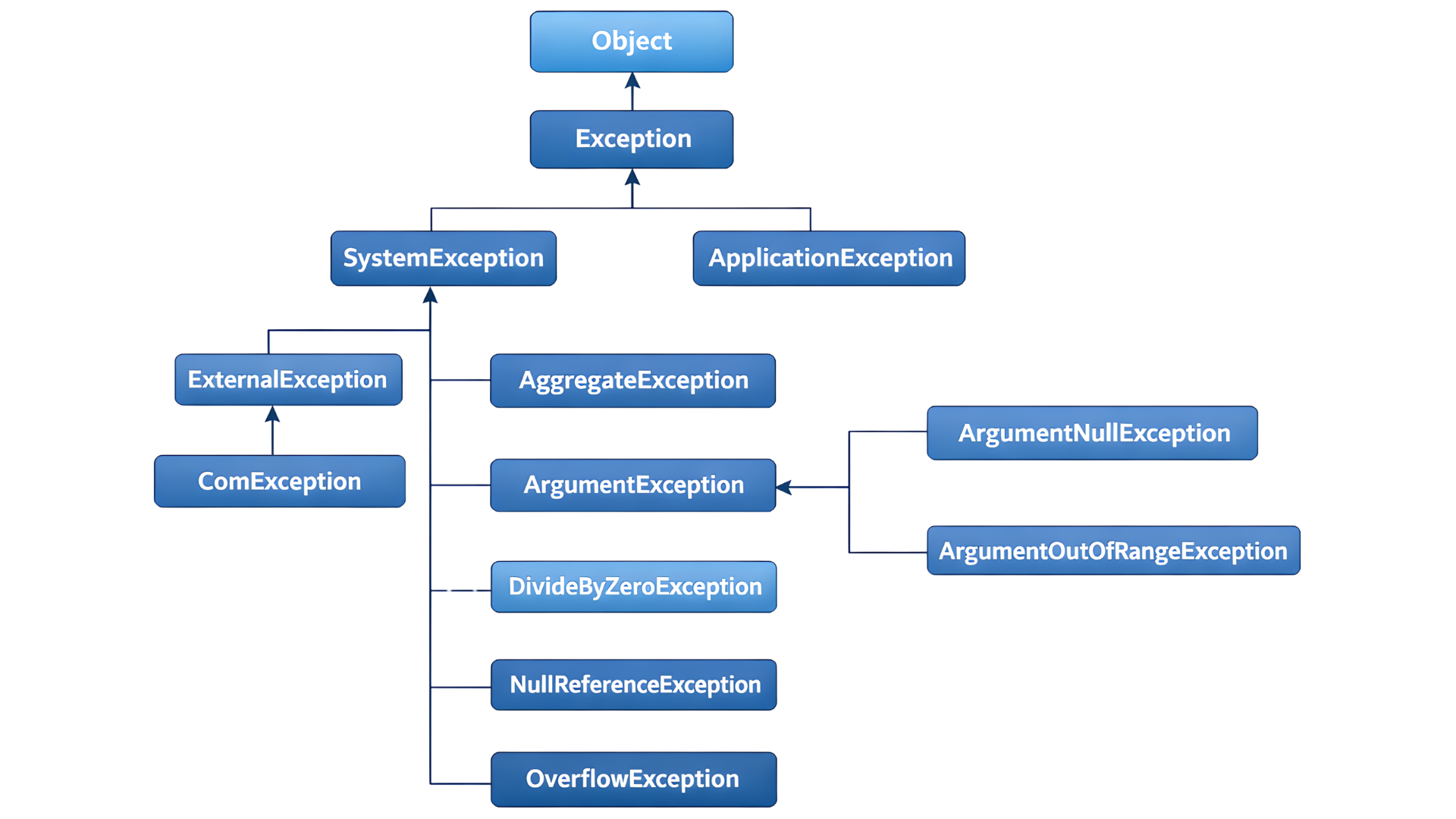
In large applications, following best practices for exception handling is crucial. You should always catch the most specific exception possible and only use a general catch block when absolutely necessary—such as for logging or cleanup before rethrowing. Avoid using exceptions for normal control flow, and document any custom exceptions you create. Consistent and thoughtful exception handling keeps your application reliable and easier to maintain as it grows.
1. What is the base class for all exceptions in C#?
2. Why is it important to catch specific exceptions rather than the base Exception class?
Bedankt voor je feedback!
Vraag AI

Vraag AI

Vraag wat u wilt of probeer een van de voorgestelde vragen om onze chat te starten.
