Password Managers In 30 Minutes
Svep för att visa menyn
You can't remember 50 unique long passwords. Nobody can. That's the whole problem password managers solve.
This chapter is the practical one. By the end, you'll know which manager to pick, how to set it up, and how to migrate your existing accounts without losing your mind.
What A Password Manager Actually Does
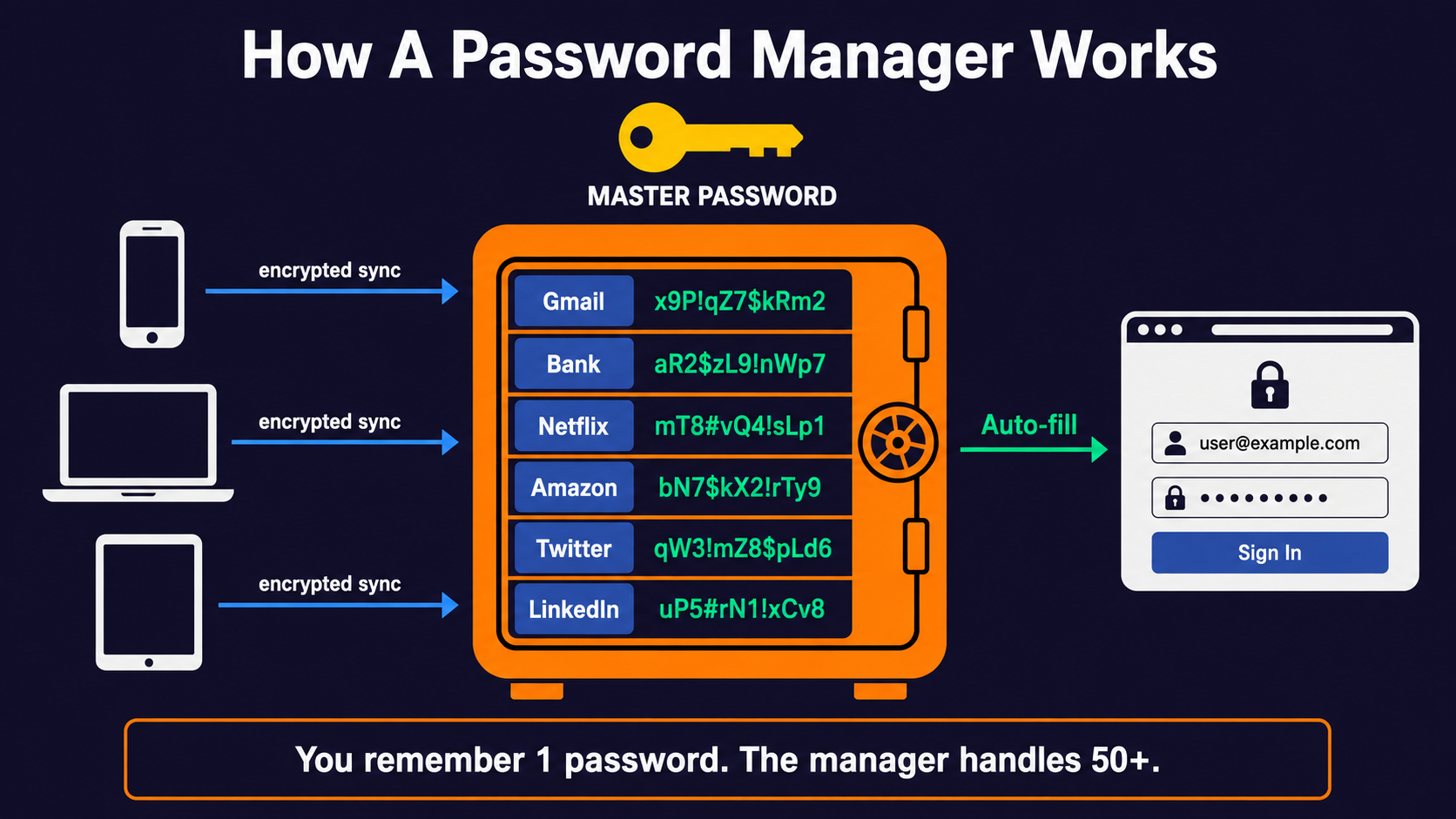
A password manager is an app — installed on your phone, laptop, and as a browser extension — that:
- Stores all your passwords, encrypted, behind one master password you actually remember;
- Auto-fills logins when you visit a website you've saved;
- Generates new random passwords when you sign up for new sites;
- Syncs everything across your devices through encrypted cloud storage;
- Warns you about leaked passwords, weak passwords, and reused passwords.
You go from "I have to invent and remember 50 passwords" to "I remember one very good password, and a machine handles the rest." It's the single highest-leverage thing you can do for your security.
Three Good Options For 2026
You don't have to pick the perfect one. You have to pick any one and start using it. That said, here are the three that consistently come out on top:
Bitwarden — Free, open source, security community favorite.
- Free plan: unlimited passwords across unlimited devices. Genuinely no catch;
- Premium plan: $10/year, adds extras like 2FA codes inside the app, file storage;
- Open source — anyone can audit the code, and they have. Many times;
- Best for: people who want a no-cost no-nonsense option.
1Password — Paid, polished, family-friendly.
- $36/year individual, $60/year family (up to 5 people);
- The most refined user experience — the interface, the apps, the integrations;
- Family plans include shared vaults — great for couples sharing Netflix, parents storing kid logins, etc.;
- Best for: people who'll pay for polish or need family features.
Apple Passwords / Google Password Manager — Built-in, free.
- Apple Passwords (since iOS 18) is solid and works across Apple devices;
- Google Password Manager works across anything signed into Chrome;
- Free, automatic, requires no extra app — for many people, this is enough;
- Drawback: locked into one ecosystem. If you have iOS and a Windows laptop, Apple Passwords becomes awkward;
- Best for: people who use only Apple devices, or only Chrome.
Avoid LastPass. It was popular for years but has suffered multiple serious breaches, including a 2022 incident where attackers stole encrypted vaults from millions of users. It's not a category — it's that specific company.
The 30-Minute Setup
Whichever you pick, the process is the same:
Step 1 — Install the app on your phone and laptop, plus the browser extension.
This takes 5 minutes. Browser extension is critical — it's how auto-fill works.
Step 2 — Create your master password.
This is the most important password of your life, because it's the key to everything else. Rules:
- Long. Minimum 16 characters. Ideally a passphrase of 4+ random words;
- Memorable. You will type this dozens of times.
coffee-melon-pulley-saturday-29beats anything you can't remember; - Unique. Never used anywhere else, ever. Not on any other account, past or present;
- Written down once, somewhere physical and safe. A piece of paper in a drawer. A safe. A note inside a book on your shelf. If you forget it, your entire vault is unrecoverable. There is no "I forgot my master password" reset.
Take 10 minutes on this step. Don't rush.
Step 3 — Turn on 2FA on the password manager itself.
This is your most important account. Treat it that way. We'll cover 2FA in the next chapter — for now, just know you'll come back to this step after Chapter 4.
Step 4 — Save logins as you go.
Don't try to migrate every account at once. Just live your life — and each time you log into a site, let the manager save it. After a week or two, most of your important accounts are in there.
Step 5 — Generate new passwords for important accounts.
Once it's all set up, go through your top 5 accounts — email, bank, primary social media, password manager itself, anywhere with payment info — and use the manager to generate a new random 20+ character password for each. This breaks any old reused passwords.
Total time: about 30 minutes spread over a week. After that, it's invisible — you never type a password again.
What If The Password Manager Gets Hacked?
A reasonable concern. The short answer:
- Your vault is encrypted with your master password, on your device. The company never sees the contents;
- Even if their servers are breached, attackers get encrypted blobs that require brute-forcing each individual master password — practically impossible if yours is long enough;
- This is exactly what saved most Bitwarden and 1Password users when various incidents have happened — the vaults were never readable to attackers;
- The exception is LastPass 2022 — attackers got encrypted vaults and slowly cracked the ones with weak master passwords. Which is why your master password has to be long.
The math: a 4-word passphrase like correct-horse-battery-staple would take a well-funded attacker centuries to brute-force, even with a stolen encrypted vault. A 6-character password could fall in hours.
Long master password = the bet pays off.
Common Objections
"I don't trust having all my passwords in one place."
The alternative is reusing weak passwords or writing them on sticky notes. Statistically, you are far safer with a properly-configured password manager than with any approach a human can pull off by memory. Every major security agency now recommends password managers.
"What about Excel/Notes/a notebook?"
These can work in a pinch but don't auto-fill, don't generate, don't warn you about leaks, and tend to fall behind. They also leak if your device is compromised — notes apps are unencrypted unless you specifically set them up to be.
"What if I forget my master password?"
You won't, because you're going to write it down once, on paper, somewhere safe (a sealed envelope in a fireproof drawer is fine). Many managers also offer a "recovery code" — a one-time printable string that can recover the vault if you lose the master. Print it. Put it in the same envelope. Then forget it exists.
Tack för dina kommentarer!
Fråga AI

Fråga AI

Fråga vad du vill eller prova någon av de föreslagna frågorna för att starta vårt samtal
Password Managers In 30 Minutes
You can't remember 50 unique long passwords. Nobody can. That's the whole problem password managers solve.
This chapter is the practical one. By the end, you'll know which manager to pick, how to set it up, and how to migrate your existing accounts without losing your mind.
What A Password Manager Actually Does
A password manager is an app — installed on your phone, laptop, and as a browser extension — that:
- Stores all your passwords, encrypted, behind one master password you actually remember;
- Auto-fills logins when you visit a website you've saved;
- Generates new random passwords when you sign up for new sites;
- Syncs everything across your devices through encrypted cloud storage;
- Warns you about leaked passwords, weak passwords, and reused passwords.
You go from "I have to invent and remember 50 passwords" to "I remember one very good password, and a machine handles the rest." It's the single highest-leverage thing you can do for your security.
Three Good Options For 2026
You don't have to pick the perfect one. You have to pick any one and start using it. That said, here are the three that consistently come out on top:
Bitwarden — Free, open source, security community favorite.
- Free plan: unlimited passwords across unlimited devices. Genuinely no catch;
- Premium plan: $10/year, adds extras like 2FA codes inside the app, file storage;
- Open source — anyone can audit the code, and they have. Many times;
- Best for: people who want a no-cost no-nonsense option.
1Password — Paid, polished, family-friendly.
- $36/year individual, $60/year family (up to 5 people);
- The most refined user experience — the interface, the apps, the integrations;
- Family plans include shared vaults — great for couples sharing Netflix, parents storing kid logins, etc.;
- Best for: people who'll pay for polish or need family features.
Apple Passwords / Google Password Manager — Built-in, free.
- Apple Passwords (since iOS 18) is solid and works across Apple devices;
- Google Password Manager works across anything signed into Chrome;
- Free, automatic, requires no extra app — for many people, this is enough;
- Drawback: locked into one ecosystem. If you have iOS and a Windows laptop, Apple Passwords becomes awkward;
- Best for: people who use only Apple devices, or only Chrome.
Avoid LastPass. It was popular for years but has suffered multiple serious breaches, including a 2022 incident where attackers stole encrypted vaults from millions of users. It's not a category — it's that specific company.
The 30-Minute Setup
Whichever you pick, the process is the same:
Step 1 — Install the app on your phone and laptop, plus the browser extension.
This takes 5 minutes. Browser extension is critical — it's how auto-fill works.
Step 2 — Create your master password.
This is the most important password of your life, because it's the key to everything else. Rules:
- Long. Minimum 16 characters. Ideally a passphrase of 4+ random words;
- Memorable. You will type this dozens of times.
coffee-melon-pulley-saturday-29beats anything you can't remember; - Unique. Never used anywhere else, ever. Not on any other account, past or present;
- Written down once, somewhere physical and safe. A piece of paper in a drawer. A safe. A note inside a book on your shelf. If you forget it, your entire vault is unrecoverable. There is no "I forgot my master password" reset.
Take 10 minutes on this step. Don't rush.
Step 3 — Turn on 2FA on the password manager itself.
This is your most important account. Treat it that way. We'll cover 2FA in the next chapter — for now, just know you'll come back to this step after Chapter 4.
Step 4 — Save logins as you go.
Don't try to migrate every account at once. Just live your life — and each time you log into a site, let the manager save it. After a week or two, most of your important accounts are in there.
Step 5 — Generate new passwords for important accounts.
Once it's all set up, go through your top 5 accounts — email, bank, primary social media, password manager itself, anywhere with payment info — and use the manager to generate a new random 20+ character password for each. This breaks any old reused passwords.
Total time: about 30 minutes spread over a week. After that, it's invisible — you never type a password again.
What If The Password Manager Gets Hacked?
A reasonable concern. The short answer:
- Your vault is encrypted with your master password, on your device. The company never sees the contents;
- Even if their servers are breached, attackers get encrypted blobs that require brute-forcing each individual master password — practically impossible if yours is long enough;
- This is exactly what saved most Bitwarden and 1Password users when various incidents have happened — the vaults were never readable to attackers;
- The exception is LastPass 2022 — attackers got encrypted vaults and slowly cracked the ones with weak master passwords. Which is why your master password has to be long.
The math: a 4-word passphrase like correct-horse-battery-staple would take a well-funded attacker centuries to brute-force, even with a stolen encrypted vault. A 6-character password could fall in hours.
Long master password = the bet pays off.
Common Objections
"I don't trust having all my passwords in one place."
The alternative is reusing weak passwords or writing them on sticky notes. Statistically, you are far safer with a properly-configured password manager than with any approach a human can pull off by memory. Every major security agency now recommends password managers.
"What about Excel/Notes/a notebook?"
These can work in a pinch but don't auto-fill, don't generate, don't warn you about leaks, and tend to fall behind. They also leak if your device is compromised — notes apps are unencrypted unless you specifically set them up to be.
"What if I forget my master password?"
You won't, because you're going to write it down once, on paper, somewhere safe (a sealed envelope in a fireproof drawer is fine). Many managers also offer a "recovery code" — a one-time printable string that can recover the vault if you lose the master. Print it. Put it in the same envelope. Then forget it exists.
Tack för dina kommentarer!
