Notice: This page requires JavaScript to function properly.
Please enable JavaScript in your browser settings or update your browser.
Lära What is .NET MAUI? | Introduction to Desktop Development with .NET
C# Desktop Development with .NET MAUI

What is .NET MAUI?

Svep för att visa menyn

MAUI, also known as Multi-Application User Interface, is a powerful cross-platform framework for creating mobile and desktop applications using C#.

There are multiple options when it comes to developing desktop applications using C#, for example, using the Windows Forms (WF) library, or the more advanced Windows Presentation Foundation (WPF). However, WF and WPF are somewhat older as compared to MAUI, moreover, WF and WPF only support application development for Windows, however, with MAUI, it is possible to create desktop applications for all popular platforms: Windows, Mac, and Linux. Apart from that, it is also possible to create applications for Android and iOS using MAUI.

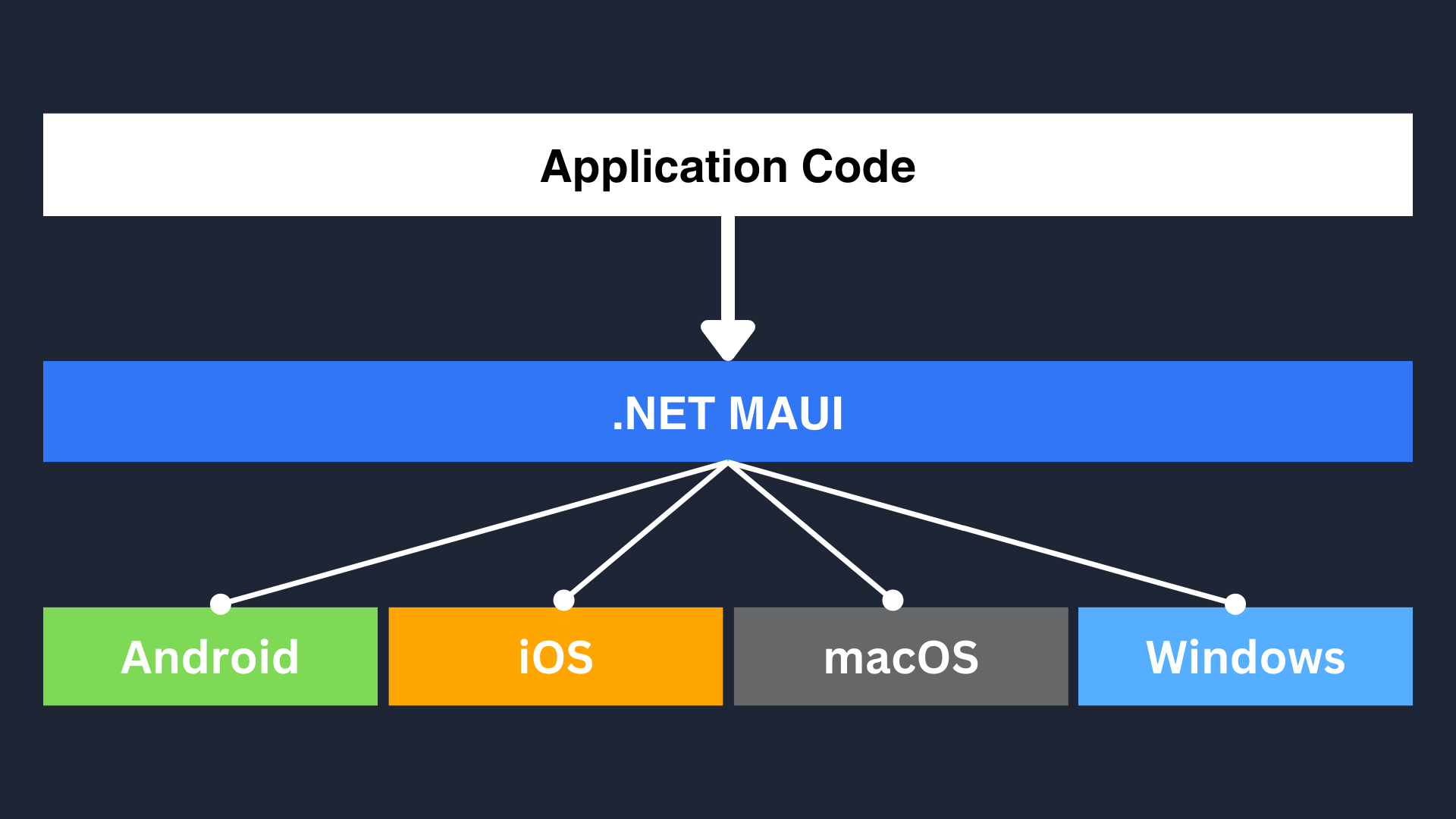
Since MAUI applications are cross-platform, an app created for Windows can be exported to be runnable on MacOS, or even for Android and iOS, without making any changes to the code. This makes MAUI very robust.
Note
Note

MAUI is built with cross-platform compatibility as one of its important goals which allows us to make applications for multiple different platforms using a single codebase; however, in some rare cases, we might need to write platform-specific code to make it fully compatible with a specific platform.

This is why we will be using MAUI to develop Desktop Applications. We will also cover some important C# concepts along the way as we learn to develop some cool desktop applications.

Note
Note

If you are on MacOS, certain procedures might be different for you, for example creating a new project or running the application. However, you should be able to follow the tutorial without any issues, as in such cases I will have the alternate method mentioned in the tutorials.

In MAUI, we define the application's UI (User Interface) using XAML (eXtensible Application Markup Language) and program the functionality and logic of the application using C#.

XAML is a Markup Language that has a very similar syntax to HTML, which is very convenient as we can define the structure and components of our application using XAML similar to how we would define the structure and components of a web page using HTML.

Note
Note

A Markup Language is a system of annotating a document using tags and symbols, to describe its structure and presentation. The most popular markup language is HTML which is used for defining how elements appear on web pages.

1. What is the limitation of Windows Forms and Windows Presentation Foundation?

2. What does MAUI stand for in terms of .NET?

question mark

What is the limitation of Windows Forms and Windows Presentation Foundation?

Vänligen välj det korrekta svaret

question mark

What does MAUI stand for in terms of .NET?

Vänligen välj det korrekta svaret

Var allt tydligt?

Hur kan vi förbättra det?

Tack för dina kommentarer!

Avsnitt 1. Kapitel 1

Fråga AI

expand

Fråga AI

ChatGPT

Fråga vad du vill eller prova någon av de föreslagna frågorna för att starta vårt samtal

What is .NET MAUI?

MAUI, also known as Multi-Application User Interface, is a powerful cross-platform framework for creating mobile and desktop applications using C#.

There are multiple options when it comes to developing desktop applications using C#, for example, using the Windows Forms (WF) library, or the more advanced Windows Presentation Foundation (WPF). However, WF and WPF are somewhat older as compared to MAUI, moreover, WF and WPF only support application development for Windows, however, with MAUI, it is possible to create desktop applications for all popular platforms: Windows, Mac, and Linux. Apart from that, it is also possible to create applications for Android and iOS using MAUI.

Since MAUI applications are cross-platform, an app created for Windows can be exported to be runnable on MacOS, or even for Android and iOS, without making any changes to the code. This makes MAUI very robust.

Note
Note

MAUI is built with cross-platform compatibility as one of its important goals which allows us to make applications for multiple different platforms using a single codebase; however, in some rare cases, we might need to write platform-specific code to make it fully compatible with a specific platform.

This is why we will be using MAUI to develop Desktop Applications. We will also cover some important C# concepts along the way as we learn to develop some cool desktop applications.

Note
Note

If you are on MacOS, certain procedures might be different for you, for example creating a new project or running the application. However, you should be able to follow the tutorial without any issues, as in such cases I will have the alternate method mentioned in the tutorials.

In MAUI, we define the application's UI (User Interface) using XAML (eXtensible Application Markup Language) and program the functionality and logic of the application using C#.

XAML is a Markup Language that has a very similar syntax to HTML, which is very convenient as we can define the structure and components of our application using XAML similar to how we would define the structure and components of a web page using HTML.

Note
Note

A Markup Language is a system of annotating a document using tags and symbols, to describe its structure and presentation. The most popular markup language is HTML which is used for defining how elements appear on web pages.

Var allt tydligt?

Hur kan vi förbättra det?

Tack för dina kommentarer!

Avsnitt 1. Kapitel 1
some-alt