Small UI Polish
Свайпніть щоб показати меню
Now you will clean up the screen and bring everything together.
At this stage, you already have all the pieces:
- Image: avatar;
- Text: name and description;
- Input: user field;
- Button: action.
The goal now is to improve spacing, alignment, and structure so the screen looks clean and complete.
Example:
import { View, Text, Image, TextInput, Button, StyleSheet } from 'react-native';

export default function App() {
  return (
    <View style={styles.container}>
      <Image
        source={{ uri: 'https://i.pravatar.cc/150' }}
        style={styles.avatar}
      />

      <Text style={styles.name}>Alex Johnson</Text>
      <Text style={styles.subtitle}>Frontend Developer</Text>

      <TextInput
        placeholder="Send a message"
        style={styles.input}
      />

      <Button title="Contact" onPress={() => console.log('Contact pressed')} />
    </View>
  );
}

const styles = StyleSheet.create({
  container: {
    padding: 20,
    alignItems: 'center'
  },
  avatar: {
    width: 100,
    height: 100,
    marginBottom: 15
  },
  name: {
    fontSize: 20,
    fontWeight: 'bold'
  },
  subtitle: {
    marginBottom: 15,
    color: 'gray'
  },
  input: {
    width: '100%',
    borderWidth: 1,
    padding: 10,
    marginBottom: 10
  }
});
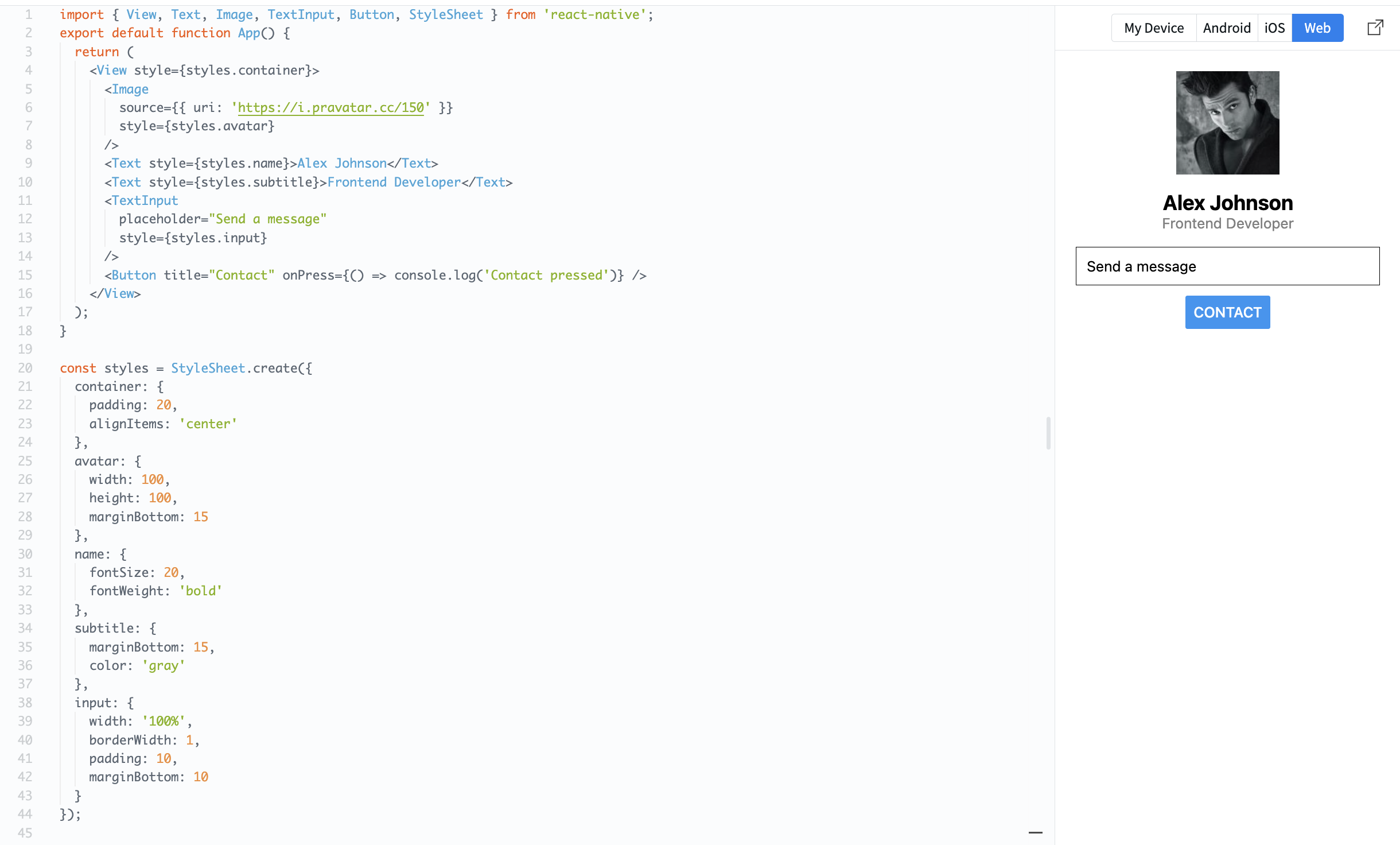
Now your screen looks structured and realistic.
This is your first complete mobile UI built with React Native.
You combined layout, styling, images, text, and interaction into one screen.
Moving to Styling and Layout
At this point, you have built your first mobile screen using React Native. You understand how to use core components like View, Text, Image, TextInput, and Button. You also know how to structure a screen and make it interactive.
Right now, your UI works but it is still basic. The next step is to improve how it looks.
You will focus on spacing, alignment, text styling, and layout. These small changes make a big difference in how your app feels to users.
Now it's time to move from functional UI to clean and structured UI. Let's continue with styling and layout.
Дякуємо за ваш відгук!
Запитати АІ

Запитати АІ

Запитайте про що завгодно або спробуйте одне із запропонованих запитань, щоб почати наш чат
Small UI Polish
Now you will clean up the screen and bring everything together.
At this stage, you already have all the pieces:
- Image: avatar;
- Text: name and description;
- Input: user field;
- Button: action.
The goal now is to improve spacing, alignment, and structure so the screen looks clean and complete.
Example:
import { View, Text, Image, TextInput, Button, StyleSheet } from 'react-native';

export default function App() {
  return (
    <View style={styles.container}>
      <Image
        source={{ uri: 'https://i.pravatar.cc/150' }}
        style={styles.avatar}
      />

      <Text style={styles.name}>Alex Johnson</Text>
      <Text style={styles.subtitle}>Frontend Developer</Text>

      <TextInput
        placeholder="Send a message"
        style={styles.input}
      />

      <Button title="Contact" onPress={() => console.log('Contact pressed')} />
    </View>
  );
}

const styles = StyleSheet.create({
  container: {
    padding: 20,
    alignItems: 'center'
  },
  avatar: {
    width: 100,
    height: 100,
    marginBottom: 15
  },
  name: {
    fontSize: 20,
    fontWeight: 'bold'
  },
  subtitle: {
    marginBottom: 15,
    color: 'gray'
  },
  input: {
    width: '100%',
    borderWidth: 1,
    padding: 10,
    marginBottom: 10
  }
});
Now your screen looks structured and realistic.
This is your first complete mobile UI built with React Native.
You combined layout, styling, images, text, and interaction into one screen.
Moving to Styling and Layout
At this point, you have built your first mobile screen using React Native. You understand how to use core components like View, Text, Image, TextInput, and Button. You also know how to structure a screen and make it interactive.
Right now, your UI works but it is still basic. The next step is to improve how it looks.
You will focus on spacing, alignment, text styling, and layout. These small changes make a big difference in how your app feels to users.
Now it's time to move from functional UI to clean and structured UI. Let's continue with styling and layout.
Дякуємо за ваш відгук!
