Communication Tools and When to Use Which
Свайпніть щоб показати меню
The average knowledge worker receives 117 emails per day, spends 57% of their working hours communicating across platforms, and faces an interruption — a ping, a notification, a message — every two minutes during core work hours. According to Microsoft's 2025 Work Trend Index, 48% of employees describe their workday as feeling chaotic and fragmented.
The tools aren't the problem. The problem is using them without a framework.
The Two Axes of Workplace Communication
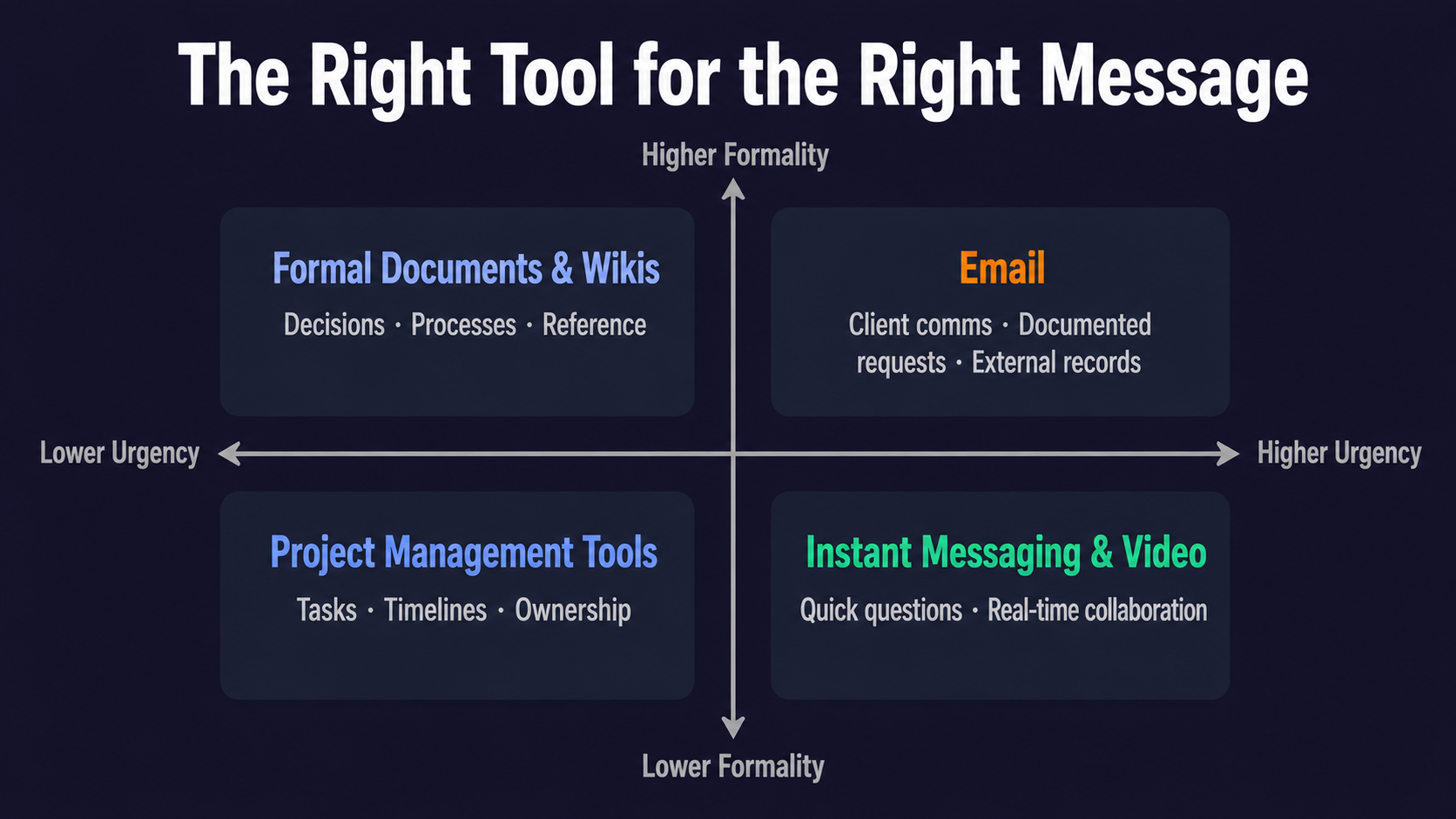
Every professional communication sits somewhere on two dimensions:
Urgency — does this need a response in the next few minutes, the next few hours, or the next few days?
Formality — is this an internal team exchange, a cross-functional discussion, an external client interaction, or a formal record that needs to be retrievable?
Matching your tool to both dimensions is the core skill. Using a high-urgency channel (like instant messaging) for a low-urgency request trains your team to treat everything as urgent. Using a low-formality channel (like a chat message) for a decision that needs a paper trail loses the record.
The Main Channels and Where They Fit
Email — low-to-medium urgency, medium-to-high formality. Email is the professional default for external communications, formal requests, documented decisions, and anything that needs to be searchable and retrievable. It's not designed for rapid back-and-forth. A five-message email thread about lunch plans is email being used wrong.
Instant messaging (Slack, Teams, Google Chat) — medium-to-high urgency, low-to-medium formality. Best for quick questions, team coordination, status updates, and informal collaboration. The trap: because it's fast and informal, it gets used for everything — including decisions that should be documented somewhere more permanent and discussions that generate too much noise for the people copied in.
Video calls (Zoom, Teams, Google Meet) — high urgency or high complexity, any formality level. The right tool when tone matters, when a topic has too many nuances for text, or when real-time collaboration is genuinely necessary. The wrong tool when a two-sentence message would have done the job.
Project management tools (Asana, Jira, Monday.com, Notion) — low urgency, high structure. The right home for task assignments, project timelines, documented decisions, and work that needs context over time. When a task is assigned in Slack, it often disappears. When it's in a project management tool, it has an owner, a deadline, and a status.
Formal documents (shared docs, reports, wikis) — no urgency, high permanence. For knowledge that needs to outlast the conversation — processes, decisions, reference material, meeting notes that others will need later.
The Decision That Costs the Most Time
The single most common communication error in modern workplaces is starting a discussion in the wrong channel and then having to move it. A decision gets made in a Slack thread; six weeks later nobody can find it. A project update gets buried in an email chain; the person who needed to act on it never saw it.
Before sending anything significant, take five seconds to ask: does the person I'm sending this to need to find it again? Does a record of this decision need to exist? Is the urgency I'm implying by using this channel accurate?
Those three questions route almost every workplace communication to the right channel.
Notification Hygiene: The Habit Nobody Teaches
Every notification is a context switch. Research from the University of California, Irvine shows that after each interruption, it takes an average of 23 minutes to fully regain focus. In a workday with 275 average interruptions, unmanaged notifications make sustained concentration structurally impossible.
Three settings worth configuring today:
Turn off notifications for channels you don't need to monitor in real time. Set specific times to check email rather than responding to every arrival. Use status indicators ("in deep work," "available," "in a meeting") to signal to colleagues when a response will come — which reduces the pressure to be always-on.
These aren't radical changes. They're the difference between a day shaped by your priorities and a day shaped by other people's notification timing.
Дякуємо за ваш відгук!
Запитати АІ

Запитати АІ

Запитайте про що завгодно або спробуйте одне із запропонованих запитань, щоб почати наш чат
