Configuring Nginx And Apache
Свайпніть щоб показати меню
You have certificates flowing in automatically. You know the cryptography. Now the practical question: what should your server's TLS config actually look like in 2026?
The good news — you don't need to memorize cipher suite syntax. Mozilla maintains a tool that does the thinking for you: the Mozilla SSL Configuration Generator at ssl-config.mozilla.org. Pick your server (Nginx, Apache, HAProxy, etc), your version of the server and OpenSSL, and one of three profiles. Copy. Paste. Done.
This chapter is about what each profile gives you, why the recommended default in 2026 is Intermediate, and what a hardened production config actually looks like.
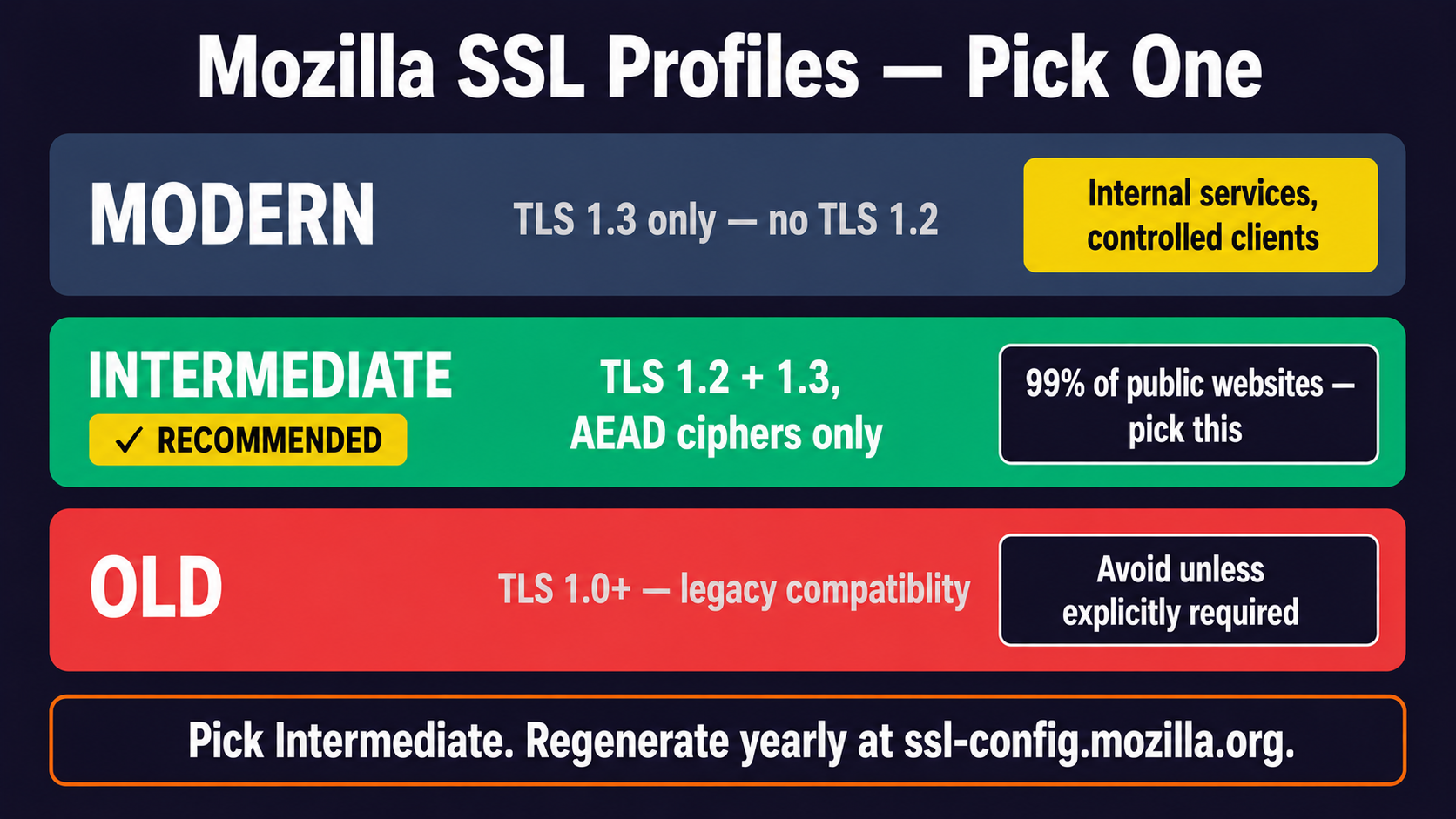
The Three Mozilla Profiles
Mozilla publishes three configuration profiles, updated regularly as the threat landscape changes:
- Modern — TLS 1.3 only. Strictest, fastest, breaks anything older than Firefox 63 / Chrome 70 / Safari 12.1 / Edge 79 (released 2018). For internal services, APIs with known clients, or sites where you control every client;
- Intermediate — TLS 1.2 + TLS 1.3, with a curated list of AEAD-only cipher suites. Works with virtually every client released in the last 5+ years. This is the recommended default for any public-facing service in 2026;
- Old — re-enables TLS 1.0 and 1.1 for ancient clients (Windows XP IE 8, very old Android). Only use if you have a documented compliance reason. Even then, isolate it to specific endpoints.
For 99% of websites today, Intermediate is the right answer. Modern is tempting but locks out roughly 1-2% of real-world traffic from older devices and corporate proxies still on TLS 1.2.
The Intermediate Nginx Config — Annotated
Here's what the Mozilla Intermediate config looks like for Nginx in 2026:
server {
    listen 443 ssl http2;
    listen [::]:443 ssl http2;
    server_name example.com;

    # Certificate (managed by Certbot or your ACME tool)
    ssl_certificate     /etc/letsencrypt/live/example.com/fullchain.pem;
    ssl_certificate_key /etc/letsencrypt/live/example.com/privkey.pem;

    # Protocols — TLS 1.2 + 1.3 only
    ssl_protocols TLSv1.2 TLSv1.3;

    # Cipher list (TLS 1.2) — all AEAD, all ECDHE, no CBC
    ssl_ciphers ECDHE-ECDSA-AES128-GCM-SHA256:ECDHE-RSA-AES128-GCM-SHA256:ECDHE-ECDSA-AES256-GCM-SHA384:ECDHE-RSA-AES256-GCM-SHA384:ECDHE-ECDSA-CHACHA20-POLY1305:ECDHE-RSA-CHACHA20-POLY1305:DHE-RSA-AES128-GCM-SHA256:DHE-RSA-AES256-GCM-SHA384;

    # Let the client pick the best cipher for its hardware
    ssl_prefer_server_ciphers off;

    # Session resumption
    ssl_session_timeout 1d;
    ssl_session_cache shared:MozSSL:10m;
    ssl_session_tickets off;

    # OCSP Stapling (with DNS resolver)
    ssl_stapling on;
    ssl_stapling_verify on;
    ssl_trusted_certificate /etc/letsencrypt/live/example.com/chain.pem;
    resolver 1.1.1.1 8.8.8.8 valid=300s;
    resolver_timeout 5s;

    # HSTS — 2 years, all subdomains, ready for preload
    add_header Strict-Transport-Security "max-age=63072000; includeSubDomains; preload" always;

    # Other security headers
    add_header X-Content-Type-Options nosniff always;
    add_header Referrer-Policy strict-origin-when-cross-origin always;
}

# Redirect HTTP → HTTPS
server {
    listen 80;
    listen [::]:80;
    server_name example.com;
    return 301 https://$server_name$request_uri;
}
Every line is there for a reason. The cipher list excludes CBC (BEAST, Lucky 13). Session tickets are off (they've had subtle PFS issues — session cache is safer). OCSP stapling is on with a real resolver (without resolver, stapling silently does nothing). HSTS is long enough for preload-list submission.
The Same Thing For Apache
<VirtualHost *:443>
    ServerName example.com

    SSLEngine on
    SSLCertificateFile      /etc/letsencrypt/live/example.com/fullchain.pem
    SSLCertificateKeyFile   /etc/letsencrypt/live/example.com/privkey.pem

    SSLProtocol             -all +TLSv1.2 +TLSv1.3
    SSLCipherSuite          ECDHE-ECDSA-AES128-GCM-SHA256:ECDHE-RSA-AES128-GCM-SHA256:...
    SSLHonorCipherOrder     off
    SSLSessionTickets       off

    SSLUseStapling          on
    SSLStaplingCache        "shmcb:logs/ssl_stapling(32768)"

    Header always set Strict-Transport-Security "max-age=63072000; includeSubDomains; preload"
</VirtualHost>
Same structure, different syntax. Same security properties.
Common Mistakes That Break Production
Things that cause hours of debugging in real life:
- Wrong intermediate chain order — your cert file should be
leaf, intermediate1, intermediate2. Reversed order = Firefox loads but Safari shows weird errors.fullchain.pemfrom Let's Encrypt is already in the right order, but copy-pasting from a CA's web UI often gets it wrong; - OCSP stapling without
resolver— Nginx silently fails to staple. SSL Labs flags this. Fix: always includeresolver 1.1.1.1 8.8.8.8;in the server block; - Copy-pasted 2017 cipher lists — old configs still floating around the internet have CBC, RC4, even 3DES. Always regenerate from Mozilla's tool, never from a blog post;
- HSTS without testing first — once you ship HSTS with a long max-age, you can't roll back easily. Test for a week with
max-age=300before going to 2 years; - Mixed content — HTTPS page loading HTTP scripts. Browser blocks them silently. Causes weird "the site is broken on production but works on staging" reports.
Aiming For An A+ On SSL Labs
Qualys SSL Labs (ssllabs.com/ssltest) is the de facto TLS audit tool. It gives a letter grade and a detailed breakdown. Aim for A or A+:
- A — modern protocols, AEAD ciphers, valid cert chain. Achievable with vanilla Mozilla Intermediate;
- A+ — A plus HSTS preload-ready, recent cipher prefs. Achievable by adding HSTS preload directives and submitting to
hstspreload.org.
Don't aim for A+ at all costs — sometimes it requires breaking compatibility you actually need.
Дякуємо за ваш відгук!
Запитати АІ

Запитати АІ

Запитайте про що завгодно або спробуйте одне із запропонованих запитань, щоб почати наш чат
Configuring Nginx And Apache
You have certificates flowing in automatically. You know the cryptography. Now the practical question: what should your server's TLS config actually look like in 2026?
The good news — you don't need to memorize cipher suite syntax. Mozilla maintains a tool that does the thinking for you: the Mozilla SSL Configuration Generator at ssl-config.mozilla.org. Pick your server (Nginx, Apache, HAProxy, etc), your version of the server and OpenSSL, and one of three profiles. Copy. Paste. Done.
This chapter is about what each profile gives you, why the recommended default in 2026 is Intermediate, and what a hardened production config actually looks like.
The Three Mozilla Profiles
Mozilla publishes three configuration profiles, updated regularly as the threat landscape changes:
- Modern — TLS 1.3 only. Strictest, fastest, breaks anything older than Firefox 63 / Chrome 70 / Safari 12.1 / Edge 79 (released 2018). For internal services, APIs with known clients, or sites where you control every client;
- Intermediate — TLS 1.2 + TLS 1.3, with a curated list of AEAD-only cipher suites. Works with virtually every client released in the last 5+ years. This is the recommended default for any public-facing service in 2026;
- Old — re-enables TLS 1.0 and 1.1 for ancient clients (Windows XP IE 8, very old Android). Only use if you have a documented compliance reason. Even then, isolate it to specific endpoints.
For 99% of websites today, Intermediate is the right answer. Modern is tempting but locks out roughly 1-2% of real-world traffic from older devices and corporate proxies still on TLS 1.2.
The Intermediate Nginx Config — Annotated
Here's what the Mozilla Intermediate config looks like for Nginx in 2026:
server {
    listen 443 ssl http2;
    listen [::]:443 ssl http2;
    server_name example.com;

    # Certificate (managed by Certbot or your ACME tool)
    ssl_certificate     /etc/letsencrypt/live/example.com/fullchain.pem;
    ssl_certificate_key /etc/letsencrypt/live/example.com/privkey.pem;

    # Protocols — TLS 1.2 + 1.3 only
    ssl_protocols TLSv1.2 TLSv1.3;

    # Cipher list (TLS 1.2) — all AEAD, all ECDHE, no CBC
    ssl_ciphers ECDHE-ECDSA-AES128-GCM-SHA256:ECDHE-RSA-AES128-GCM-SHA256:ECDHE-ECDSA-AES256-GCM-SHA384:ECDHE-RSA-AES256-GCM-SHA384:ECDHE-ECDSA-CHACHA20-POLY1305:ECDHE-RSA-CHACHA20-POLY1305:DHE-RSA-AES128-GCM-SHA256:DHE-RSA-AES256-GCM-SHA384;

    # Let the client pick the best cipher for its hardware
    ssl_prefer_server_ciphers off;

    # Session resumption
    ssl_session_timeout 1d;
    ssl_session_cache shared:MozSSL:10m;
    ssl_session_tickets off;

    # OCSP Stapling (with DNS resolver)
    ssl_stapling on;
    ssl_stapling_verify on;
    ssl_trusted_certificate /etc/letsencrypt/live/example.com/chain.pem;
    resolver 1.1.1.1 8.8.8.8 valid=300s;
    resolver_timeout 5s;

    # HSTS — 2 years, all subdomains, ready for preload
    add_header Strict-Transport-Security "max-age=63072000; includeSubDomains; preload" always;

    # Other security headers
    add_header X-Content-Type-Options nosniff always;
    add_header Referrer-Policy strict-origin-when-cross-origin always;
}

# Redirect HTTP → HTTPS
server {
    listen 80;
    listen [::]:80;
    server_name example.com;
    return 301 https://$server_name$request_uri;
}
Every line is there for a reason. The cipher list excludes CBC (BEAST, Lucky 13). Session tickets are off (they've had subtle PFS issues — session cache is safer). OCSP stapling is on with a real resolver (without resolver, stapling silently does nothing). HSTS is long enough for preload-list submission.
The Same Thing For Apache
<VirtualHost *:443>
    ServerName example.com

    SSLEngine on
    SSLCertificateFile      /etc/letsencrypt/live/example.com/fullchain.pem
    SSLCertificateKeyFile   /etc/letsencrypt/live/example.com/privkey.pem

    SSLProtocol             -all +TLSv1.2 +TLSv1.3
    SSLCipherSuite          ECDHE-ECDSA-AES128-GCM-SHA256:ECDHE-RSA-AES128-GCM-SHA256:...
    SSLHonorCipherOrder     off
    SSLSessionTickets       off

    SSLUseStapling          on
    SSLStaplingCache        "shmcb:logs/ssl_stapling(32768)"

    Header always set Strict-Transport-Security "max-age=63072000; includeSubDomains; preload"
</VirtualHost>
Same structure, different syntax. Same security properties.
Common Mistakes That Break Production
Things that cause hours of debugging in real life:
- Wrong intermediate chain order — your cert file should be
leaf, intermediate1, intermediate2. Reversed order = Firefox loads but Safari shows weird errors.fullchain.pemfrom Let's Encrypt is already in the right order, but copy-pasting from a CA's web UI often gets it wrong; - OCSP stapling without
resolver— Nginx silently fails to staple. SSL Labs flags this. Fix: always includeresolver 1.1.1.1 8.8.8.8;in the server block; - Copy-pasted 2017 cipher lists — old configs still floating around the internet have CBC, RC4, even 3DES. Always regenerate from Mozilla's tool, never from a blog post;
- HSTS without testing first — once you ship HSTS with a long max-age, you can't roll back easily. Test for a week with
max-age=300before going to 2 years; - Mixed content — HTTPS page loading HTTP scripts. Browser blocks them silently. Causes weird "the site is broken on production but works on staging" reports.
Aiming For An A+ On SSL Labs
Qualys SSL Labs (ssllabs.com/ssltest) is the de facto TLS audit tool. It gives a letter grade and a detailed breakdown. Aim for A or A+:
- A — modern protocols, AEAD ciphers, valid cert chain. Achievable with vanilla Mozilla Intermediate;
- A+ — A plus HSTS preload-ready, recent cipher prefs. Achievable by adding HSTS preload directives and submitting to
hstspreload.org.
Don't aim for A+ at all costs — sometimes it requires breaking compatibility you actually need.
Дякуємо за ваш відгук!
