Ready-to-Use Prompts for Common Work Tasks
Swipe to show menu
Everything you've learned in this section — the four building blocks, role prompting, iteration — is useful only if it translates into your actual daily work.
This chapter gives you a set of ready-to-use prompt templates for the tasks most professionals deal with regularly. Each template is designed to be adapted, not copy-pasted wholesale.
Template 1 — Writing a Professional Email

Write a [formal / friendly / direct] email to [recipient: client / colleague / manager] about [topic].
Context: [1–2 sentences of background — what happened, what you need]
The goal of the email is to [inform / request / follow up / apologize / confirm].
Length: [short (under 100 words) / medium / detailed] Tone: [professional / warm / neutral]
Example in use:

Write a friendly but professional email to a client who hasn't responded to our proposal in two weeks.
Context: We sent a detailed proposal on April 3rd for a 6-month consulting engagement. They seemed enthusiastic in our last call but have gone quiet since.
The goal is to follow up without being pushy and to re-open dialogue. Length: short. Tone: warm and professional.
Template 2 — Summarizing a Document or Meeting
Summarize the following [document / meeting transcript / email thread] in [format: 5 bullet points / 3 paragraphs / one sentence per topic].
Focus on: [decisions made / action items / key insights / open questions]
The audience for this summary is: [who will read it — executive, team, client, etc.]
[Paste your content here]
When to use: after long meetings, before sharing notes with someone who wasn't there, when you need to extract key points from a lengthy report.
Template 3 — Brainstorming Ideas
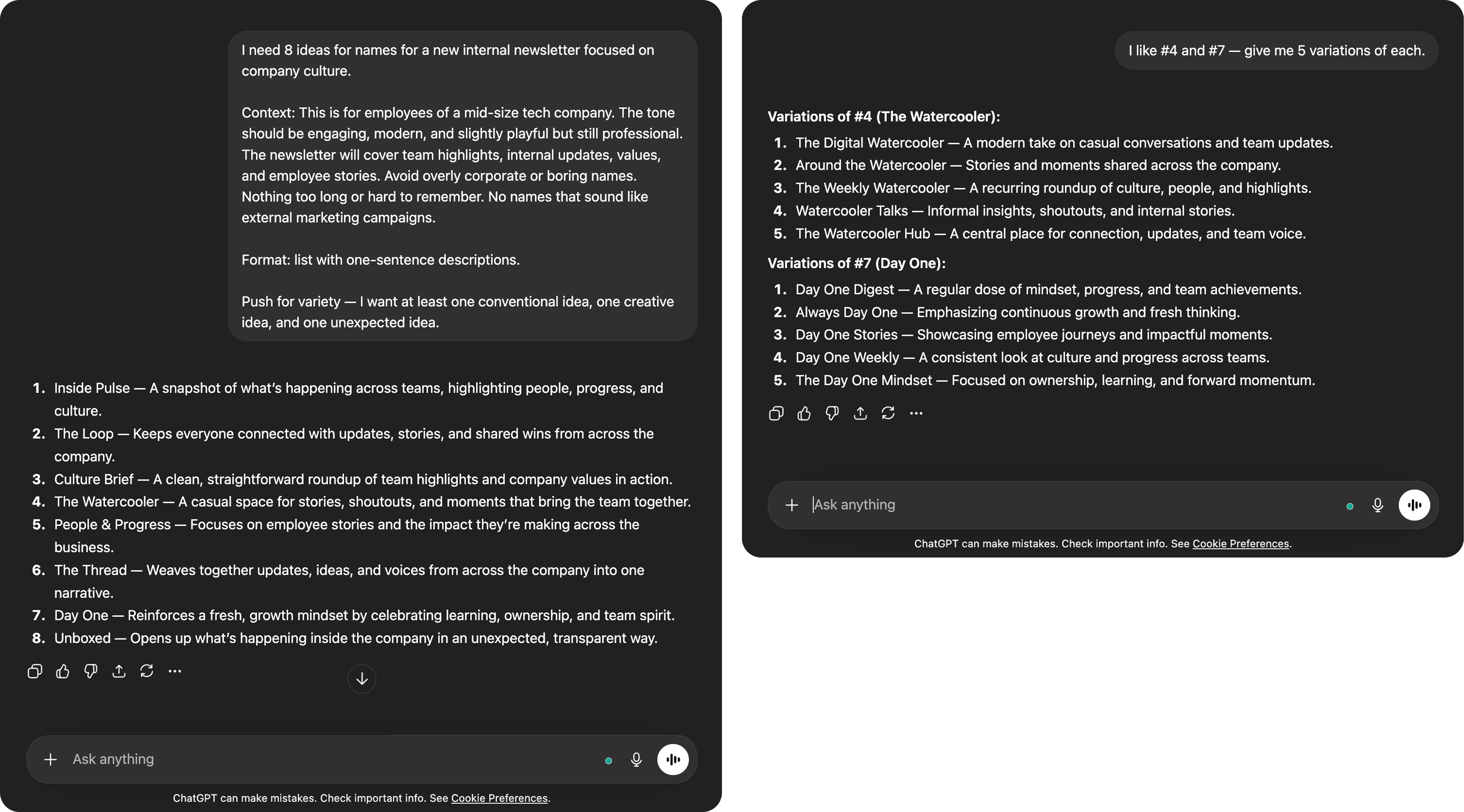
I need [number] ideas for [topic / challenge / goal].
Context: [Who is this for? What constraints apply? What's already been tried?]
Format: [list of titles only / list with one-sentence descriptions / ranked by feasibility]
Push for variety — I want at least one conventional idea, one creative idea, and one unexpected idea.
After the AI gives its list, you can follow up with: "Expand on idea #3" or "Give me 5 more, but more unconventional".
Template 4 — Reviewing and Improving Writing
Review the following text and suggest improvements for [clarity / tone / conciseness / grammar / all of the above].
Context: this is a [what it is — email / report section / job posting / proposal] for [audience].
Return the improved version with a brief note explaining the main changes you made.
[Paste your text here]
Tip: if you don't want the AI to rewrite everything, add: "Make minimal changes — preserve the original structure and voice as much as possible."
Practice: Adapt a Template to a Real Task
Pick one of the four templates above and apply it to something you actually need to do this week:
- Fill in the brackets with your real details
- Send it to any of the AI tools from Section 1
- If the first result isn't quite right — use what you learned in Chapter 2.4 to iterate
There's no perfect output to aim for. The goal is to get comfortable with the process of prompting → reviewing → refining.
Thanks for your feedback!
Ask AI

Ask AI

Ask anything or try one of the suggested questions to begin our chat
