AI for Data and Analytics
Swipe to show menu
You don't need to write code or build dashboards to use AI for analytical work. In 2026, AI tools can help you interpret data, generate reports, explain findings in plain language, and turn numbers into narratives — without any technical background required.
This chapter focuses on what's accessible to non-technical users, while also covering what AI can do for analysts and data professionals.
For Non-Technical Professionals: AI as an Interpreter
If you regularly work with reports, spreadsheets, or dashboards but don't have a data background, AI can serve as a translator — helping you extract meaning from numbers without needing to understand the underlying analysis.
Tasks AI handles well in this context:
- Explaining what a chart or table means — paste in a summary of the data and ask "what does this tell us?";
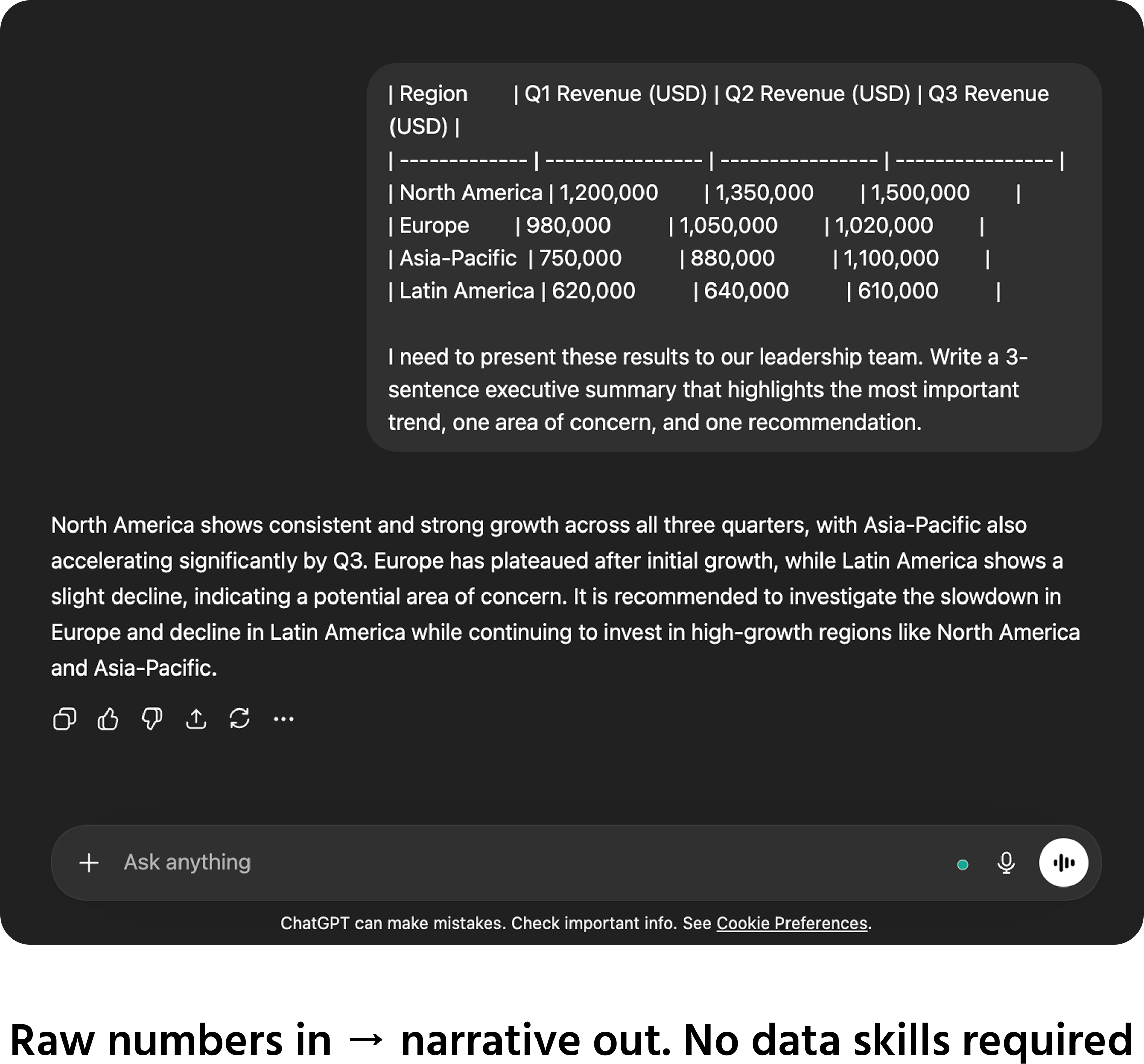
- Drafting the narrative for a report — turn a set of figures into a written executive summary;
- Generating questions to ask your data team — if you don't know what to look for, AI can help you formulate the right questions;
- Comparing figures and identifying patterns — describe the data in text and ask AI to highlight what stands out.
For Analysts: AI as a Workflow Accelerator
For professionals who already work with data, AI accelerates the parts of the job that are time-consuming but not analytically complex:
- Writing SQL queries from plain English — describe what you want to extract and AI generates the query for you to review and run;
- Explaining code and formulas — paste an unfamiliar formula or script and ask AI to explain what it does line by line;
- Structuring analysis frameworks — "what would a thorough analysis of customer churn look like?" gives you a structured starting point;
- Generating commentary for dashboards — turning chart data into clear written interpretations for stakeholders;
- Writing up findings — producing the written sections of analytical reports from bullet-point inputs.
Important: AI Does Not Replace Data Validation
A critical point for any AI-assisted analytical work:
AI does not check your data — it only processes what you give it.
If the underlying data is incorrect, incomplete, or misformatted, AI will produce confident-sounding analysis based on wrong inputs. The output will look clean and authoritative even when it is built on errors.
Always validate your source data before using AI to interpret or summarize it. The quality of the insight depends entirely on the quality of the input.
1. Which of the following describe how AI can help non-technical professionals interpret data and generate reports
2. Which of the following statements about using AI for data and analytics are correct
Thanks for your feedback!
Ask AI

Ask AI

Ask anything or try one of the suggested questions to begin our chat
AI for Data and Analytics
You don't need to write code or build dashboards to use AI for analytical work. In 2026, AI tools can help you interpret data, generate reports, explain findings in plain language, and turn numbers into narratives — without any technical background required.
This chapter focuses on what's accessible to non-technical users, while also covering what AI can do for analysts and data professionals.
For Non-Technical Professionals: AI as an Interpreter
If you regularly work with reports, spreadsheets, or dashboards but don't have a data background, AI can serve as a translator — helping you extract meaning from numbers without needing to understand the underlying analysis.
Tasks AI handles well in this context:
- Explaining what a chart or table means — paste in a summary of the data and ask "what does this tell us?";
- Drafting the narrative for a report — turn a set of figures into a written executive summary;
- Generating questions to ask your data team — if you don't know what to look for, AI can help you formulate the right questions;
- Comparing figures and identifying patterns — describe the data in text and ask AI to highlight what stands out.
For Analysts: AI as a Workflow Accelerator
For professionals who already work with data, AI accelerates the parts of the job that are time-consuming but not analytically complex:
- Writing SQL queries from plain English — describe what you want to extract and AI generates the query for you to review and run;
- Explaining code and formulas — paste an unfamiliar formula or script and ask AI to explain what it does line by line;
- Structuring analysis frameworks — "what would a thorough analysis of customer churn look like?" gives you a structured starting point;
- Generating commentary for dashboards — turning chart data into clear written interpretations for stakeholders;
- Writing up findings — producing the written sections of analytical reports from bullet-point inputs.
Important: AI Does Not Replace Data Validation
A critical point for any AI-assisted analytical work:
AI does not check your data — it only processes what you give it.
If the underlying data is incorrect, incomplete, or misformatted, AI will produce confident-sounding analysis based on wrong inputs. The output will look clean and authoritative even when it is built on errors.
Always validate your source data before using AI to interpret or summarize it. The quality of the insight depends entirely on the quality of the input.
Thanks for your feedback!
