Understanding the INDEX Function
Swipe to show menu
What the INDEX Function Does
The INDEX function returns a value from a specific position inside a range.
Instead of searching for a match, INDEX retrieves a value based on its row and column position.
This makes INDEX useful when the exact location of the data is known.
Basic Syntax
=INDEX(array; row_num; [column_num])
array: the range containing the data;row_num: the row number inside the range;column_num: the column number inside the range.
If the range contains only one column, the column number is not required.
Example Retrieving a Value by Position
Assume the worksheet contains the following table.
The table is located in range A1:B5.
To retrieve the price of the second product in the table, use:
=INDEX(A2:B5; 2; 2)
A2:B5: defines the table containing the data;2: refers to the second row inside the table;2: refers to the second column.
Excel returns the value located at row 2 column 2 of the range.

Understanding Row and Column Positions
The row and column numbers refer to the position inside the selected range, not the worksheet.
For example, in the range C8:D11:
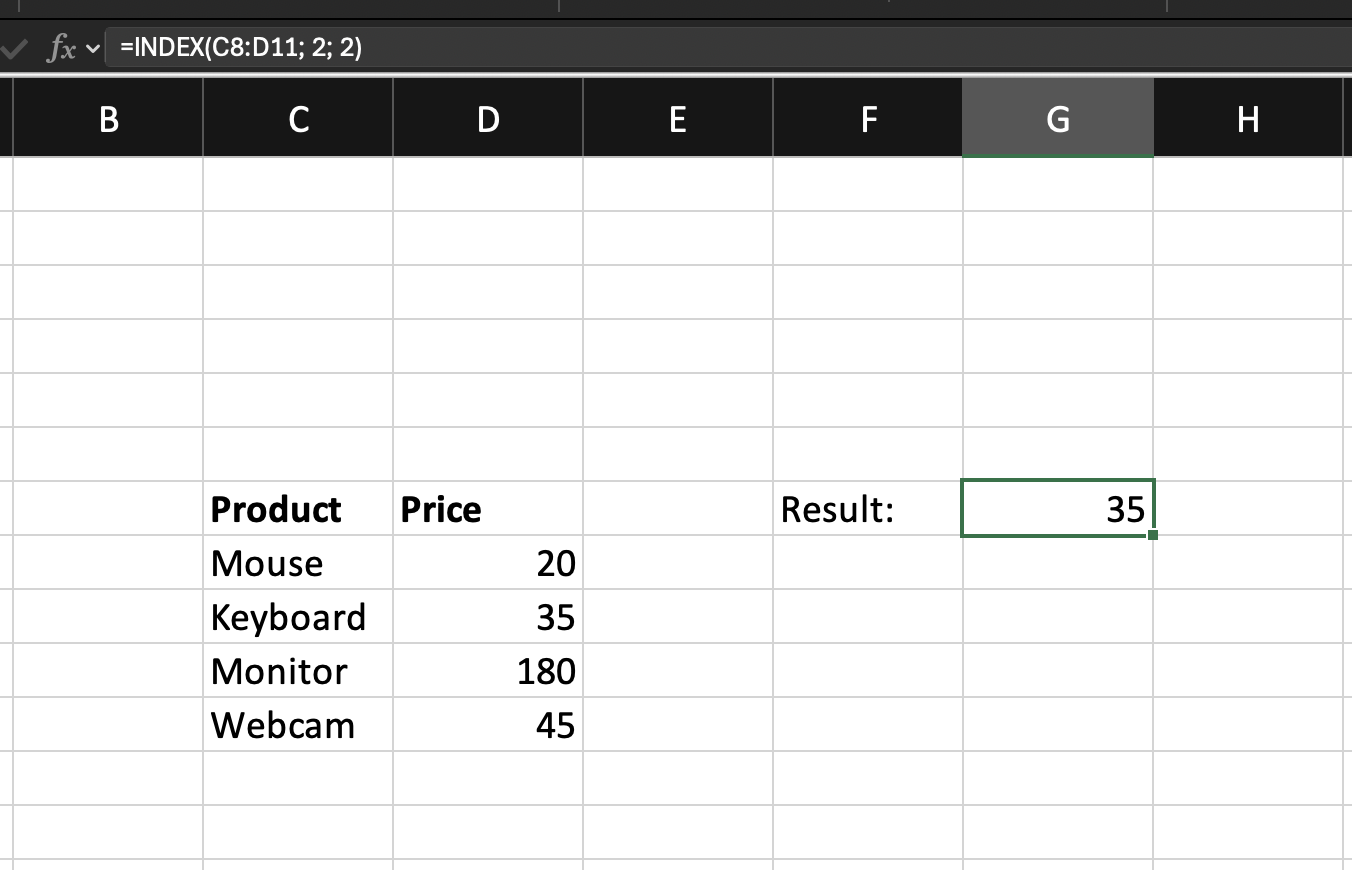
INDEX simply retrieves the value at the specified coordinates.
When INDEX Is Useful
INDEX is useful when:
- The position of the data is known;
- You want to retrieve values without searching;
- You need a flexible formula that can work with dynamic row and column numbers.
Further, you will combine INDEX with MATCH to create a dynamic lookup formula.
Task
Scenario
A worksheet contains a product table with Product Name, Category, and Price.
Your goal is to retrieve the price of a product using its position in the table.
Task Instructions
Use the INDEX function to return the value located at Row 4 Column 3
inside the product table.
Thanks for your feedback!
Ask AI

Ask AI

Ask anything or try one of the suggested questions to begin our chat
