HTML Document Structure Explained
Swipe to show menu
An HTML document follows a consistent structure made of a few key elements.
<html> tag
The root element of every page. All content goes inside the opening <html> and closing </html> tags.
<html>
  <!-- Other elements go here -->
</html>
<head> tag
Contains information about the page, not visible to the user. This includes the title, metadata, and links to stylesheets or scripts.
<head>
  <title>Title of the Document</title>
  <meta charset="UTF-8" />
  <!-- Other meta tags, links, and scripts go here -->
</head>
Common items in <head>:
<title>: text shown on the browser tab;<meta charset="UTF-8">: sets text encoding;<meta name="description">: short page description;<meta name="viewport">: needed for responsive design.
<body> tag
Holds everything visible on the page: text, images, links, forms, etc.
<body>
  <h1>Hello, World!</h1>
  <p>This is a paragraph of text.</p>
  <!-- Other content goes here -->
</body>
Document type declaration
Tells the browser to use the HTML5 standard when rendering the page.
<!DOCTYPE html>
Full Structure Example
To wrap things up, let's gather all the elements we have considered and combine them into a single HTML document.
<!DOCTYPE html>
<html>
  <head>
    <title>Title of the Document</title>
    <meta charset="UTF-8" />
    <!-- Other meta tags, links, and scripts go here -->
  </head>

  <body>
    <h1>Hello, World!</h1>
    <p>This is a paragraph of text.</p>
    <!-- Other content goes here -->
  </body>
</html>
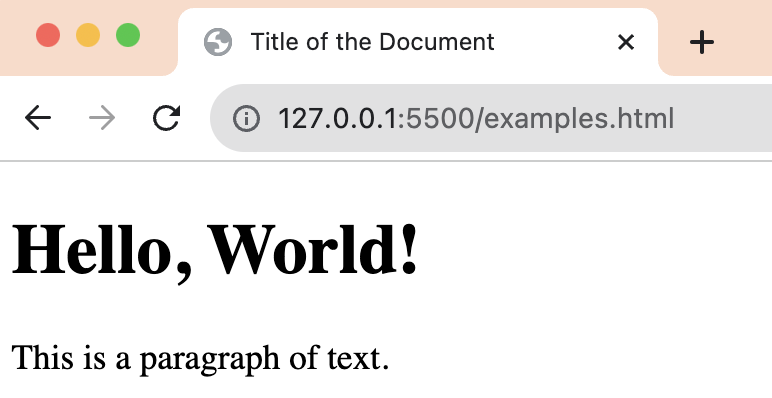
Below, you can see how the HTML document appears in the web browser.
1. Which tag is the root element of an HTML document?
2. What does the <head> tag contain?
3. What does the <title> tag define?
4. What is the purpose of the <body> tag?
Thanks for your feedback!
Ask AI

Ask AI

Ask anything or try one of the suggested questions to begin our chat
