Using Ad Extensions Effectively
Swipe to show menu

Ad extensions (now called assets in Google Ads) are extra pieces of information that appear under your ad.
They make your ad more useful to the person searching, and more likely to get clicked.
No extra pay for adding them — you only pay for clicks, just like usual.
But ads with extensions usually perform better because they take up more space on the screen — especially on phones.
The Seven Core Types of Ad Extensions
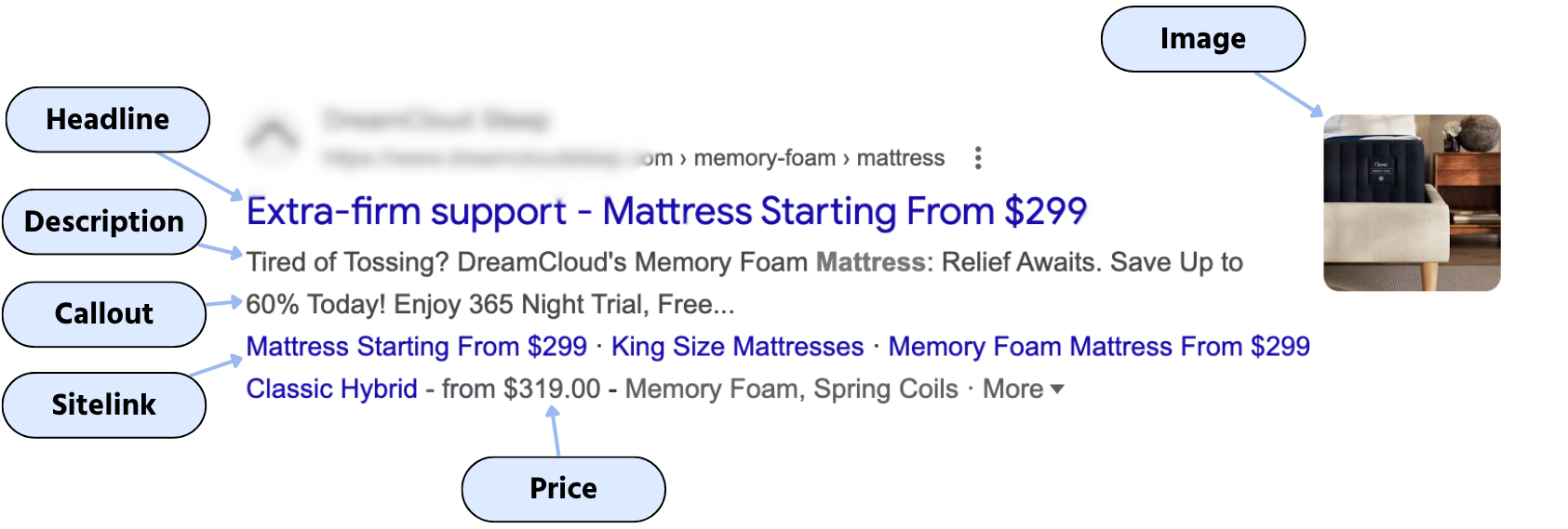
- Sitelink: adds extra links to specific pages on your site;
- Callout: adds short, non-clickable selling points;
- Structured Snippet: lists categories or services under a topic;
- Call: adds a clickable phone number;
- Location: shows your address, map pin, and directions;
- Price: displays product/service pricing directly under your ad;
- App: adds a direct download link for your app.
Thanks for your feedback!
Ask AI

Ask AI

Ask anything or try one of the suggested questions to begin our chat
Using Ad Extensions Effectively
Ad extensions (now called assets in Google Ads) are extra pieces of information that appear under your ad.
They make your ad more useful to the person searching, and more likely to get clicked.
No extra pay for adding them — you only pay for clicks, just like usual.
But ads with extensions usually perform better because they take up more space on the screen — especially on phones.
The Seven Core Types of Ad Extensions
- Sitelink: adds extra links to specific pages on your site;
- Callout: adds short, non-clickable selling points;
- Structured Snippet: lists categories or services under a topic;
- Call: adds a clickable phone number;
- Location: shows your address, map pin, and directions;
- Price: displays product/service pricing directly under your ad;
- App: adds a direct download link for your app.
Thanks for your feedback!
