Joint Plot
Swipe to show menu

Joint plot is a rather unique plot, since it combines multiple plots. It is a chart that shows the relationship between two variables along with their individual distributions.
A joint plot combines three elements:
- a histogram on top (distribution of the x-variable);
- a histogram on the right (distribution of the y-variable);
- a scatter plot in the center (relationship between the two variables).
Here is an example:
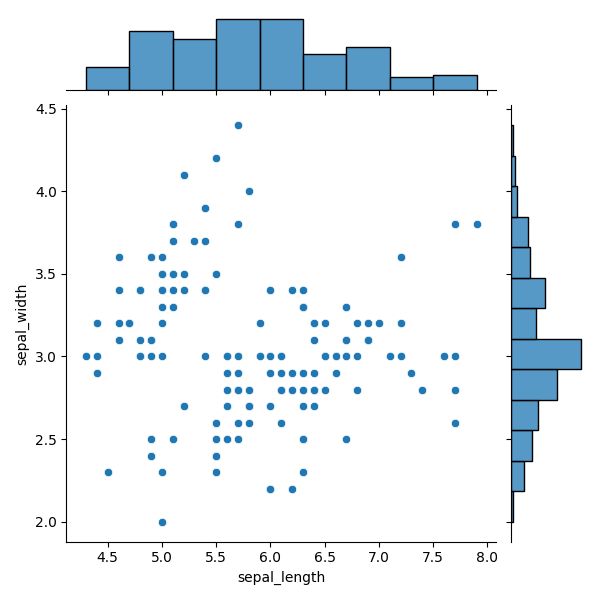
Data for the Joint Plot
seaborn.jointplot() uses three key parameters:
data— the DataFrame,x— variable for the top histogram,y— variable for the right histogram.
x and y may be column names or array-like objects.
12345678import seaborn as sns import matplotlib.pyplot as plt # Loading the dataset with data about three different iris flowers species iris_df = sns.load_dataset("iris") sns.jointplot(data=iris_df, x="sepal_length", y="sepal_width") plt.show()
The example is recreated by passing a DataFrame to data and specifying column names for x and y.
Plot in the Middle
The kind parameter controls the central plot type.
Default: 'scatter'.
Other options include: 'kde', 'hist', 'hex', 'reg', 'resid'.
12345678import seaborn as sns import matplotlib.pyplot as plt # Loading the dataset with data about three different iris flowers species iris_df = sns.load_dataset("iris") sns.jointplot(data=iris_df, x="sepal_length", y="sepal_width", kind='reg') plt.show()
Plot Kinds
Besides scatter, you can choose:
- reg — adds a linear regression fit;
- resid — plots regression residuals;
- hist — bivariate histogram;
- kde — two-variable KDE;
- hex — hexbin plot showing density using colored hexagonal bins.

As usual, you can explore more options and parameters in jointplot() documentation.
Also, it is worth exploring the mentioned topics:
residplot() documentation;
Bivariate histogram example;
Hexbin plot example.
Swipe to start coding
- Use the correct function to create a joint plot.
- Use
weather_dfas the data for the plot (the first argument). - Set the
'Boston'column for the x-axis variable (the second argument). - Set the
'Seattle'column for the y-axis variable (the third argument). - Set the plot in the middle to have a regression line (the rightmost argument).
Solution
 Switch to desktop for real-world practiceContinue from where you are using one of the options below
Thanks for your feedback!

single
Ask AI

Ask AI

Ask anything or try one of the suggested questions to begin our chat
