Slicing in 2D Arrays
Swipe to show menu
Slicing in 2D and higher-dimensional arrays works similarly to slicing in 1D arrays. However, in 2D arrays, there are two axes.
If you want to perform slicing only on axis 0 to retrieve 1D arrays, the syntax remains the same: array[start:end:step]. If you want to perform slicing on the elements of these 1D arrays (axis 1), the syntax is as follows: array[start:end:step, start:end:step]. Essentially, the number of slices corresponds to the number of dimensions of an array.
Moreover, you can use slicing for one axis and basic indexing for the other axis. Take a look at an example of 2D slicing (purple squares represent the elements retrieved from slicing, and the black arrow indicates that the elements are taken in reverse order):
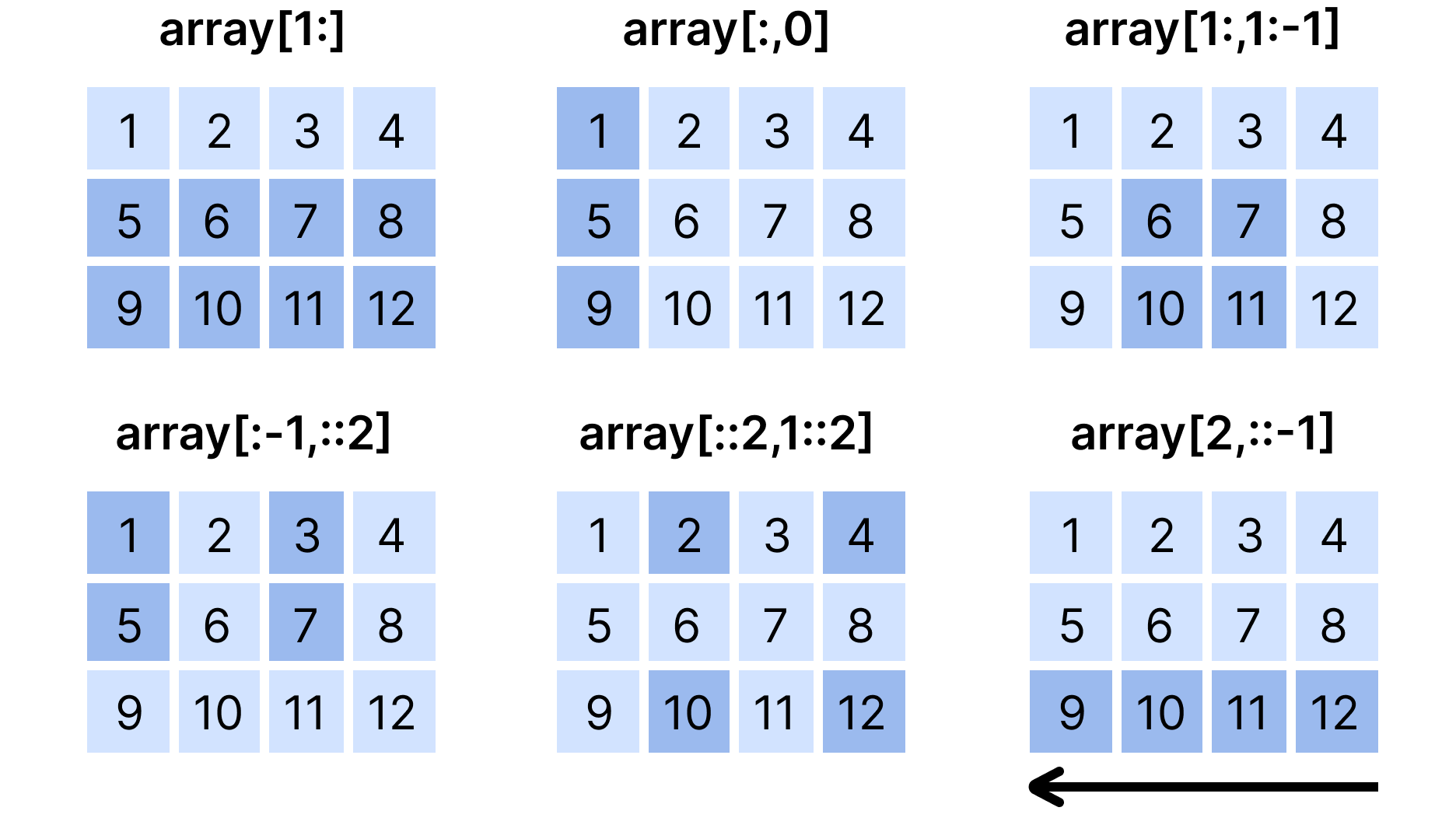
1234567891011121314151617181920import numpy as np array_2d = np.array([ [1, 2, 3, 4], [5, 6, 7, 8], [9, 10, 11, 12] ]) # Initial Array print("Initial array_2d:\n", array_2d) # Rows from index 1 to the end print("\narray_2d[1:]:\n", array_2d[1:]) # All rows, first column only print("\narray_2d[:, 0]:\n", array_2d[:, 0]) # Subarray: rows from 1 to end, columns from 1 to second-to-last print("\narray_2d[1:, 1:-1]:\n", array_2d[1:, 1:-1]) # All rows except the last, every second column print("\narray_2d[:-1, ::2]:\n", array_2d[:-1, ::2]) # Third row (index 2) reversed print("\narray_2d[2, ::-1]:\n", array_2d[2, ::-1])
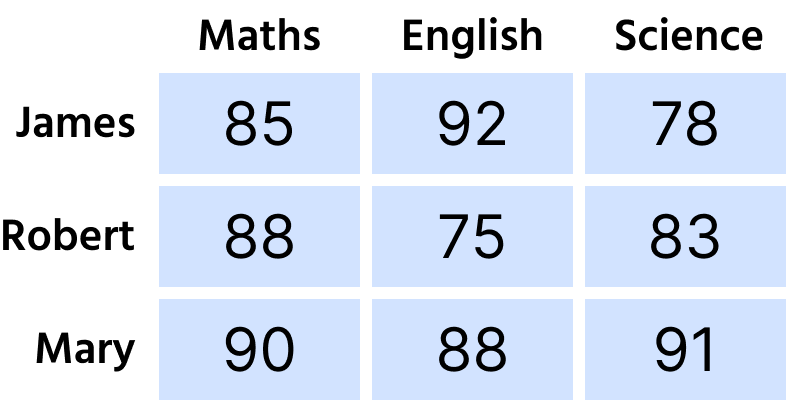
The picture below shows the structure of the student_scores array used in the task:
Swipe to start coding
You are working with a 2D NumPy array that represents the scores of three students in three different subjects. The scores for each student are stored in a separate row, with each element representing the score in a specific subject.
- Create a slice of
student_scoresthat includes the last two scores of the first student (first row). - Use basic indexing (positive indexing) and slicing, specifying only a positive
start.
Solution
 Switch to desktop for real-world practiceContinue from where you are using one of the options below
Thanks for your feedback!

single
Ask AI

Ask AI

Ask anything or try one of the suggested questions to begin our chat
