Cleaning and Formatting Data
Swipe to show menu
Raw data is often messy and hard to use. Gemini helps you clean and format it so you can work with it faster.
Situation
You receive a spreadsheet from a colleague.
The data has problems:
- Inconsistent formatting;
- Mixed text styles;
- Extra spaces;
- Missing or unclear values.
For example:
- Names written differently;
- Dates in different formats;
- Numbers stored as text.
You need to clean it before using it in reports.
Inside Google Sheets, you select the data and describe what needs to be fixed.

Prompt
Generate a clean data table based on the data provided.
Gemini formats and prepares the data for use. You can provide further guidance if needed.
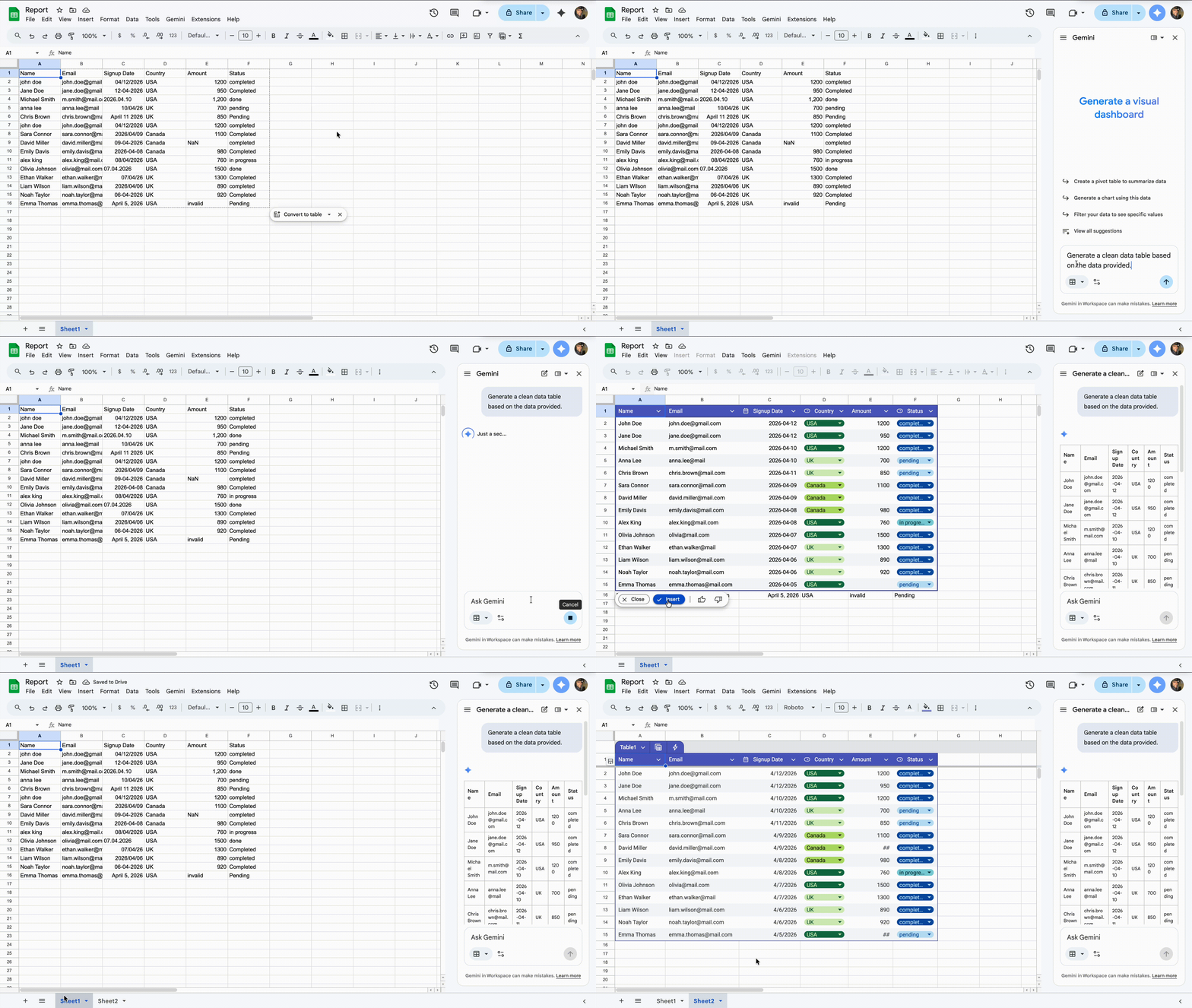
You don't need to fix each cell manually. Instead, describe the problem, and Gemini will handle the cleanup. Your focus is on utilizing the data rather than fixing it.
Everything was clear?
Thanks for your feedback!
Section 4. Chapter 2
Ask AI

Ask AI

Ask anything or try one of the suggested questions to begin our chat
Section 4. Chapter 2
