Claude Routines
Swipe to show menu

Claude Routines are automated workflows that run predefined tasks based on a saved prompt, allowing Claude to perform actions without manual input each time.
Instead of repeating the same prompt over and over, you can create a Routine once and reuse it anytime. A routine includes:
- A goal;
- A prompt;
- Optional data sources or tools.
Once set up, Claude can execute it automatically or on demand.

Open Claude Code → go to Routines → click New Routine.
Add a name and describe the task clearly.
Select the model and environment.
Set a trigger, schedule, GitHub event, or API.
Connect needed tools like Slack or Drive and set permissions.
Save and test the routine.
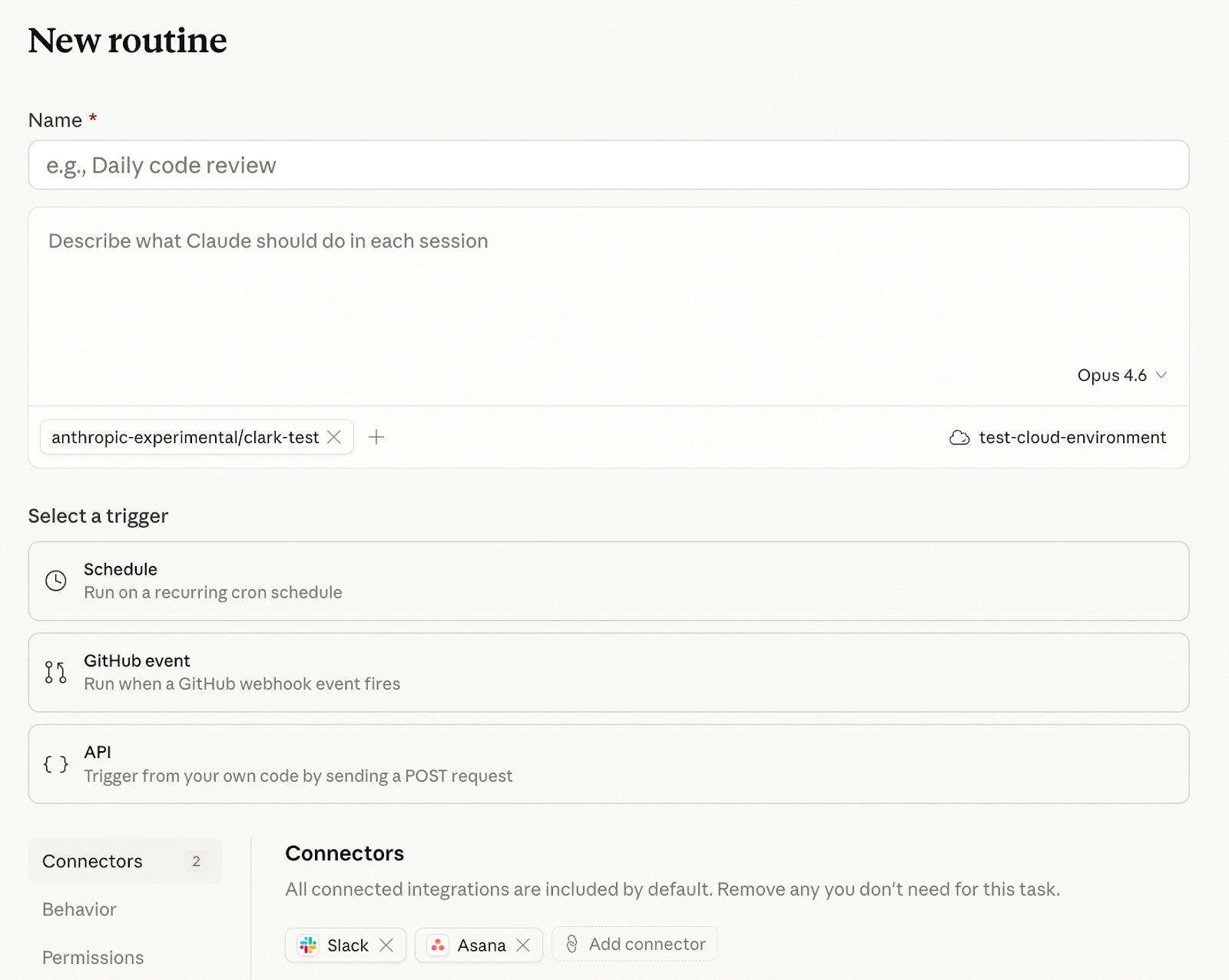
At the top, you define the routine's name and task description, which tells Claude what to do on each run. You also choose the model and environment, making this the core setup.
Next, you set how the routine is triggered, such as on a schedule, via a GitHub event, or through an API call, so it can run automatically without manual input.
Finally, you configure access and permissions using connectors like Slack or Asana. This controls what Claude can interact with, ensuring it works within the right limits.
Thanks for your feedback!
Ask AI

Ask AI

Ask anything or try one of the suggested questions to begin our chat
