String Indexing in Python
Swipe to show menu
To access a specific character in a string, use square brackets with an index number inside. Python uses zero-based indexing, meaning the index number does not correspond directly to the character's position.
12345# The string of digits word = "codefinity" # Access the character at index 1 (second character) print(word[1])
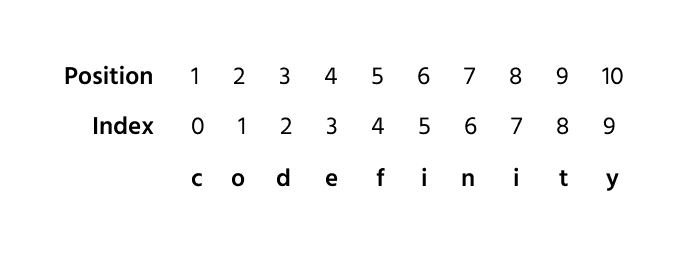
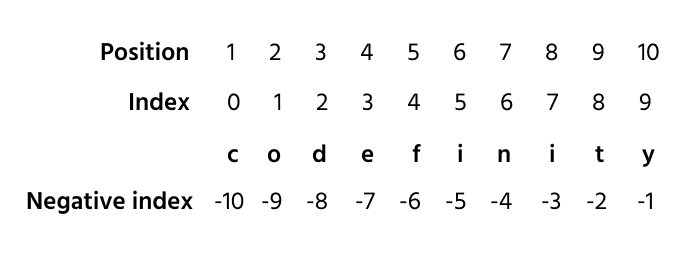
Negative indexing in Python allows you to access elements from the end. Instead of starting from the beginning (index 0), negative indexing starts from the end (index -1), which represents the last element.
12345# The string of digits word = "codefinity" # Access the characters at index -1 and -9 (first and last ones) print(word[-1], word[-10])
Sometimes you need to retrieve multiple elements from a text. This is where slicing comes in handy. Slicing allows us to access a range of elements without modifying the original sequence. To retrieve multiple characters at once, use square brackets ([]) and a colon (:) to specify the start and end indices.
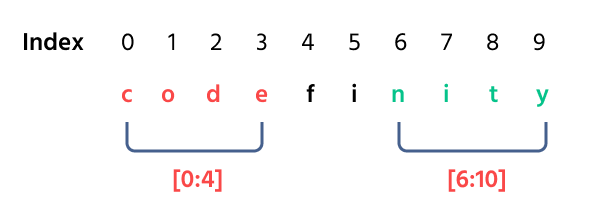
The end position is always one more than the last character's index you want to include. In the example above, there are 10 positions, but the final index is 9.
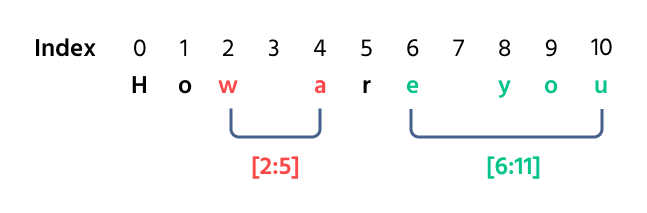
12345678# Initial strings platform_name = "codefinity" greeting_message = "How are you" # Slice strings to extract substrings # Spaces count as characters and have their own indices print(platform_name[0:4], platform_name[6:10]) print(greeting_message[2:5], greeting_message[6:11])
Thanks for your feedback!
Ask AI

Ask AI

Ask anything or try one of the suggested questions to begin our chat
