Challenge: Create a Shop Card Layout Using Flexbox
Swipe to show menu
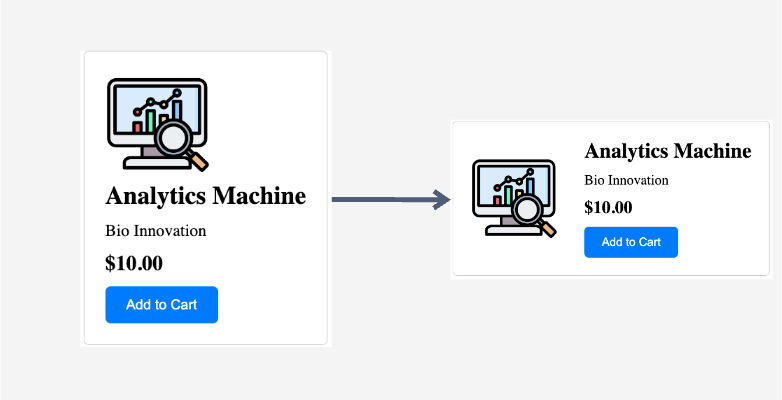
Let's explore the power of flexbox by creating a shop card with a product image, some description, and the price. By default, all the elements are stacked in a column, one below the other. However, our goal is to change this behavior using flexbox.
Task
Consider the following HTML structure:
<div class="shopping-card">
  <img src="link-to-image" alt="Analytics Machine" class="product-image" />
  <div class="product-info">
    <h3 class="product-title">Analytics Machine</h3>
    <p class="product-description">Bio Innovation</p>
    <div class="product-price">$10.00</div>
    <button class="add-to-cart">Add to Cart</button>
  </div>
</div>
The task is to modify the CSS to achieve the following:
- Identify the parent element containing both the product image (
imgtag with theproduct-imageclass) and product information (divtag with theproduct-infoclass). - Apply flexbox to the identified parent element (the
divtag with theshopping-cardclass). - Vertically center the items within the shopping card.

index.html

index.css
- Apply
display: flex;to the parent element with the classshopping-card. - The default flex direction is row, so there is no need to change the value of the
flex-directionproperty. - To center items vertically, use
align-items: center;.
index.html
index.css
Thanks for your feedback!
Ask AI

Ask AI

Ask anything or try one of the suggested questions to begin our chat
Challenge: Create a Shop Card Layout Using Flexbox
Let's explore the power of flexbox by creating a shop card with a product image, some description, and the price. By default, all the elements are stacked in a column, one below the other. However, our goal is to change this behavior using flexbox.
Task
Consider the following HTML structure:
<div class="shopping-card">
  <img src="link-to-image" alt="Analytics Machine" class="product-image" />
  <div class="product-info">
    <h3 class="product-title">Analytics Machine</h3>
    <p class="product-description">Bio Innovation</p>
    <div class="product-price">$10.00</div>
    <button class="add-to-cart">Add to Cart</button>
  </div>
</div>
The task is to modify the CSS to achieve the following:
- Identify the parent element containing both the product image (
imgtag with theproduct-imageclass) and product information (divtag with theproduct-infoclass). - Apply flexbox to the identified parent element (the
divtag with theshopping-cardclass). - Vertically center the items within the shopping card.
index.html
index.css
- Apply
display: flex;to the parent element with the classshopping-card. - The default flex direction is row, so there is no need to change the value of the
flex-directionproperty. - To center items vertically, use
align-items: center;.
index.html
index.css
Thanks for your feedback!
