Final Estimator
Swipe to show menu
Pipeline was previously used for preprocessing, but its real purpose is to chain preprocessing with a final predictor. The last step in a pipeline can be any estimator (typically a model) that produces predictions.
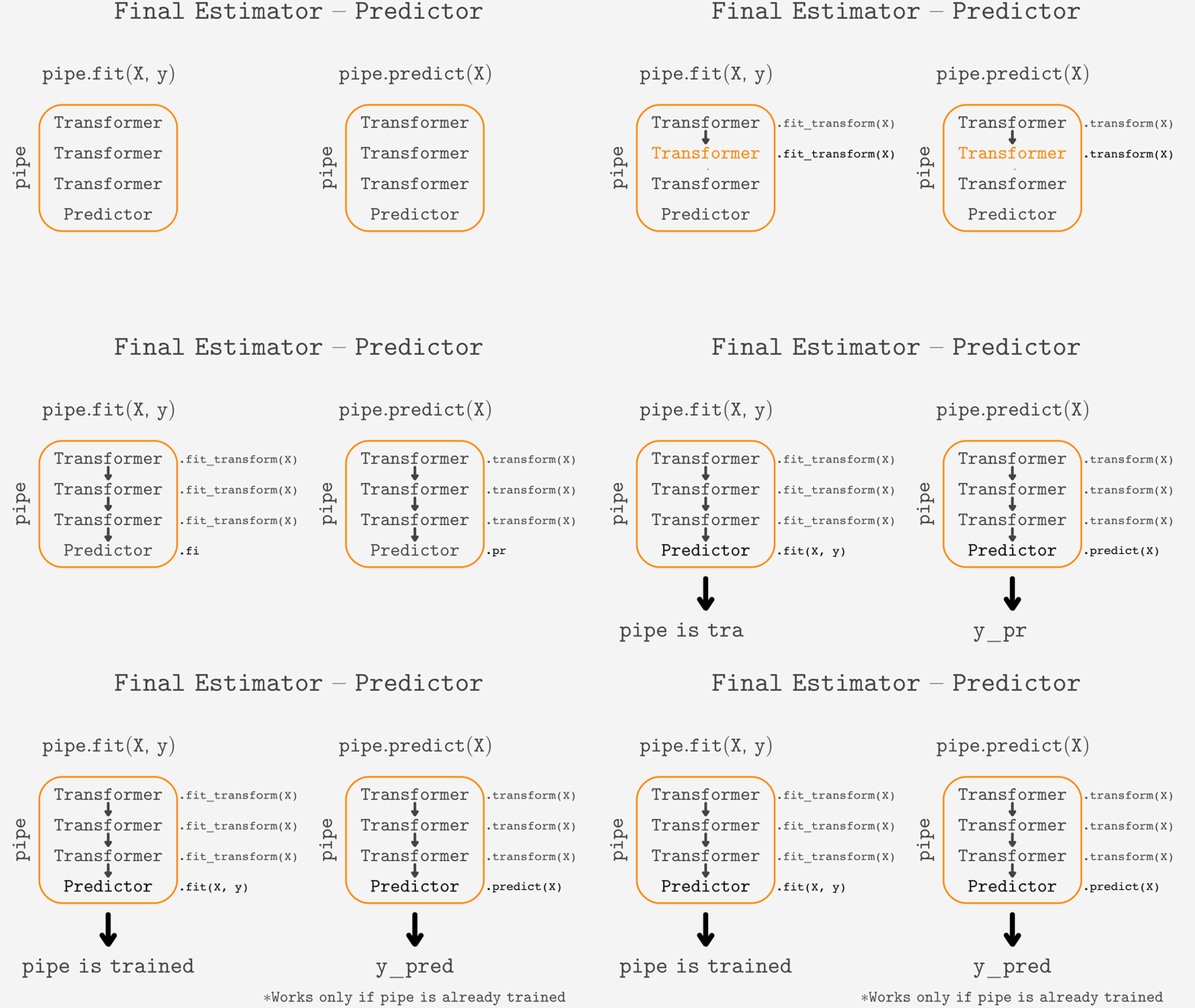

When calling .fit(), each transformer runs .fit_transform().
When calling .predict(), the pipeline uses .transform() before sending data to the final estimator.
This is required because new data must be transformed exactly like the training data.
Why .transform()?
Using .fit_transform() on new data could change encodings (e.g., in OneHotEncoder), creating mismatched columns and unreliable predictions.
.transform() guarantees consistent preprocessing, ignoring unseen categories and keeping the same column order.
Here is the original dataset before any transformation. This raw data is the starting point for the transformation process. No encoding or preprocessing has been applied yet—each row shows an instance with its color feature as a string. This is the data that will be transformed using preprocessing steps in the pipeline.
This table shows the dataset before one-hot encoding. The Color column is categorical—it contains string values instead of numbers. You will transform this column into separate binary columns in the next step using one-hot encoding, which is essential for most machine learning models to process categorical data correctly.
Here is how one-hot encoded training data looks like:
The table below shows the dataset after applying one-hot encoding. The original Color column has been replaced by separate binary columns—Color_Red, Color_Blue, and Color_Green. Each column indicates whether the instance has that specific color (1) or not (0).
Notice how the original single Color column has been replaced by three separate columns: Color_Red, Color_Blue, and Color_Green. Each column represents whether a specific color is present for that instance, using 1 for yes and 0 for no. This transformation is called one-hot encoding.
This change is crucial for machine learning models because most algorithms cannot work directly with text or categorical data. By converting categories into separate binary columns, you provide the model with clear, numeric features it can use to learn patterns and make predictions. This approach also prevents the model from assuming any ordinal relationship between the original categories, which could lead to incorrect conclusions.
Here are the new instances to predict:
Here is the new data you want to predict on. This is the raw input—the 'before' state—just as it appears before any transformation or preprocessing. The pipeline will transform this data to match the format used during training before making predictions.
The next step is to transform these new instances using the previously fitted encoder. This guarantees that the new data is processed in the same way as the training data, ensuring consistency and reliable predictions from the model.
If .fit_transform() were applied to new instances, the OneHotEncoder could generate columns in a different order or even introduce new ones. This would cause the new data to be transformed inconsistently with the training set, making predictions unreliable.
If you use .fit_transform() on new data instead of .transform(), the encoder will treat the new data as if it is being seen for the first time. This causes it to:
- Re-learn the categories from the new data;
- Change the order of columns based on the new set of categories;
- Add a new column for any unseen category, such as
'Color_Yellow'in this case.
This creates a mismatch between the training and prediction data, making predictions unreliable and potentially causing errors in your pipeline.
Notice the difference between the incorrect transformation and the correct one. The table with the incorrect transformation includes a new column (Color_Yellow) and changes the order of columns compared to the training data. This breaks the consistency between training and prediction:
- The model expects the same columns and order as during training;
- New or reordered columns confuse the model, causing it to use the wrong features;
- Predictions become unreliable because the input structure no longer matches what the model learned.
Always ensure new data is transformed with .transform() after fitting, so the columns and order stay consistent. This is essential for accurate, trustworthy predictions.
However, using .transform() ensures that the new data is encoded exactly as the training data, ignoring categories not seen during training:
When you use .transform() on new data, only the columns from training are included in the output. Any categories not seen during training—like 'Yellow'—are ignored. This guarantees that the new data matches the structure expected by the model, with no extra or missing columns.
Comparing the three tables:
- The original training data (after one-hot encoding) has columns for
Color_Red,Color_Blue, andColor_Green; - The incorrectly transformed new data (using
.fit_transform()) adds aColor_Yellowcolumn and dropsColor_Green, changing the column order and structure; - The correctly transformed new data (using
.transform()) keeps the same columns and order as the training set, with zeros for unseen categories likeYellow.
Using .transform() is the correct approach because it guarantees that new data is processed in exactly the same way as the training data. This ensures the model receives data in the expected format, preventing errors and making predictions reliable.
Adding the Final Estimator
Simply add the model as the last step of the pipeline:
pipe = make_pipeline(
    ct,
    SimpleImputer(strategy='most_frequent'),
    StandardScaler(),
    KNeighborsClassifier()
)
pipe.fit(X, y)
pipe.predict(X_new)
This allows the whole workflow—preprocessing + prediction—to run with one call.
12345678910111213141516171819202122232425262728293031323334353637from sklearn.pipeline import make_pipeline from sklearn.compose import ColumnTransformer from sklearn.impute import SimpleImputer from sklearn.preprocessing import StandardScaler from sklearn.neighbors import KNeighborsClassifier import pandas as pd # Example data data = pd.DataFrame({ 'color': ['red', 'blue', 'green'], 'value': [1, 2, 3] }) labels = [0, 1, 0] # Define a simple column transformer (placeholder for real preprocessing) ct = ColumnTransformer([ ('imputer', SimpleImputer(strategy='most_frequent'), ['color']) ]) # --- Before: Pipeline with only preprocessing steps --- # This pipeline only transforms the data; it cannot make predictions. pipeline_preprocessing = make_pipeline( ct, StandardScaler() ) # pipeline_preprocessing.fit(data) # Only fits transformers, no estimator at the end # --- After: Pipeline with a final estimator --- # Now the pipeline ends with a model, so it can fit and predict. pipeline_full = make_pipeline( ct, StandardScaler(), KNeighborsClassifier() ) pipeline_full.fit(data, labels) predictions = pipeline_full.predict(data) print("Predictions:", predictions)
Adding the final estimator as the last step turns your pipeline into a complete end-to-end workflow. Instead of just preparing your data, the pipeline now handles both preprocessing and prediction in a single object. This means you can call fit() and predict() directly on the pipeline, and it will automatically apply all preprocessing steps before making predictions.
This approach is important because:
- It guarantees that all data is processed in exactly the same way during both training and prediction;
- It reduces the risk of errors, such as forgetting a preprocessing step when predicting on new data;
- It makes your code cleaner and easier to maintain, since the entire workflow is managed in one place.
By chaining preprocessing and modeling, you ensure consistency, reliability, and simplicity in your machine learning projects.
Thanks for your feedback!
Ask AI

Ask AI

Ask anything or try one of the suggested questions to begin our chat
