Setting The Rules Before The Conversation Starts
Swipe to show menu
Every conversation you have with an AI tool starts with a blank slate. The model doesn't know who you are, how you write, what your role is, or what standards your output needs to meet. You've been compensating for this by including context in every prompt — which works, but means repeating the same information over and over.
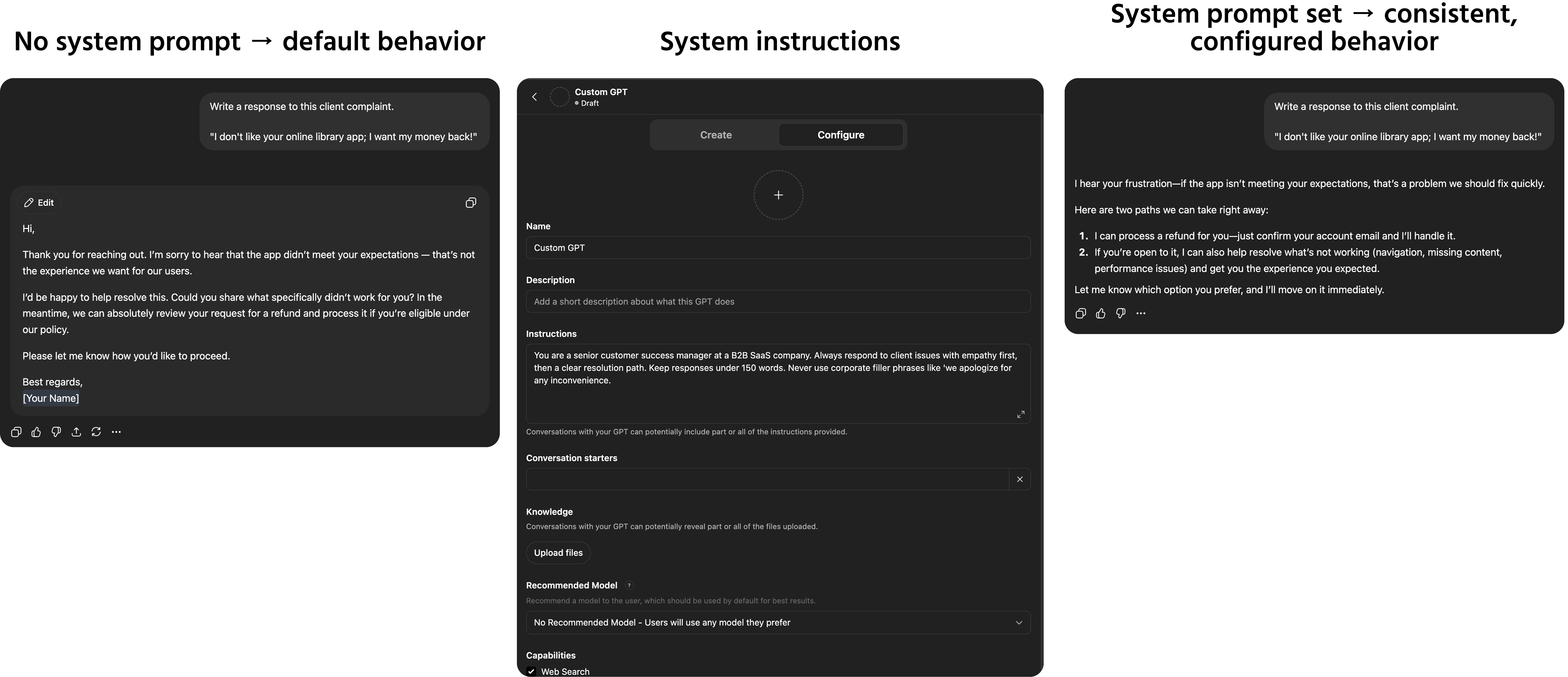
System prompts solve this. They are instructions that run before the conversation begins, setting permanent rules that apply to everything the model produces in that session — without you having to restate them every time.
What A System Prompt Is

A system prompt is a block of instructions placed at the start of an AI interaction that defines how the model should behave throughout the entire conversation. Unlike a regular prompt, it isn't part of the dialogue — it's the operating context the model works within.
Think of it as the briefing you'd give a new assistant before they start work:
- Who they're working for and what the organization does;
- What tone and style to use in all communications;
- What topics to focus on and what to avoid;
- What format to default to when none is specified;
- Any standing rules that apply to every task.
Once a system prompt is set, every message you send in that session is interpreted through that frame — without you needing to restate any of it.
Where You Can Use System Prompts
Access to system prompts varies by tool and plan:
- ChatGPT — available through the Custom GPTs feature, where you define a system prompt for a reusable AI configuration;
- Claude — available in the API and in Claude's Projects feature, where you can set persistent instructions for a workspace;
- API access — any tool built on the OpenAI, Anthropic, or Google API allows a system prompt as a dedicated parameter, separate from the user message;
- Embedded tools — some enterprise tools like Microsoft Copilot Studio allow system-level configuration for custom AI deployments.
If you're using a standard consumer chat interface without these features, the closest equivalent is a standing context block at the start of your conversation — a paragraph you paste at the beginning of any session that establishes your role, preferences, and constraints.
What To Put In A System Prompt
A well-written system prompt covers the standing information that applies to all tasks in a given context. Useful elements include:
- Role and context — who you are, what your organization does, what the AI is helping you with;
- Tone and style defaults — formal or conversational, technical or plain language, first or third person;
- Formatting defaults — bullet points or prose, maximum lengths, heading conventions;
- Standing constraints — phrases to avoid, topics outside scope, things to always include;
- Audience defaults — who the output is typically for, and what that audience cares about.
An example system prompt for a marketing professional:

You are assisting a B2B content marketer at a mid-size HR technology company.
Tone: clear, direct, and professional — never jargon-heavy or salesy. Write like a knowledgeable peer, not a vendor.
Default format: short paragraphs for prose, bullet points for lists. Maximum 150 words unless specified otherwise.
Audience: HR leaders and People Operations professionals at companies with 200–2000 employees.
Avoid: phrases like "game-changing," "revolutionary," "best-in-class," or any superlatives that can't be verified.
What A System Prompt Cannot Do
System prompts are powerful but not unlimited. They cannot:
- Override the model's core safety guidelines and built-in restrictions;
- Give the model access to information it wasn't trained on;
- Guarantee perfectly consistent behavior across every response — complex or ambiguous tasks may still require explicit guidance in the individual prompt;
- Replace good prompt writing for specific, high-stakes tasks — a system prompt sets defaults, your individual prompts handle exceptions.
A system prompt is a foundation, not a replacement for prompting skill. The techniques from Sections 1 and 2 still apply to every individual message — the system prompt just means you don't have to repeat the standing context every time.
Thanks for your feedback!
Ask AI

Ask AI

Ask anything or try one of the suggested questions to begin our chat
Setting The Rules Before The Conversation Starts
Every conversation you have with an AI tool starts with a blank slate. The model doesn't know who you are, how you write, what your role is, or what standards your output needs to meet. You've been compensating for this by including context in every prompt — which works, but means repeating the same information over and over.
System prompts solve this. They are instructions that run before the conversation begins, setting permanent rules that apply to everything the model produces in that session — without you having to restate them every time.
What A System Prompt Is
A system prompt is a block of instructions placed at the start of an AI interaction that defines how the model should behave throughout the entire conversation. Unlike a regular prompt, it isn't part of the dialogue — it's the operating context the model works within.
Think of it as the briefing you'd give a new assistant before they start work:
- Who they're working for and what the organization does;
- What tone and style to use in all communications;
- What topics to focus on and what to avoid;
- What format to default to when none is specified;
- Any standing rules that apply to every task.
Once a system prompt is set, every message you send in that session is interpreted through that frame — without you needing to restate any of it.
Where You Can Use System Prompts
Access to system prompts varies by tool and plan:
- ChatGPT — available through the Custom GPTs feature, where you define a system prompt for a reusable AI configuration;
- Claude — available in the API and in Claude's Projects feature, where you can set persistent instructions for a workspace;
- API access — any tool built on the OpenAI, Anthropic, or Google API allows a system prompt as a dedicated parameter, separate from the user message;
- Embedded tools — some enterprise tools like Microsoft Copilot Studio allow system-level configuration for custom AI deployments.
If you're using a standard consumer chat interface without these features, the closest equivalent is a standing context block at the start of your conversation — a paragraph you paste at the beginning of any session that establishes your role, preferences, and constraints.
What To Put In A System Prompt
A well-written system prompt covers the standing information that applies to all tasks in a given context. Useful elements include:
- Role and context — who you are, what your organization does, what the AI is helping you with;
- Tone and style defaults — formal or conversational, technical or plain language, first or third person;
- Formatting defaults — bullet points or prose, maximum lengths, heading conventions;
- Standing constraints — phrases to avoid, topics outside scope, things to always include;
- Audience defaults — who the output is typically for, and what that audience cares about.
An example system prompt for a marketing professional:
You are assisting a B2B content marketer at a mid-size HR technology company.
Tone: clear, direct, and professional — never jargon-heavy or salesy. Write like a knowledgeable peer, not a vendor.
Default format: short paragraphs for prose, bullet points for lists. Maximum 150 words unless specified otherwise.
Audience: HR leaders and People Operations professionals at companies with 200–2000 employees.
Avoid: phrases like "game-changing," "revolutionary," "best-in-class," or any superlatives that can't be verified.
What A System Prompt Cannot Do
System prompts are powerful but not unlimited. They cannot:
- Override the model's core safety guidelines and built-in restrictions;
- Give the model access to information it wasn't trained on;
- Guarantee perfectly consistent behavior across every response — complex or ambiguous tasks may still require explicit guidance in the individual prompt;
- Replace good prompt writing for specific, high-stakes tasks — a system prompt sets defaults, your individual prompts handle exceptions.
A system prompt is a foundation, not a replacement for prompting skill. The techniques from Sections 1 and 2 still apply to every individual message — the system prompt just means you don't have to repeat the standing context every time.
Thanks for your feedback!
