Prompting Across Different AI Tools
Swipe to show menu
The prompting principles you've learned in this course — the four components, role framing, few-shot examples, chain-of-thought, iteration — work across all major AI tools. The fundamentals are transferable.
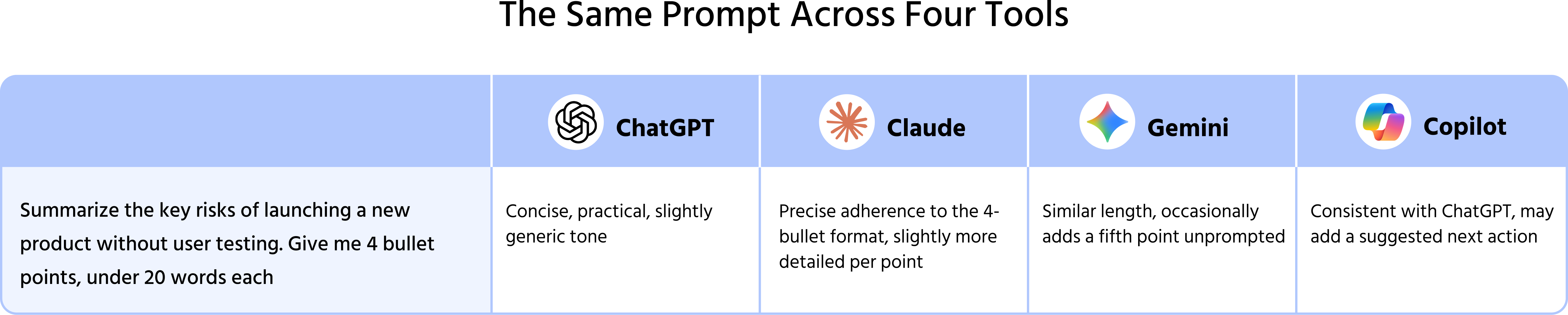
But tools are not identical. When you move between ChatGPT, Claude, Gemini, and Copilot, you'll notice differences in how they respond to the same prompt — in length, tone, structure, and the kind of output they default to. Understanding these differences helps you get better results from whichever tool you're using, and makes switching between them less frustrating.
What Stays The Same Across All Tools
Regardless of which tool you use:
- Clear tasks produce better results than vague ones — every model responds to specificity;
- Context improves output — no model can infer what you haven't told it;
- Format instructions are always respected — if you ask for bullet points, you'll get bullet points;
- Iteration works — every major tool supports multi-turn conversation and responds well to targeted follow-ups;
- Role prompting changes the output — assigning a perspective shifts tone and framing in all tools.
These principles are model-agnostic. If a technique works in ChatGPT, it will work in Claude, Gemini, and Copilot — the output will look different, but the technique itself transfers.
What Differs Between Tools
Response length defaults: Claude tends to produce longer, more detailed responses by default. ChatGPT and Gemini are more concise in their defaults. If length matters, specify it explicitly regardless of which tool you use — but if you're switching from Claude to ChatGPT, you may find outputs shorter than expected without asking.
Instruction-following precision: Claude is generally more literal in following detailed format instructions. If you specify a precise structure — five bullet points, each under fifteen words — Claude tends to adhere to it more consistently than other models.
Tone defaults: ChatGPT tends toward a helpful, neutral tone. Claude tends toward a more careful, nuanced register. Gemini often mirrors the tone of the input more closely. All of these are adjustable with explicit tone instructions.
Tool integration: Copilot operates within Microsoft 365 — it has context about the document or email you're working in, which standalone tools don't. Gemini integrates with Google Workspace similarly. This contextual awareness changes what you need to provide in the prompt — less pasting of document content, more direct instructions.
Web access: ChatGPT with Browse, Perplexity, and Gemini with Search can access current information. Claude and standard ChatGPT cannot by default. For time-sensitive research, your tool choice matters — not just your prompt.
How To Adapt When Switching Tools
When you move from one tool to another, adjust for these common differences:
- If outputs are too long — add a word count or sentence count constraint. Don't assume the tool will match the length defaults you're used to;
- If the tone feels different — add an explicit tone instruction. What reads as neutral in one tool may read as formal in another;
- If format isn't being followed precisely — restate the format requirement more explicitly. Different tools have different sensitivities to format instructions;
- If the tool has document context (Copilot, Gemini in Workspace) — you can reference the document directly rather than pasting content; test whether this produces more accurate output than pasting would;
- If you're missing web access — switch to a search-enabled tool for the specific task, or provide the current information directly in the prompt.
Your prompt library from Chapter 3.6 works across tools. The templates are transferable — you may need to adjust length and tone defaults for each tool, but the core structure moves with you.
1. Which of the following statements accurately describe differences in response length, tone, or format adherence among ChatGPT, Claude, Gemini, and Copilot
2. Which actions help you adapt your prompts effectively when switching between different AI tools?
Thanks for your feedback!
Ask AI

Ask AI

Ask anything or try one of the suggested questions to begin our chat
Prompting Across Different AI Tools
The prompting principles you've learned in this course — the four components, role framing, few-shot examples, chain-of-thought, iteration — work across all major AI tools. The fundamentals are transferable.
But tools are not identical. When you move between ChatGPT, Claude, Gemini, and Copilot, you'll notice differences in how they respond to the same prompt — in length, tone, structure, and the kind of output they default to. Understanding these differences helps you get better results from whichever tool you're using, and makes switching between them less frustrating.
What Stays The Same Across All Tools
Regardless of which tool you use:
- Clear tasks produce better results than vague ones — every model responds to specificity;
- Context improves output — no model can infer what you haven't told it;
- Format instructions are always respected — if you ask for bullet points, you'll get bullet points;
- Iteration works — every major tool supports multi-turn conversation and responds well to targeted follow-ups;
- Role prompting changes the output — assigning a perspective shifts tone and framing in all tools.
These principles are model-agnostic. If a technique works in ChatGPT, it will work in Claude, Gemini, and Copilot — the output will look different, but the technique itself transfers.
What Differs Between Tools
Response length defaults: Claude tends to produce longer, more detailed responses by default. ChatGPT and Gemini are more concise in their defaults. If length matters, specify it explicitly regardless of which tool you use — but if you're switching from Claude to ChatGPT, you may find outputs shorter than expected without asking.
Instruction-following precision: Claude is generally more literal in following detailed format instructions. If you specify a precise structure — five bullet points, each under fifteen words — Claude tends to adhere to it more consistently than other models.
Tone defaults: ChatGPT tends toward a helpful, neutral tone. Claude tends toward a more careful, nuanced register. Gemini often mirrors the tone of the input more closely. All of these are adjustable with explicit tone instructions.
Tool integration: Copilot operates within Microsoft 365 — it has context about the document or email you're working in, which standalone tools don't. Gemini integrates with Google Workspace similarly. This contextual awareness changes what you need to provide in the prompt — less pasting of document content, more direct instructions.
Web access: ChatGPT with Browse, Perplexity, and Gemini with Search can access current information. Claude and standard ChatGPT cannot by default. For time-sensitive research, your tool choice matters — not just your prompt.
How To Adapt When Switching Tools
When you move from one tool to another, adjust for these common differences:
- If outputs are too long — add a word count or sentence count constraint. Don't assume the tool will match the length defaults you're used to;
- If the tone feels different — add an explicit tone instruction. What reads as neutral in one tool may read as formal in another;
- If format isn't being followed precisely — restate the format requirement more explicitly. Different tools have different sensitivities to format instructions;
- If the tool has document context (Copilot, Gemini in Workspace) — you can reference the document directly rather than pasting content; test whether this produces more accurate output than pasting would;
- If you're missing web access — switch to a search-enabled tool for the specific task, or provide the current information directly in the prompt.
Your prompt library from Chapter 3.6 works across tools. The templates are transferable — you may need to adjust length and tone defaults for each tool, but the core structure moves with you.
Thanks for your feedback!
