Making AI Remember Your Preferences
Swipe to show menu
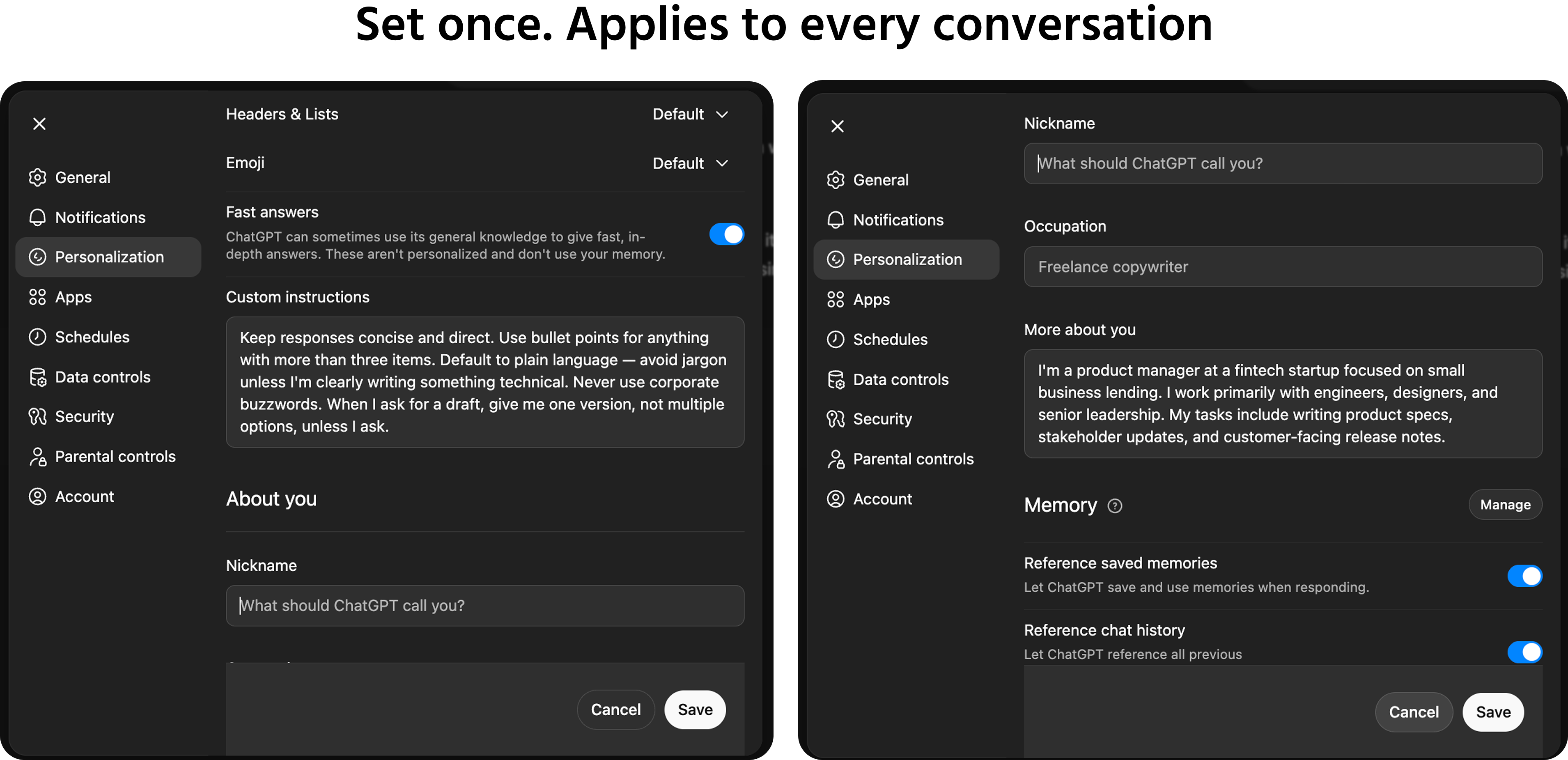
System prompts apply within a specific tool configuration or session. Custom instructions are the consumer-facing equivalent — a set of persistent preferences you configure once in your AI tool of choice, and that apply automatically to every conversation you start.
If you use ChatGPT, Claude, or Gemini regularly, setting up custom instructions is one of the highest-return, lowest-effort things you can do. It takes ten minutes to configure and saves you from re-explaining yourself in every new chat.
How Custom Instructions Work
Custom instructions are a standing configuration you set in your account settings — separate from any individual conversation. Once set, the model reads them before every new chat and uses them to calibrate its behavior.
Most tools structure custom instructions around two core questions:
1. What should the AI know about you? Your role, your industry, your typical tasks, the kind of content you produce, who your audience usually is.
2. How should the AI respond? Your preferred tone, your formatting preferences, your default output length, and any standing rules about what to include or avoid.
You don't need to answer both exhaustively. Even a few well-chosen sentences in each field will meaningfully improve the consistency of your outputs.
Writing Effective Custom Instructions
The most useful custom instructions are specific rather than general. Compare these two versions:
Too general:
I like clear and concise writing.
Specific and actionable:
Keep all responses under 200 words unless I ask for a longer output. Use bullet points for any list with more than three items. Default to plain language — no business jargon unless the context is clearly technical.
The model can act on the second version. The first is too vague to change behavior in a meaningful way.
What your custom instructions should cover:
- Your role and the type of work you do most often;
- Your typical audience — who your outputs are usually for;
- Your preferred default format — prose, bullets, tables;
- Your preferred default length — short, medium, or a word count;
- Standing tone preferences — formal, direct, conversational;
- Anything you consistently have to ask AI not to do — generic openers, unnecessary caveats, repeated suggestions to "consult a professional."
Keeping Custom Instructions Current
Custom instructions should reflect how you actually work right now — not how you worked six months ago. They're worth revisiting when:
- Your role, team, or focus area changes significantly;
- You notice you're regularly asking for the same adjustment in every conversation — that adjustment belongs in your custom instructions, not in every prompt;
- A new AI tool you're using has its own custom instructions field with different options than what you've configured elsewhere;
- Your writing style preferences have evolved based on what you've learned about what works.
Treat custom instructions as a living document — not a one-time configuration you set and forget.
Thanks for your feedback!
Ask AI

Ask AI

Ask anything or try one of the suggested questions to begin our chat
Making AI Remember Your Preferences
System prompts apply within a specific tool configuration or session. Custom instructions are the consumer-facing equivalent — a set of persistent preferences you configure once in your AI tool of choice, and that apply automatically to every conversation you start.
If you use ChatGPT, Claude, or Gemini regularly, setting up custom instructions is one of the highest-return, lowest-effort things you can do. It takes ten minutes to configure and saves you from re-explaining yourself in every new chat.
How Custom Instructions Work
Custom instructions are a standing configuration you set in your account settings — separate from any individual conversation. Once set, the model reads them before every new chat and uses them to calibrate its behavior.
Most tools structure custom instructions around two core questions:
1. What should the AI know about you? Your role, your industry, your typical tasks, the kind of content you produce, who your audience usually is.
2. How should the AI respond? Your preferred tone, your formatting preferences, your default output length, and any standing rules about what to include or avoid.
You don't need to answer both exhaustively. Even a few well-chosen sentences in each field will meaningfully improve the consistency of your outputs.
Writing Effective Custom Instructions
The most useful custom instructions are specific rather than general. Compare these two versions:
Too general:
I like clear and concise writing.
Specific and actionable:
Keep all responses under 200 words unless I ask for a longer output. Use bullet points for any list with more than three items. Default to plain language — no business jargon unless the context is clearly technical.
The model can act on the second version. The first is too vague to change behavior in a meaningful way.
What your custom instructions should cover:
- Your role and the type of work you do most often;
- Your typical audience — who your outputs are usually for;
- Your preferred default format — prose, bullets, tables;
- Your preferred default length — short, medium, or a word count;
- Standing tone preferences — formal, direct, conversational;
- Anything you consistently have to ask AI not to do — generic openers, unnecessary caveats, repeated suggestions to "consult a professional."
Keeping Custom Instructions Current
Custom instructions should reflect how you actually work right now — not how you worked six months ago. They're worth revisiting when:
- Your role, team, or focus area changes significantly;
- You notice you're regularly asking for the same adjustment in every conversation — that adjustment belongs in your custom instructions, not in every prompt;
- A new AI tool you're using has its own custom instructions field with different options than what you've configured elsewhere;
- Your writing style preferences have evolved based on what you've learned about what works.
Treat custom instructions as a living document — not a one-time configuration you set and forget.
Thanks for your feedback!
