Prompts For Analysis And Working With Data
Swipe to show menu
You don't need to be a data analyst to use AI for analytical work. And if you are one, AI can significantly accelerate the parts of your workflow that are time-consuming but not analytically complex.
This chapter covers how to prompt AI to interpret data, structure analytical thinking, and produce outputs that drive decisions — at every level of technical skill.
For Non-Technical Users: Turning Numbers Into Narrative
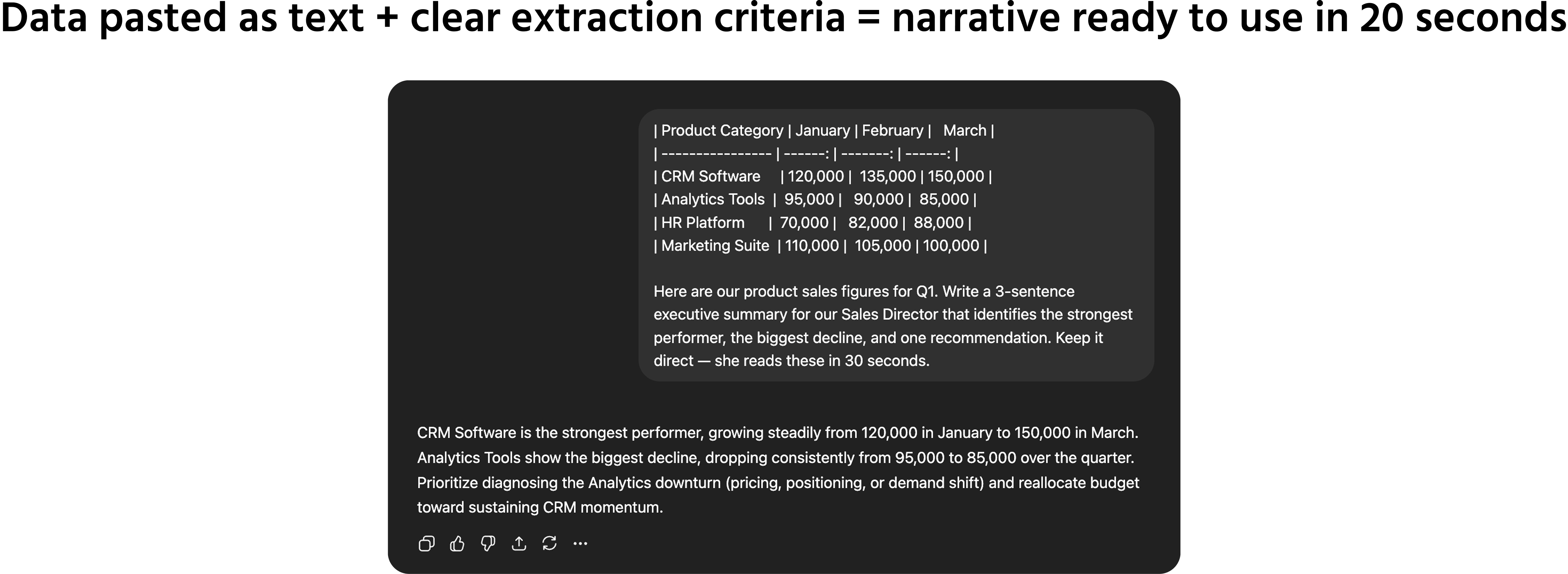
If you work with reports, dashboards, or spreadsheets but don't have a data background, AI's most immediate value is translation — turning a table of numbers into a clear narrative that communicates what the data actually means.
What you need to do first: paste the data into the prompt as text. You can copy a table from Excel, paste figures from a report, or type out the key numbers. The model cannot see files or screenshots — the data must be in the prompt.
Core narrative prompt template:

Here is a table of [what the data represents]:
[paste data here]
Write a 3-sentence executive summary that identifies:
- The most significant trend or finding;
- One area of concern or underperformance;
- One specific recommendation based on the data.
Audience: [who will read this — their role and what they care about]. Use plain language — no jargon.
For Analysts: Accelerating The Workflow
If you already work with data professionally, AI handles the parts of your workflow that are formulaic but time-consuming:
Generating SQL from plain English:
Write a SQL query that [describe what you want to extract in plain language]. The table is called [table name] and has the following columns: [list columns and data types].
Return the results sorted by [column], limited to [number] rows.
Explaining unfamiliar code or formulas:
Explain what this [SQL query / Excel formula / Python script] does, line by line. Use plain language — assume the reader understands the data but not the syntax.
[paste code here]
Structuring an analysis framework:
I need to analyze [business problem or question].
Before I start pulling data, help me think through the framework. What are the key questions I should answer? What dimensions should I cut the data by? What would a complete analysis of this problem look like?
Think through this step by step.
A Critical Constraint: Garbage In, Garbage Out
AI does not validate your data. It processes whatever you give it and produces confident-sounding output regardless of whether the underlying numbers are correct.
If you paste incorrect, outdated, or misformatted data, the analysis will look clean and authoritative — and be built on a flawed foundation.
Before using AI to interpret or summarize any data:
- Verify the source is current and correctly exported;
- Check that the figures match what's in your original system;
- Confirm that any calculations or aggregations in the data are correct before pasting.
AI is a powerful tool for communicating what data means. Validating that the data is correct remains your responsibility.
Practice: Data To Narrative In Under Two Minutes
Take any table or set of figures you've worked with recently — a sales report, a project metric, a budget snapshot. Paste it into any major AI tool as plain text.
Write a prompt that specifies:
- What the data represents;
- Who the summary is for;
- What three things to extract (trend, concern, recommendation);
- The length and format of the output.
Review the result. Note what's accurate, what's imprecise, and whether the model flagged anything you hadn't noticed. Then try adjusting the extraction criteria and observe how the output changes.
1. Which statements describe best practices for using AI to turn data into a narrative for non-technical users
2. Which statements accurately describe the importance of data validation when using AI for data analysis or summarization
Thanks for your feedback!
Ask AI

Ask AI

Ask anything or try one of the suggested questions to begin our chat
Prompts For Analysis And Working With Data
You don't need to be a data analyst to use AI for analytical work. And if you are one, AI can significantly accelerate the parts of your workflow that are time-consuming but not analytically complex.
This chapter covers how to prompt AI to interpret data, structure analytical thinking, and produce outputs that drive decisions — at every level of technical skill.
For Non-Technical Users: Turning Numbers Into Narrative
If you work with reports, dashboards, or spreadsheets but don't have a data background, AI's most immediate value is translation — turning a table of numbers into a clear narrative that communicates what the data actually means.
What you need to do first: paste the data into the prompt as text. You can copy a table from Excel, paste figures from a report, or type out the key numbers. The model cannot see files or screenshots — the data must be in the prompt.
Core narrative prompt template:
Here is a table of [what the data represents]:
[paste data here]
Write a 3-sentence executive summary that identifies:
- The most significant trend or finding;
- One area of concern or underperformance;
- One specific recommendation based on the data.
Audience: [who will read this — their role and what they care about]. Use plain language — no jargon.
For Analysts: Accelerating The Workflow
If you already work with data professionally, AI handles the parts of your workflow that are formulaic but time-consuming:
Generating SQL from plain English:
Write a SQL query that [describe what you want to extract in plain language]. The table is called [table name] and has the following columns: [list columns and data types].
Return the results sorted by [column], limited to [number] rows.
Explaining unfamiliar code or formulas:
Explain what this [SQL query / Excel formula / Python script] does, line by line. Use plain language — assume the reader understands the data but not the syntax.
[paste code here]
Structuring an analysis framework:
I need to analyze [business problem or question].
Before I start pulling data, help me think through the framework. What are the key questions I should answer? What dimensions should I cut the data by? What would a complete analysis of this problem look like?
Think through this step by step.
A Critical Constraint: Garbage In, Garbage Out
AI does not validate your data. It processes whatever you give it and produces confident-sounding output regardless of whether the underlying numbers are correct.
If you paste incorrect, outdated, or misformatted data, the analysis will look clean and authoritative — and be built on a flawed foundation.
Before using AI to interpret or summarize any data:
- Verify the source is current and correctly exported;
- Check that the figures match what's in your original system;
- Confirm that any calculations or aggregations in the data are correct before pasting.
AI is a powerful tool for communicating what data means. Validating that the data is correct remains your responsibility.
Practice: Data To Narrative In Under Two Minutes
Take any table or set of figures you've worked with recently — a sales report, a project metric, a budget snapshot. Paste it into any major AI tool as plain text.
Write a prompt that specifies:
- What the data represents;
- Who the summary is for;
- What three things to extract (trend, concern, recommendation);
- The length and format of the output.
Review the result. Note what's accurate, what's imprecise, and whether the model flagged anything you hadn't noticed. Then try adjusting the extraction criteria and observe how the output changes.
Thanks for your feedback!
