Prompts For Writing
Swipe to show menu
Writing is the task most professionals use AI for first — and the one where the gap between a weak prompt and a strong one is most visible. The difference between getting a generic draft you'll discard and getting something close to what you'd actually send comes down to how much information you give the model before it starts generating.
This chapter covers the three most common writing tasks in professional life — emails, reports, and presentations — with prompt templates and techniques specific to each.
Writing Emails
Email is where most people start with AI — and where vague prompts cause the most frustration. The model doesn't know your relationship with the recipient, the history of the conversation, or the tone your organization uses. You need to supply all of that.
The core email prompt template:

Write a [length: short / medium] [tone: formal / professional / friendly / direct] email to [recipient: who they are and your relationship to them].
Context: [1–3 sentences — what happened, what this email is responding to, or what situation it addresses]
Goal: [what you want the recipient to do, think, or feel after reading]
Constraints: [anything to include or avoid — specific phrases, topics, level of detail]
The components that matter most for email:
- Tone — professional and warm is not the same as formal. Be specific about the register you need;
- Goal — an email that informs requires a different structure than one that requests, apologizes, or persuades;
- Relationship context — "a client we've worked with for three years" produces a different output than "a new prospect we've never spoken to."
![Screenshot description: A chat window showing two email prompt examples and their outputs stacked vertically. Top exchange: user sends Write a follow-up email to a client → AI produces a generic template full of placeholders like [Client Name], [Meeting Date], [Your Name], with no specific content. Labeled "Missing context → unusable template." Bottom exchange: user sends a fully specified prompt: Write a short, warm but professional follow-up email to a long-term client (Sarah, Head of Operations at a logistics company) who attended our product demo on Tuesday but hasn't responded. We've worked with her for two years. The goal is to reopen the conversation without pressure — she may just be busy. Keep it under 100 words. → AI produces a clean, specific, ready-to-send email addressed to Sarah with a natural tone and a soft call to action. Labeled "Full context → ready to use." The contrast in output quality is stark.](https://content-media-cdn.codefinity.com/courses/b27f76bc-8783-40c9-8f35-edfba90abb04/screenshots/11.png?w=3840&q=75)
Writing Reports
Reports have more structure than emails — and that structure is exactly what you should specify in the prompt. The more clearly you define the sections, audience, and purpose, the less editing the output will need.
The core report prompt template:
Write a [type: executive summary / section / full report] on [topic] for [audience: who will read this and what they care about].
Purpose: [what decision or action this report supports]
Structure: [list the sections you want — e.g. Overview, Key Findings, Recommendations, Next Steps]
Tone: [formal / analytical / direct]
Length: [approximate word count or "one page maximum"]
Key points to include: [bullet list of the facts, data, or arguments that must appear in the output]
A useful technique for reports: give AI the raw material first, then ask it to structure it. Paste your bullet-point notes or data into the prompt, followed by the instruction to turn them into a formatted report section. This produces more accurate output than asking AI to generate content from scratch.
Writing Presentation Content
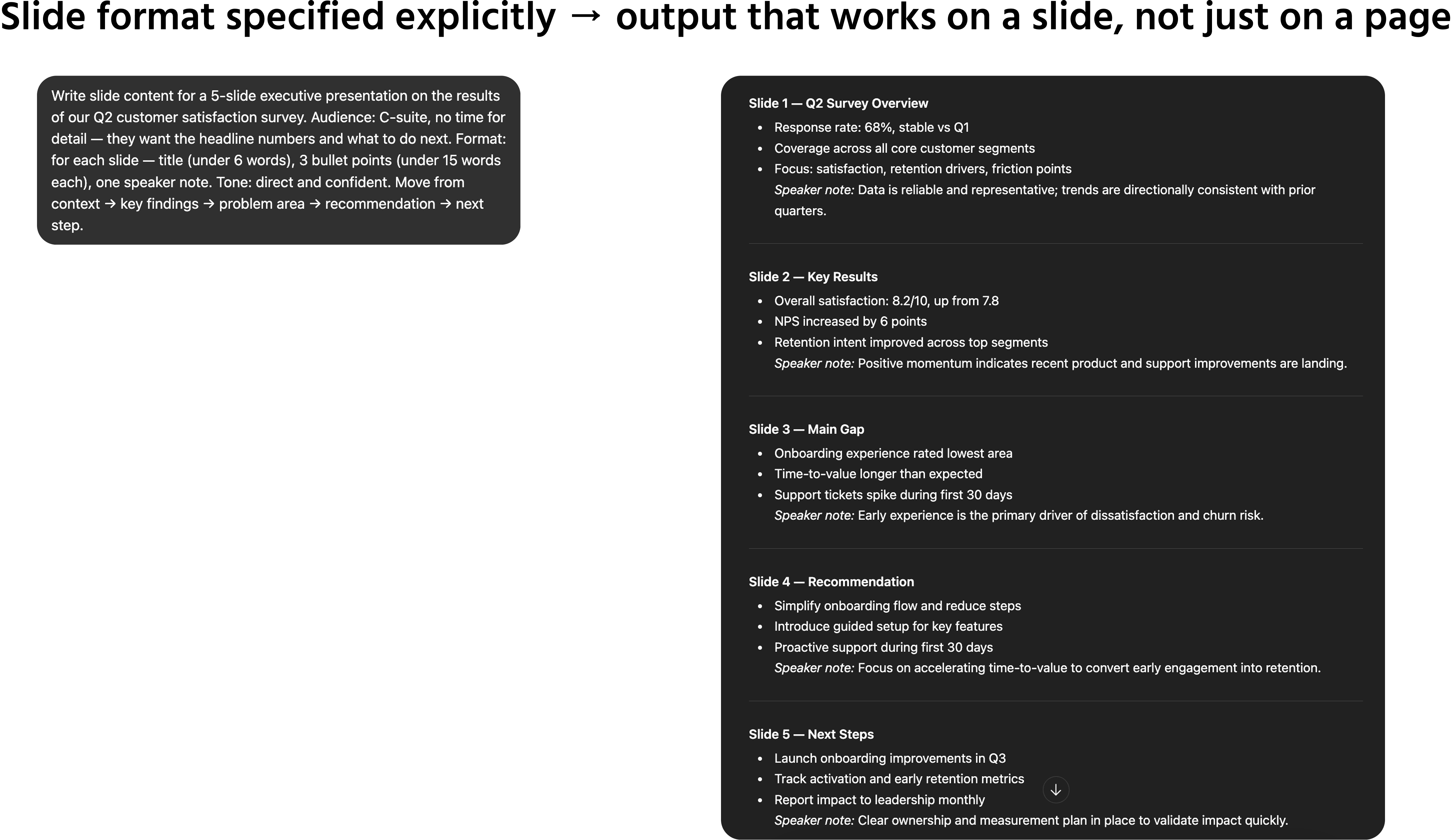
Presentations require a different kind of writing — short, punchy, structured for slides rather than for reading. AI handles this well when you specify the medium explicitly, because the default writing mode for most models is continuous prose.
The core presentation prompt template:
Write slide content for a [length: X-slide] presentation on [topic] for [audience].
Format: for each slide, give me:
- A slide title (under 6 words);
- Three bullet points (under 15 words each);
- One speaker note (2–3 sentences expanding on the slide).
Tone: [professional / persuasive / educational]
The presentation should move from [starting point] to [conclusion or call to action].
An important constraint to add for presentations:
Write for slides, not for reading — keep all text scannable at a glance. Without this, models tend to write sentences
that are too long for a slide format.
Practice: Write One Of Each
Choose one task from each category below and apply the corresponding template:
- An email you've been putting off writing — use the email template with full context and a clear goal;
- A summary or section from a report you're working on — paste your raw notes and ask AI to structure them;
- A 3-slide summary of something you need to present — use the slide format instruction explicitly.
For each one, compare the first output to what you'd have written yourself. Note where it saved time and where it still needed editing. That gap is your prompt to refine.
Thanks for your feedback!
Ask AI

Ask AI

Ask anything or try one of the suggested questions to begin our chat
