File Management Essentials
Swipe to show menu
Good file management is an important part of professional Excel workflows. Even well-designed workbooks can become difficult to maintain if files are poorly organized or stored inconsistently.
Clean file management helps teams locate workbooks quickly, reduce duplication, and maintain reliable collaboration systems.
Understanding Excel File Formats
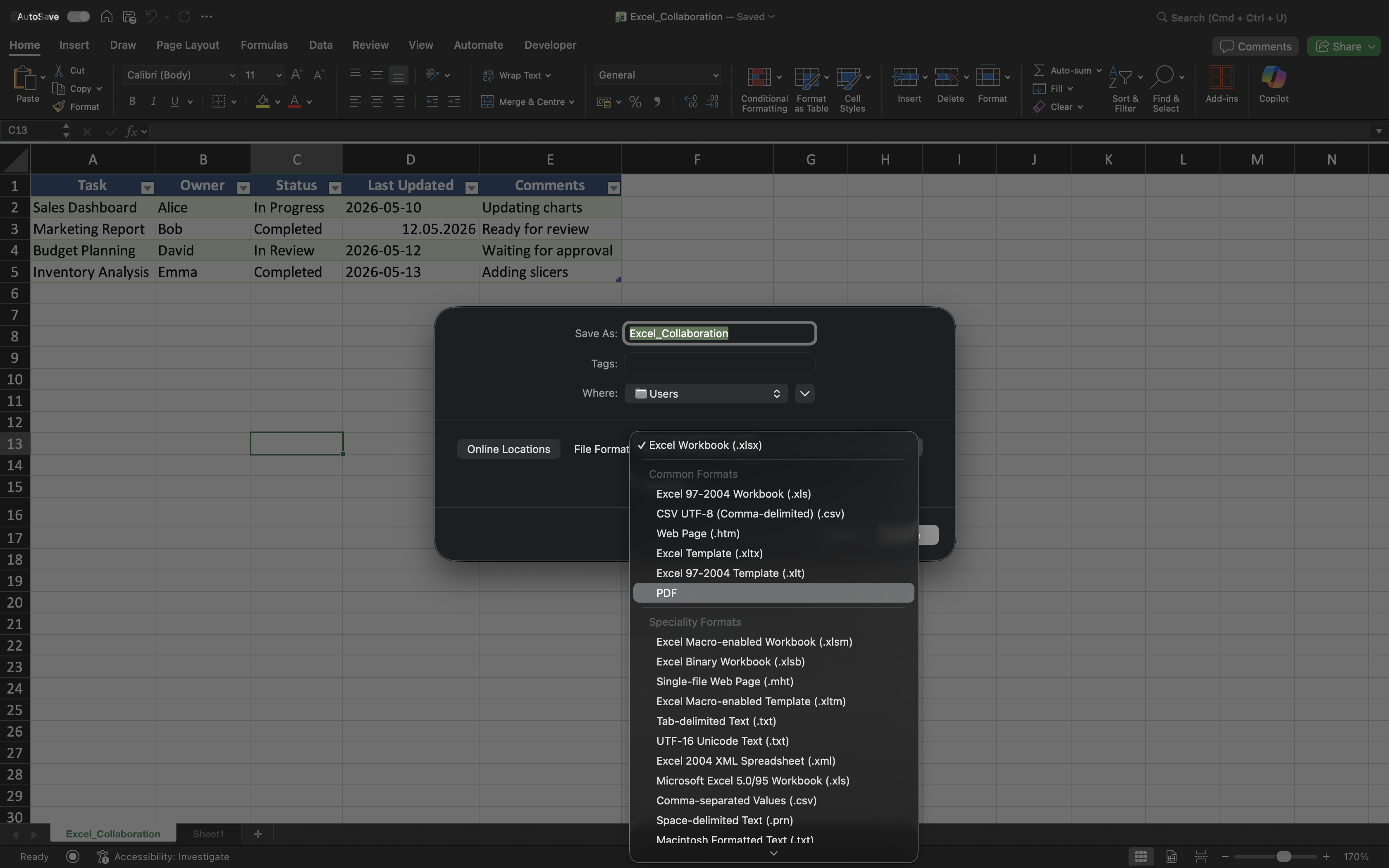
Excel supports several file formats designed for different purposes.
Common formats include:
- XLSX: standard Excel workbook format;
- XLSM: workbook format that supports macros;
- CSV: plain text format commonly used for data exchange;
- PDF: non-editable format used for sharing finalized reports.
Choosing the correct file format helps avoid compatibility problems and improves workflow reliability.

Macros are small automated scripts inside an Excel workbook. XLSM is required when a workbook contains them.
Organizing Workbook Folders
Shared Excel projects should use clear and consistent folder structures. This makes workbooks easier to locate and reduces unnecessary duplicate files.
For example, teams often separate:
- Active reports;
- Archived files;
- Templates;
- Final exports.
Well-organized folders help maintain cleaner business workflows over time.
Using Consistent Workbook Names
Workbook names should clearly describe the file contents and remain consistent across projects.
Good workbook names often include:
- Project or report name;
- Reporting period if necessary;
- Clear business context.
Names such as Sales_Report_Q2_2026.xlsx are much easier to manage than unclear versions like Final_Report_New.xlsx.
Exporting and Sharing Reports
Excel workbooks are not always shared as editable files. In many business environments, finalized reports are exported as PDFs before distribution.
PDF exports help preserve workbook formatting and prevent accidental edits by recipients.
CSV files, on the other hand, are commonly used when transferring data between different systems or applications.
Keeping Collaboration Workflows Clean
As projects grow, poor file management can create confusion and version chaos. Teams should avoid storing unnecessary local copies or creating inconsistent naming systems.
Whenever possible:
- Store shared workbooks in OneDrive;
- Share links instead of attachments;
- Archive outdated workbook versions;
- Keep project folders organized.
These habits help maintain cleaner and more reliable collaboration environments.
Thanks for your feedback!
Ask AI

Ask AI

Ask anything or try one of the suggested questions to begin our chat
