Comments and Communication
Swipe to show menu
Excel allows collaborators to communicate directly inside shared workbooks using comments and mentions. This helps teams discuss changes, ask questions, and review data without relying on external messaging tools.
Comments are especially useful when multiple users work on reports, budgets, forecasts, or project trackers.
Understanding Threaded Comments
Modern Excel uses threaded comments, which allow users to create discussions attached to specific cells.
When a comment is added:
- A small indicator appears inside the cell;
- Collaborators can reply to the discussion;
- The conversation remains connected to the worksheet data.
This makes workbook communication more organized and easier to track.
Adding Comments to Cells
To insert a comment:
- Select a cell;
- Right-click the cell;
- Choose New Comment;
- Enter the message.
Comments are commonly used to:
- Request data updates;
- Explain calculations;
- Review unusual values;
- Leave feedback for collaborators.
Because comments stay attached to worksheet cells, discussions remain connected to the relevant data.
Using Mentions
Excel supports @mentions inside comments. Mentions notify specific collaborators and help direct attention to important workbook changes.
For example:
@Daniel Please verify the revenue totals for Q3.
When a collaborator is mentioned, Excel may send a notification depending on the sharing environment and account settings.
Mentions improve communication and reduce confusion during collaborative projects.
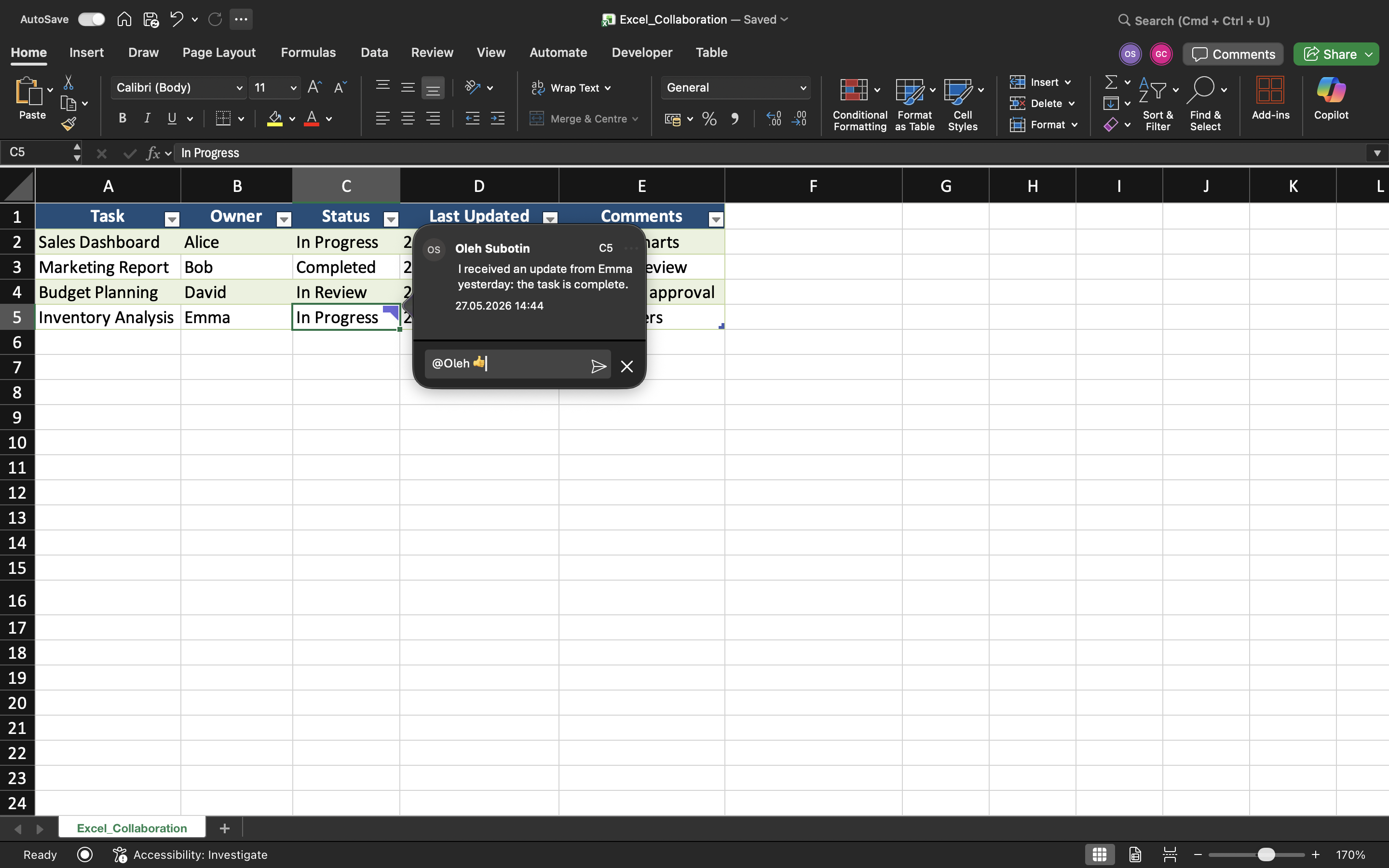
Resolving Comments
Once an issue is completed or reviewed, comments can be marked as Resolved.
Resolved comments:
- Remain stored in workbook history;
- Reduce worksheet clutter;
- Help teams track completed discussions.
This creates cleaner collaboration workflows, especially in large shared workbooks.
Notes vs Comments
Excel also includes Notes, which are different from modern threaded comments.
In modern collaborative workflows, comments are usually preferred over notes.
Task
The workbook contains a shared project tracker used by multiple team members. The goal is to communicate workbook updates using comments and mentions.
- Add comments to multiple worksheet cells;
- Reply to an existing comment;
- Use an @mention inside a comment;
- Resolve a completed discussion;
- Compare Notes and Comments inside the workbook.
Thanks for your feedback!
Ask AI

Ask AI

Ask anything or try one of the suggested questions to begin our chat
