Challenge: Design a Functional HTML Table
Swipe to show menu
Goal
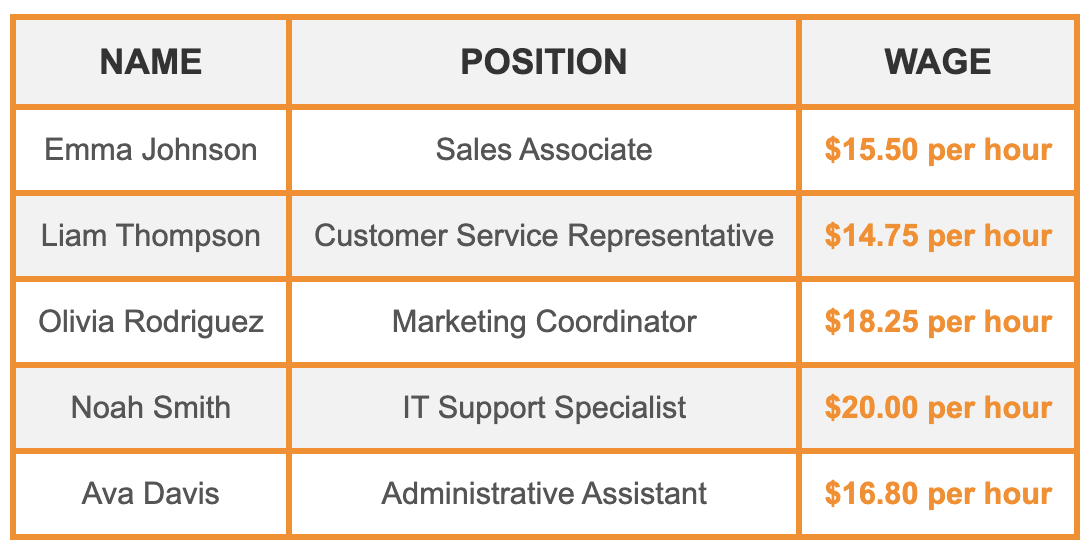
Present employee information in a structured table format by using appropriate HTML tags to create rows and columns.
Task
Create a table with three columns: Name, Position, and Wage. Focus on using the appropriate HTML tags to populate the table with the correct rows and columns. Here is the data to include:
- Name: Emma Johnson | Position: Sales Associate | Wage: $15.50 per hour.
- Name: Liam Thompson | Position: Customer Service Representative | Wage: $14.75 per hour.
- Name: Olivia Rodriguez | Position: Marketing Coordinator | Wage: $18.25 per hour.
- Name: Noah Smith | Position: IT Support Specialist | Wage: $20.00 per hour.
- Name: Ava Davis | Position: Administrative Assistant | Wage: $16.80 per hour.

index.html

index.css
Hint

- Use the
<table>tag to define the main container for the table; - Use the
<thead>tag to group the header content of the table, such as column headings; - Use the
<tr>tag to define a new row within the table; - Use the
<th>tag to define the header text for each column; - Use the
<tbody>tag to group the main content of the table, including rows and data cells; - Use the
<td>tag to define the actual data or content within each table cell.
Solution
<!DOCTYPE html>
<html lang="en">
  <head>
    <link rel="stylesheet" href="index.css" />
  </head>
  <body>
    <table>
      <!-- Table header: Defines the column headings -->
      <thead>
        <tr>
          <th>Name</th>
          <th>Position</th>
          <th>Wage</th>
        </tr>
      </thead>

      <!-- Table body: Contains data for each employee -->
      <tbody>
        <!-- Row 1 -->
        <tr>
          <td>Emma Johnson</td>
          <td>Sales Associate</td>
          <td>$15.50 per hour</td>
        </tr>
        <!-- Row 2 -->
        <tr>
          <td>Liam Thompson</td>
          <td>Customer Service Representative</td>
          <td>$14.75 per hour</td>
        </tr>
        <!-- Row 3 -->
        <tr>
          <td>Olivia Rodriguez</td>
          <td>Marketing Coordinator</td>
          <td>$18.25 per hour</td>
        </tr>
        <!-- Row 4 -->
        <tr>
          <td>Noah Smith</td>
          <td>IT Support Specialist</td>
          <td>$20.00 per hour</td>
        </tr>
        <!-- Row 5 -->
        <tr>
          <td>Ava Davis</td>
          <td>Administrative Assistant</td>
          <td>$16.80 per hour</td>
        </tr>
      </tbody>
    </table>
  </body>
</html>
Everything was clear?
Thanks for your feedback!
Section 4. Chapter 9
Ask AI

Ask AI

Ask anything or try one of the suggested questions to begin our chat
Section 4. Chapter 9
