Displaying and Highlighting Excel Formulas
Swipe to show menu
Understanding how to display and highlight formulas is essential for ensuring accuracy and efficiency in your work.
Key Points
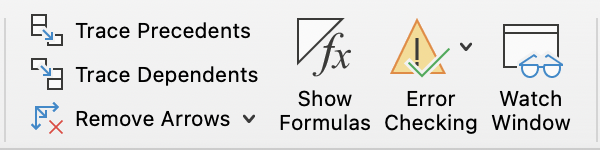
- To display formulas, go to the Formulas tab → Formula Auditing group → Show Formulas;
- Highlight cells containing formulas using Find & Select on the Home tab → Editing group;
- Use Go To Special via the Home tab → Editing group to select cells that contain formulas.
Essential Keyboard Shortcut
Everything was clear?
Thanks for your feedback!
Section 1. Chapter 11
Ask AI

Ask AI

Ask anything or try one of the suggested questions to begin our chat
