Challenge: Design a Functional HTML Table
Swipe to show menu
Goal
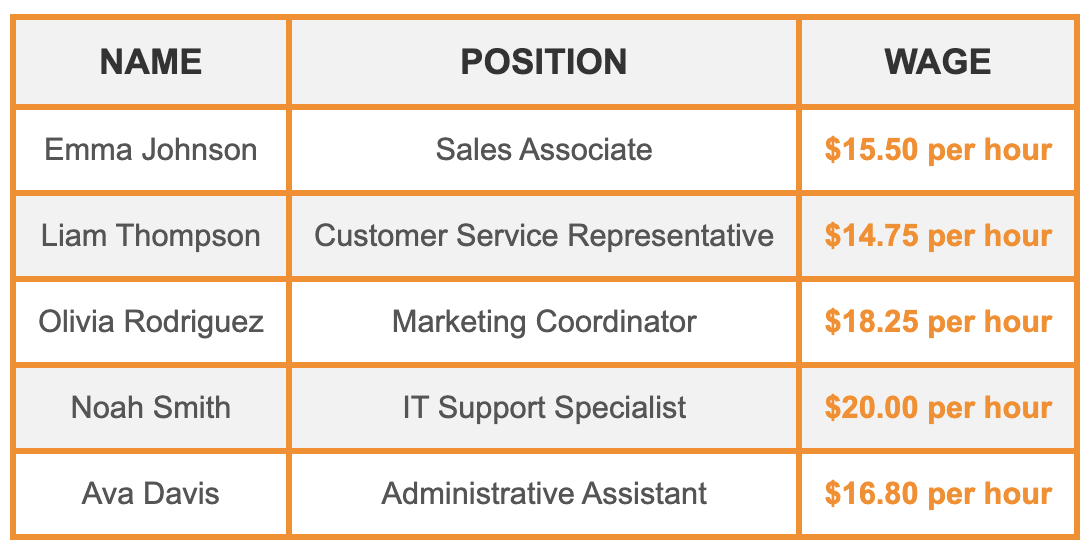
Present employee information in a structured table format by using appropriate HTML tags to create rows and columns.
Task
Create a table with three columns: Name, Position, and Wage. Focus on using the appropriate HTML tags to populate the table with the correct rows and columns. Here is the data to include:
- Name: Emma Johnson | Position: Sales Associate | Wage: $15.50 per hour.
- Name: Liam Thompson | Position: Customer Service Representative | Wage: $14.75 per hour.
- Name: Olivia Rodriguez | Position: Marketing Coordinator | Wage: $18.25 per hour.
- Name: Noah Smith | Position: IT Support Specialist | Wage: $20.00 per hour.
- Name: Ava Davis | Position: Administrative Assistant | Wage: $16.80 per hour.

index.html

index.css
Hint

- Use the
<table>tag to define the main container for the table; - Use the
<thead>tag to group the header content of the table, such as column headings; - Use the
<tr>tag to define a new row within the table; - Use the
<th>tag to define the header text for each column; - Use the
<tbody>tag to group the main content of the table, including rows and data cells; - Use the
<td>tag to define the actual data or content within each table cell.
Solution
<!DOCTYPE html>
<html lang="en">
  <head>
    <link rel="stylesheet" href="index.css" />
  </head>
  <body>
    <table>
      <!-- Table header: Defines the column headings -->
      <thead>
        <tr>
          <th>Name</th>
          <th>Position</th>
          <th>Wage</th>
        </tr>
      </thead>

      <!-- Table body: Contains data for each employee -->
      <tbody>
        <!-- Row 1 -->
        <tr>
          <td>Emma Johnson</td>
          <td>Sales Associate</td>
          <td>$15.50 per hour</td>
        </tr>
        <!-- Row 2 -->
        <tr>
          <td>Liam Thompson</td>
          <td>Customer Service Representative</td>
          <td>$14.75 per hour</td>
        </tr>
        <!-- Row 3 -->
        <tr>
          <td>Olivia Rodriguez</td>
          <td>Marketing Coordinator</td>
          <td>$18.25 per hour</td>
        </tr>
        <!-- Row 4 -->
        <tr>
          <td>Noah Smith</td>
          <td>IT Support Specialist</td>
          <td>$20.00 per hour</td>
        </tr>
        <!-- Row 5 -->
        <tr>
          <td>Ava Davis</td>
          <td>Administrative Assistant</td>
          <td>$16.80 per hour</td>
        </tr>
      </tbody>
    </table>
  </body>
</html>
Everything was clear?
Thanks for your feedback!
Section 1. Chapter 21
Ask AI

Ask AI

Ask anything or try one of the suggested questions to begin our chat
Section 1. Chapter 21
