Verwandte Kurse
Alle Kurse anzeigenAnfänger
Creating Custom AI Agents with Anthropic Claude
Learn how to create a fully functional MCP (Model Context Protocol) server to integrate AI models like Claude with real-world tools like Excel. Everything from core concepts to setting up your development environment and building your first working server that can analyze real data through natural language prompts. No advanced programming knowledge required, just curiosity and willingness to explore AI automation.

Anfänger
Web App from Scratch with Claude
Build and launch a real app in just one weekend using modern AI tools and a simple, practical workflow, using Claude Code to plan, generate, and refine your code, managing your project with GitHub, and deploying your finished app online with Vercel. You’ll start with an idea and quickly turn it into a clear project plan, then move step by step into building a working application, focusing on core features, simple architecture, and fast iteration instead of unnecessary complexity, while learning how to work effectively with AI by writing better prompts, fixing errors, and improving features, ending with a live app, a clean GitHub project, and a repeatable system for turning future ideas into real products faster.
Building Thoughtful AI Interfaces with Claude Design
Designing AI That Actually Makes Sense

by Ihor Gudzyk
C++ Developer
Apr, 2026・
3 min read



As artificial intelligence becomes part of everyday applications, the way we design interactions with AI becomes just as important as the technology behind it. This is where Claude Design comes in, a design philosophy inspired by systems like Claude, developed by Anthropic. Claude Design focuses on creating AI experiences that are:
- Easy to understand;
- Safe to use;
- Helpful without being overwhelming.
Instead of treating AI like a traditional software feature, this approach views it as a collaborative partner, something users communicate with rather than control through buttons and menus.
Traditional Software vs AI Systems
Traditional software relies on structured interactions with predictable outcomes, where users follow predefined paths. In contrast, AI systems like Claude use natural language and context, generating dynamic responses instead of fixed outputs.
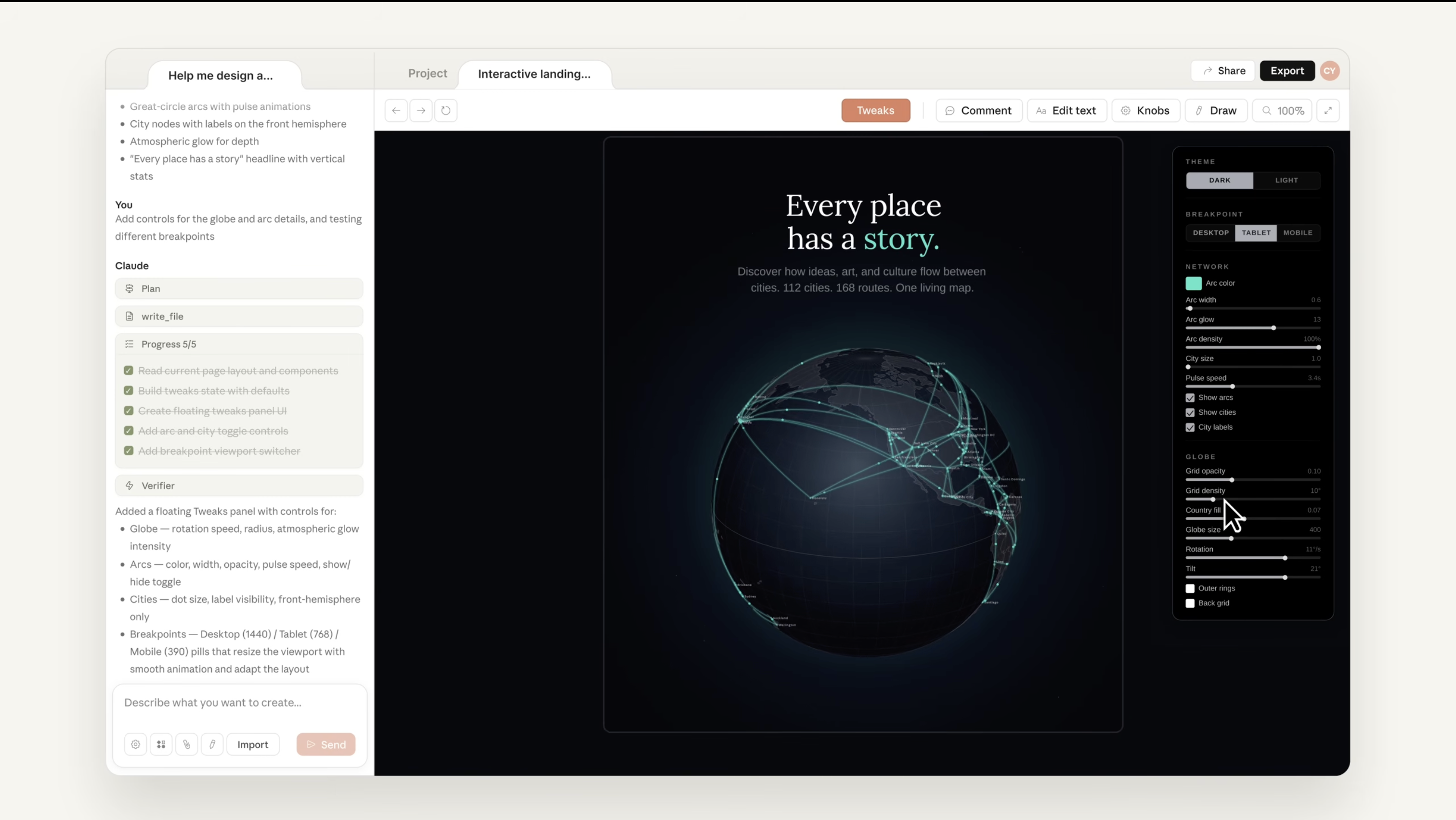
| Aspect | Traditional Apps | Claude-Style AI Systems |
|---|---|---|
| Interaction | Clicks & inputs | Conversations |
| Output | Fixed results | Generated responses |
| Behavior | Predictable | Context-dependent |
| Design Focus | Layout & navigation | Communication & clarity |
This shift makes AI feel like a conversation partner, requiring developers to design for flexibility, ambiguity, and clear communication rather than rigid interfaces.
Run Code from Your Browser - No Installation Required

Core Principles
Claude Design, inspired by Claude from Anthropic, focuses on making AI interactions clear, safe, and user-friendly. Instead of prioritizing features, it emphasizes how the AI communicates and supports the user, ensuring responses are understandable, honest, and helpful in different contexts.
- Clarity – Responses are simple, structured, and easy to follow;
- Safety – The AI avoids harmful or misleading outputs;
- Transparency – It admits uncertainty and explains limitations;
- Context awareness – Understands user intent and previous inputs;
- User-centered design – Focuses on real user needs and experience.
FAQs
Q: Why is clarity important in Claude Design?
A: Clear responses help users quickly understand the AI, reducing confusion and improving usability.
Q: What does safety mean in AI design?
A: Safety ensures the AI avoids harmful, misleading, or inappropriate outputs.
Q: How does transparency improve user trust?
A: When AI admits uncertainty or limitations, users are more likely to trust its responses.
Q: What is context awareness in AI?
A: It means the AI remembers and uses previous inputs to provide more relevant answers.
Q: Is user-centered design different in AI systems?
A: Yes, it focuses more on communication and interaction rather than just layout and controls.
Start Learning Coding today and boost your Career Potential
War dieser Artikel hilfreich?
Teilen:
War dieser Artikel hilfreich?
Teilen:
Verwandte Kurse
Alle Kurse anzeigenAnfänger
Creating Custom AI Agents with Anthropic Claude
Learn how to create a fully functional MCP (Model Context Protocol) server to integrate AI models like Claude with real-world tools like Excel. Everything from core concepts to setting up your development environment and building your first working server that can analyze real data through natural language prompts. No advanced programming knowledge required, just curiosity and willingness to explore AI automation.
Anfänger
Web App from Scratch with Claude
Build and launch a real app in just one weekend using modern AI tools and a simple, practical workflow, using Claude Code to plan, generate, and refine your code, managing your project with GitHub, and deploying your finished app online with Vercel. You’ll start with an idea and quickly turn it into a clear project plan, then move step by step into building a working application, focusing on core features, simple architecture, and fast iteration instead of unnecessary complexity, while learning how to work effectively with AI by writing better prompts, fixing errors, and improving features, ending with a live app, a clean GitHub project, and a repeatable system for turning future ideas into real products faster.
The 80 Top Java Interview Questions and Answers
Key Points to Consider When Preparing for an Interview

by Daniil Lypenets
Full Stack Developer
Apr, 2024・30 min read
Top 50 Python Interview Questions for Data Analyst
Common Python questions for DA interview

by Ruslan Shudra
Data Scientist
Apr, 2024・27 min read

The 50 Top SQL Interview Questions and Answers
For Junior and Middle Developers

by Oleh Lohvyn
Backend Developer
Apr, 2024・31 min read
Inhalt dieses Artikels
